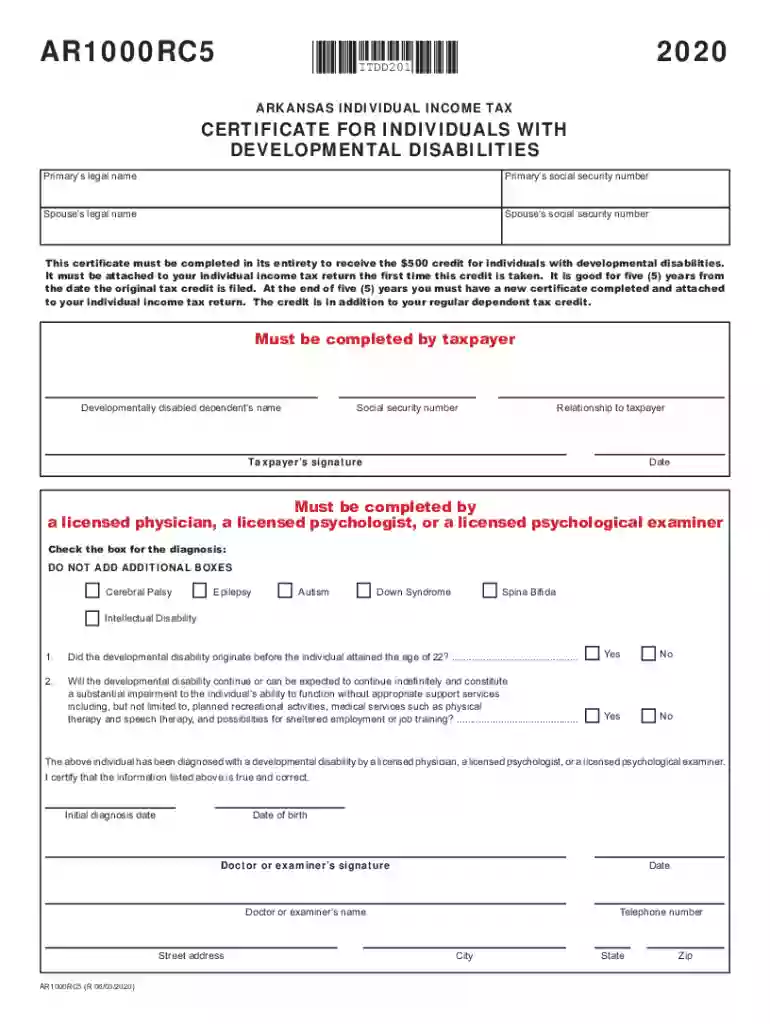
Ar1000rc5 2026

Get Form
ar1000rc5 form Preview on Page 1

Here's how it works

01. Edit your ar1000rc5 form online
Type text, add images, blackout confidential details, add comments, highlights and more.

02. Sign it in a few clicks
Draw your signature, type it, upload its image, or use your mobile device as a signature pad.

03. Share your form with others
Send ar1000rc5 via email, link, or fax. You can also download it, export it or print it out.

How to use or fill out ar1000rc5 with our platform

Form edit decoration
9.5
Ease of Setup
DocHub User Ratings on G2
9.0
Ease of Use
DocHub User Ratings on G2
  1. Click ‘Get Form’ to open the AR1000RC5 in the editor.
  2. Begin by entering the Primary’s legal name and social security number in the designated fields. Ensure accuracy as this information is crucial for tax processing.
  3. Next, fill in your Spouse’s legal name and social security number if applicable. This section is important for joint filings.
  4. Proceed to provide details about any developmentally disabled dependents, including their name, social security number, and relationship to you.
  5. Sign and date the form at the bottom. Make sure that all signatures are completed by a licensed physician or psychologist where required.
  6. Review all entries for completeness and accuracy before submitting. Use our platform's features to save your progress or make edits as needed.

Start filling out your AR1000RC5 form online for free today!

See more ar1000rc5 versions

We've got more versions of the ar1000rc5 form. Select the right ar1000rc5 version from the list and start editing it straight away!
Versions Form popularity Fillable & printable
2022 4.6 Satisfied (48 Votes)
2021 4.8 Satisfied (240 Votes)
2020 4.3 Satisfied (46 Votes)
2019 4.4 Satisfied (231 Votes)
2018 4.3 Satisfied (59 Votes)
2017 4.4 Satisfied (190 Votes)
2016 4.1 Satisfied (51 Votes)
2015 4.3 Satisfied (70 Votes)
2010 4 Satisfied (41 Votes)
2009 4 Satisfied (49 Votes)
1999 4.4 Satisfied (525 Votes)
be ready to get more

Complete this form in 5 minutes or less

Get form

Got questions?

We have answers to the most popular questions from our customers. If you can't find an answer to your question, please contact us.
Contact us
In Arkansas, residents are not required to pay state income tax on disability benefits. However, you are still required to pay federal tax. The percentage of your benefits subject to tax is based on your income. If your taxable income is more than $25,000 a year, half of your benefits are taxable.
Credit for Individual with Developmental Disabilities (This is a $500 credit per dependent with developmental disabilities. It is taken in addition to the regular dependent credit of $29. You must have a medical doctor, licensed psychologist, or licensed psychological examiner complete and sign Form AR1000RC5.
The AR1000RC5 form is used by families to receive a $500 tax credit for individuals with developmental disabilities. It is submitted with your state income taxes.
What if my dependent has developmental disabilities? Arkansas allows you to claim $500 non-refundable credit for dependents with developmental disabilities.
ArkPlus is a state income tax credit program that provides tax credits of 10% of the total investment in a new location or expansion project. This incentive is offered at the discretion of the AEDC Executive Director.
be ready to get more

Complete this form in 5 minutes or less

Get form

People also ask

Married taxpayers that meet the income thresholds for the credit that file separately on the same return may each claim a $150 credit against the tax due on the return of each spouse.
The direct answer to this question is yes. However, most individuals who receive disability benefits do not pay any or are only required to pay a small portion of taxes. Social Security Disability is only partially taxable in Arkansas, based on you and your familys total income.

ar1000rc5 2023