01. Edit your contractor agreement form texas online
Type text, add images, blackout confidential details, add comments, highlights and more.
02. Sign it in a few clicks
Draw your signature, type it, upload its image, or use your mobile device as a signature pad.
03. Share your form with others
Send dwc form 85 pdf via email, link, or fax. You can also download it, export it or print it out.
How to use or fill out dwc form 85 with our platform
Ease of Setup
DocHub User Ratings on G2
Ease of Use
DocHub User Ratings on G2
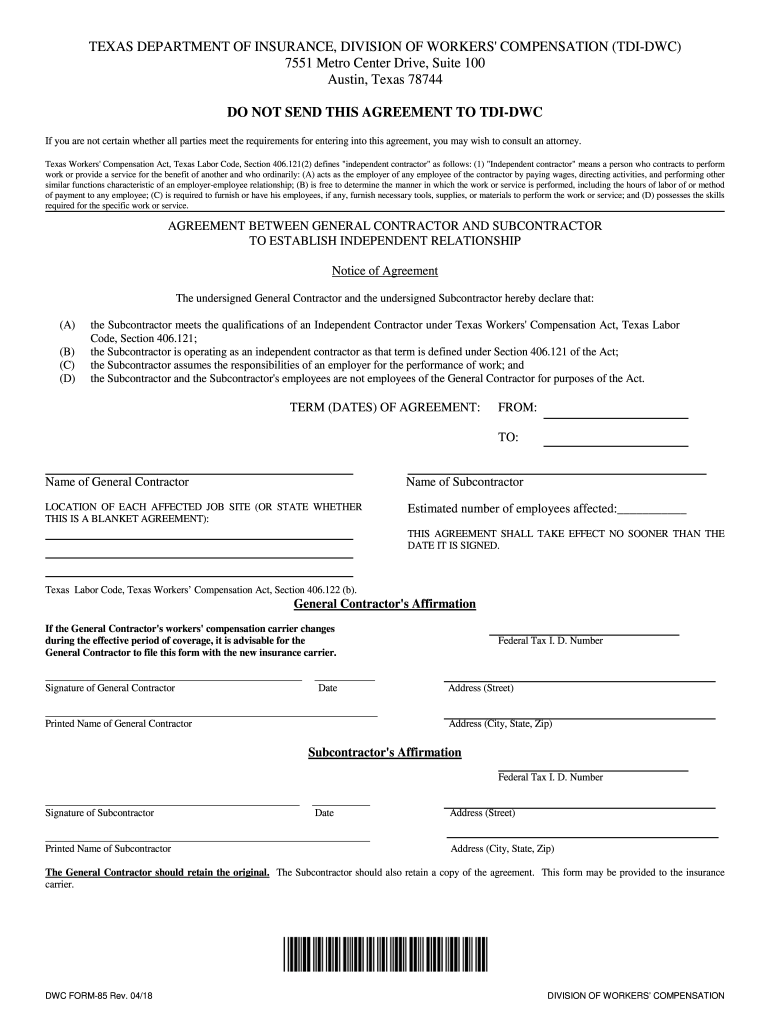
Click ‘Get Form’ to open the dwc form 85 in the editor.
Begin by filling in the names of both the General Contractor and Subcontractor in the designated fields. Ensure that all names are spelled correctly to avoid any discrepancies.
Specify the term dates of the agreement by entering the start and end dates in the 'FROM' and 'TO' sections. This is crucial for establishing the duration of your independent contractor relationship.
In the location section, indicate each affected job site or state if this is a blanket agreement. This helps clarify where the work will be performed.
Estimate and enter the number of employees affected by this agreement. Accurate numbers are important for compliance with Texas Workers' Compensation regulations.
Both parties must sign and date the form at their respective signature lines. Ensure that all signatures are completed before finalizing.
After completing, save your document. You can easily share it with relevant parties or retain a copy for your records using our platform's features.
Start using our platform today to fill out your dwc form 85 quickly and efficiently!
May 24, 2016 (p) Initial threshold screening level means a concentration in air of a toxic air contaminant which is used to evaluate noncarcinogenic healthRead more
The Employers Supplemental Report of Injury form (DWC-6) is required by the TDI, DWC DWC-85) which address agreements made between hiring contractors,Read more
Agreement between general contractor and subcontractor to
General contractors affirmation. I declare that the: subcontractor meets the qualifications of and is operating as an independent contractor under.Read more
Cookie consent notice
This site uses cookies to enhance site navigation and personalize your experience.
By using this site you agree to our use of cookies as described in our Privacy Notice.
You can modify your selections by visiting our Cookie and Advertising Notice.