Type text, add images, blackout confidential details, add comments, highlights and more.
02. Sign it in a few clicks
Draw your signature, type it, upload its image, or use your mobile device as a signature pad.
03. Share your form with others
Send it via email, link, or fax. You can also download it, export it or print it out.
How to use or fill out SC 1065 K-1 with our platform
Ease of Setup
DocHub User Ratings on G2
Ease of Use
DocHub User Ratings on G2
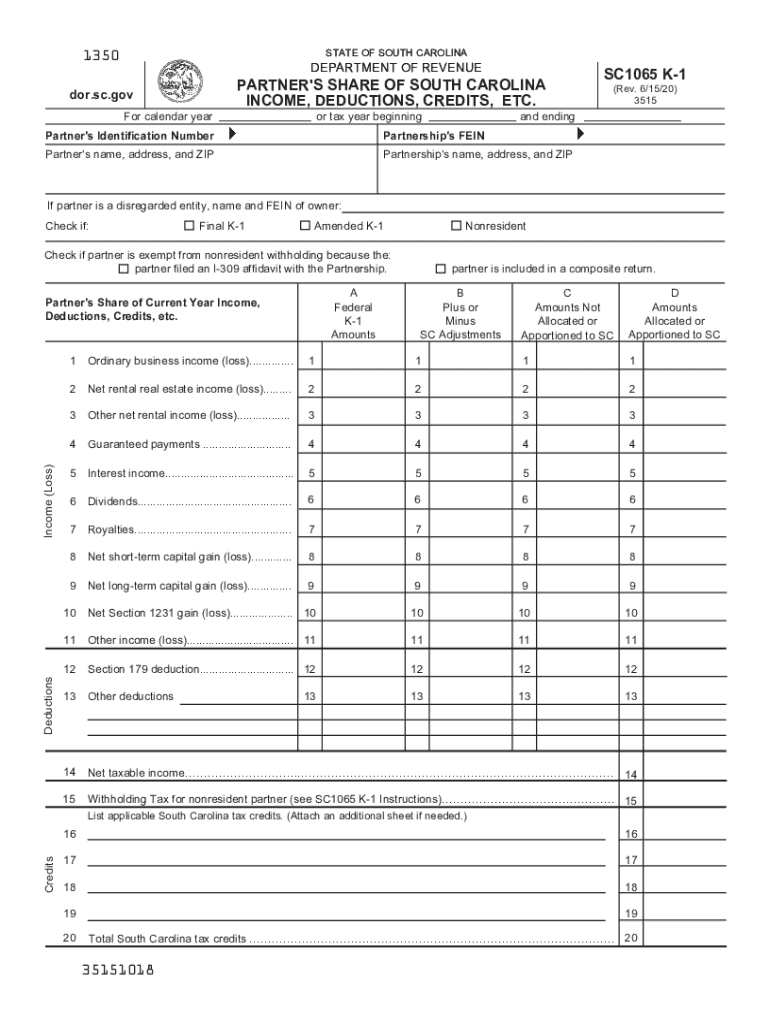
Click ‘Get Form’ to open the SC 1065 K-1 in the editor.
Begin by entering the Partner's Identification Number and the Partnership's FEIN at the top of the form. This information is crucial for identifying both the partner and partnership.
Fill in the partner's name, address, and ZIP code, followed by the partnership's name, address, and ZIP code. If applicable, indicate if the partner is a disregarded entity by providing the owner's name and FEIN.
Check any relevant boxes such as 'Final K-1', 'Amended K-1', or 'Nonresident' based on your situation. This helps clarify your tax status.
Proceed to enter amounts from federal Schedule K-1 into Column A for each income type listed (e.g., ordinary business income).
Complete Columns B, C, and D with South Carolina adjustments and allocations as instructed. Ensure accuracy to avoid issues with your tax return.
Finally, review all entries for completeness before saving or exporting your completed form for submission.
Start using our platform today to streamline your SC 1065 K-1 completion process for free!
Partnership | South Carolina Department of Revenue
Complete the SC-K and the SC1065 K-1s before completing page 1 of the SC1065. Provide each partner with a copy of their SC1065 K-1 showing the Withholding TaxRead more
This manual provides all the information on the FRENIC-Eco series of inverters including its operating procedure, operation modes, and selection of peripheral
Sep 3, 2008 The South Carolina gross income and taxable income of a corporation is the corporations gross income and taxable income as determined under theRead more
Cookie consent notice
This site uses cookies to enhance site navigation and personalize your experience.
By using this site you agree to our use of cookies as described in our Privacy Notice.
You can modify your selections by visiting our Cookie and Advertising Notice.