



Here's how it works



How to use or fill out schedule g1 with our platform

- Click ‘Get Form’ to open Schedule G-1 in the editor.
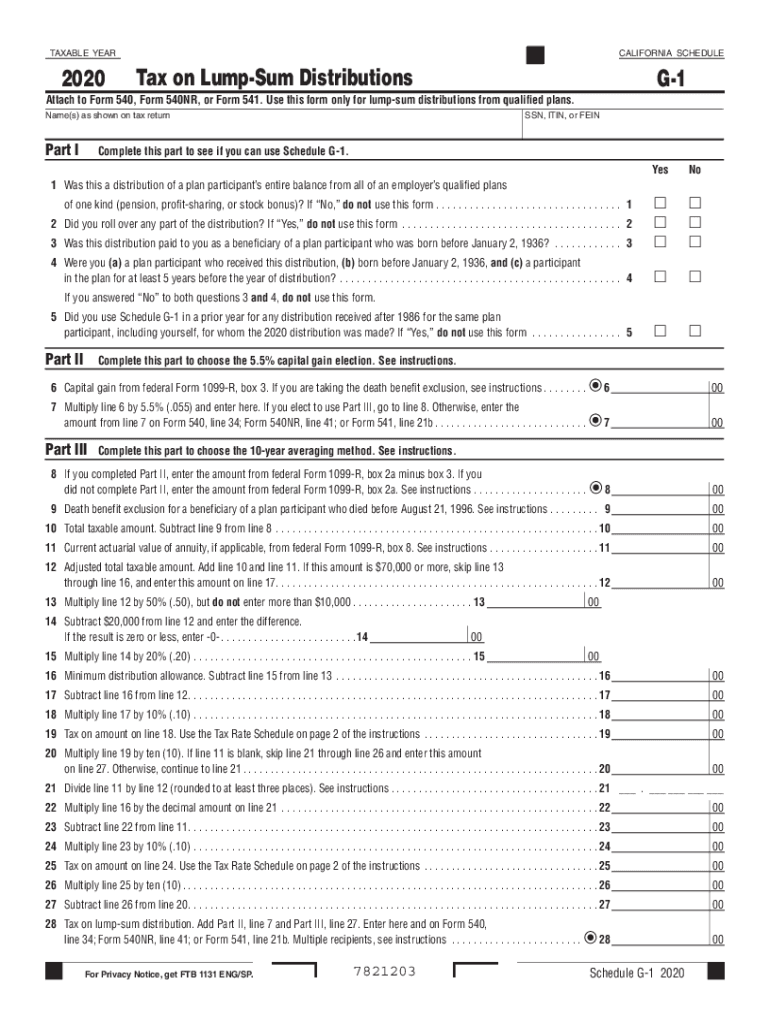
- Begin by entering your name(s) as shown on your tax return and your SSN, ITIN, or FEIN in the designated fields.
- In Part I, answer the questions regarding your eligibility for using Schedule G-1. Check 'Yes' or 'No' for each question based on your situation.
- Proceed to Part II if you are eligible. Enter the capital gain from federal Form 1099-R, box 3, and calculate 5.5% of this amount as instructed.
- If opting for the 10-year averaging method, complete Part III by entering amounts from federal Form 1099-R as specified and follow through with calculations for taxable amounts.
- Review all entries for accuracy before saving or exporting your completed form directly from our platform.
Start filling out Schedule G-1 today for free using our editor!
It's free
See more schedule g1 versions
Got questions?
What do I need to sign my schedule g1 electronically?
Electronic document approval demands a software solution that complies with data security and eSignature laws. DocHub is a great tool for that, since it meets all the above mentioned requirements. Whatever method you like to sign your schedule g1 in DocHub, your electronic signature will be legally binding and court-admissible.
How do you complete schedule g1 on Android?
It is a no-brainer on a computer or via a mobile phone to fill out a schedule g1 with DocHub. All you need to do is open any installed internet browser on your smartphone and proceed to the DocHub site. Once authenticated, add your document and open it in editing mode. Use our toolbar to make your edits and save changes. Optionally, keep your document in your files or send it to a recipient immediately.
Security and compliance
At DocHub, your data security is our priority. We follow HIPAA, SOC2, GDPR, and other standards, so you can work on your documents with confidence.
Learn more


Related forms