2020 ny 1099-2026

Get Form
2020 ny 1099 Preview on Page 1

Here's how it works

01. Edit your form online
Type text, add images, blackout confidential details, add comments, highlights and more.

02. Sign it in a few clicks
Draw your signature, type it, upload its image, or use your mobile device as a signature pad.

03. Share your form with others
Send it via email, link, or fax. You can also download it, export it or print it out.

How to use or fill out 2020 NY 1099 with our platform

Form edit decoration
9.5
Ease of Setup
DocHub User Ratings on G2
9.0
Ease of Use
DocHub User Ratings on G2
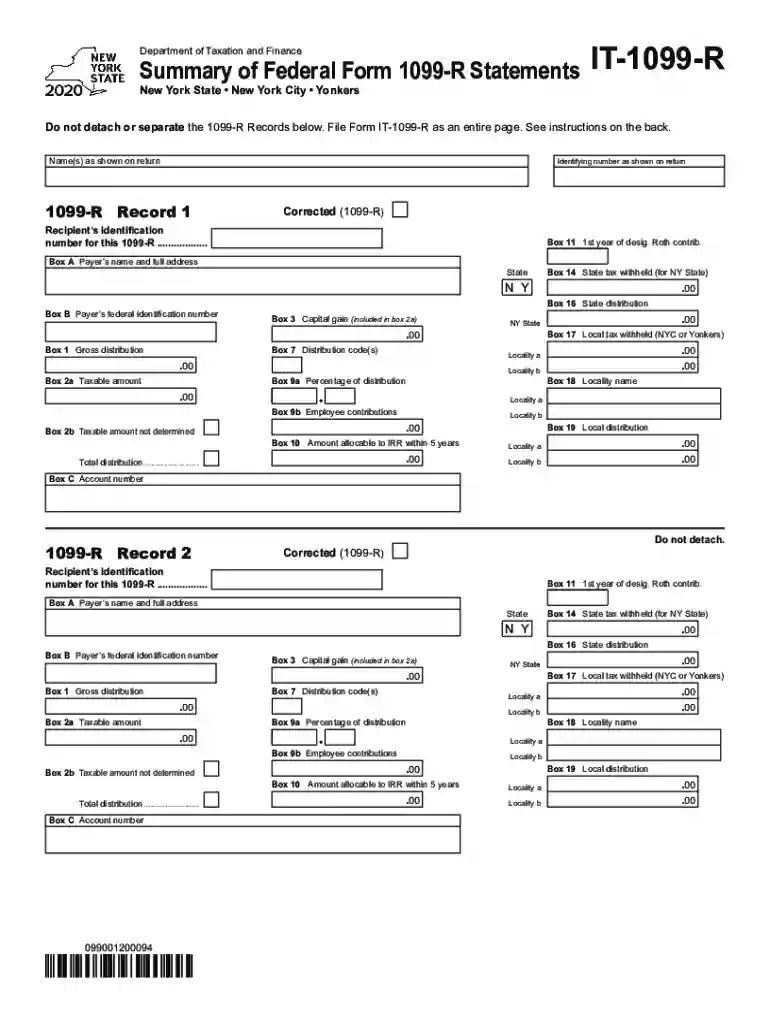
  1. Click ‘Get Form’ to open the 2020 NY 1099 in the editor.
  2. Begin by entering your name(s) and identifying number as shown on your tax return in the designated fields.
  3. In Box A, input the payer’s name and full address. Ensure accuracy as this information is crucial for tax reporting.
  4. Fill in Box B with the payer’s federal identification number. This should match what is provided on your federal Form 1099-R.
  5. Complete Boxes 1 through 19 according to the amounts and codes from your federal Form 1099-R. Pay attention to details such as state tax withheld in Box 14 and local taxes in Boxes 17 and 19.
  6. If applicable, mark an X in the Corrected (1099-R) box if you are filing a corrected form.
  7. Review all entries for accuracy before saving or exporting your completed form for submission with your New York State income tax return.

Start using our platform today to simplify filling out your forms for free!

See more 2020 ny 1099 versions

We've got more versions of the 2020 ny 1099 form. Select the right 2020 ny 1099 version from the list and start editing it straight away!
Versions Form popularity Fillable & printable
2023 4.3 Satisfied (46 Votes)
2022 4.7 Satisfied (43 Votes)
2021 4.8 Satisfied (97 Votes)
2020 4.1 Satisfied (31 Votes)
2019 4.3 Satisfied (191 Votes)
2018 4.1 Satisfied (73 Votes)
2017 4.4 Satisfied (242 Votes)
2011 4 Satisfied (24 Votes)
2010 4.3 Satisfied (141 Votes)
be ready to get more

Complete this form in 5 minutes or less

Get form

Got questions?

We have answers to the most popular questions from our customers. If you can't find an answer to your question, please contact us.
Contact us
Sign in to your account. Download your 1099 or 1042S tax form in your Social Security account. If you live outside the United States and cant access your form online, contact a Federal Benefits Unit for help.
Call our automated Self-Service Line at 1-866-333-4606 and follow the instructions to get your Form 1099G information or to request that your Form 1099G be mailed to you. This option is available 24 hours a day, 7 days a week. Form 1099G tax information is available for up to five years.
The deadline for issuing Form 1099-NEC to recipients and filing with the IRS is January 31 of the following tax year. For tax year 2020, the due date is February 1, 2021 (because January 31 falls on a weekend). There is no automatic 30-day extension for filing the Form 1099-NEC.
If you havent received your 1099-R, you can get it online. Sign in to Retirement Online. Look under My Account Summary. Click Manage My 1099-R Tax Forms button. Select an option from Year dropdown. (Note: 2024 and 2023 are currently available online.) Click Generate button.
To obtain a form, visit dol.ny.gov and search 1099-G. or call 1-888-209-8124 to have the New York State Department of Labor mail the form to the address they have on file for you. Forms may include: Form W-2 (wages from each job) Form 1099-INT (interest)

Security and compliance

At DocHub, your data security is our priority. We follow HIPAA, SOC2, GDPR, and other standards, so you can work on your documents with confidence.

Learn more
ccpa2
pci-dss
gdpr-compliance
hipaa
soc-compliance
be ready to get more

Complete this form in 5 minutes or less

Get form

People also ask

Visit the Department of Labors website. Log in to your NY.Gov ID account. Select Unemployment Services and View/Print 1099-G.
Yes, California requires 1099 filing. However, since California participates in the CF/SF program, the IRS will automatically share the completed federal 1099 Forms with the state agency. Therefore, there is no need to file directly with the state.
The state of New York does not require you to file Form 1099 as there is no state income tax. Even though the State of New York does not require 1099 Form, the IRS still requires you to file Form 1099 to report payments and the taxes withheld for each of your recipients for the year.

Related links