Form 70P 2026

Get Form
Form 70P Preview on Page 1

Here's how it works

01. Edit your form online
Type text, add images, blackout confidential details, add comments, highlights and more.

02. Sign it in a few clicks
Draw your signature, type it, upload its image, or use your mobile device as a signature pad.

03. Share your form with others
Send it via email, link, or fax. You can also download it, export it or print it out.

How to use or fill out Form 70P with our platform

Form edit decoration
9.5
Ease of Setup
DocHub User Ratings on G2
9.0
Ease of Use
DocHub User Ratings on G2
  1. Click ‘Get Form’ to open it in the editor.
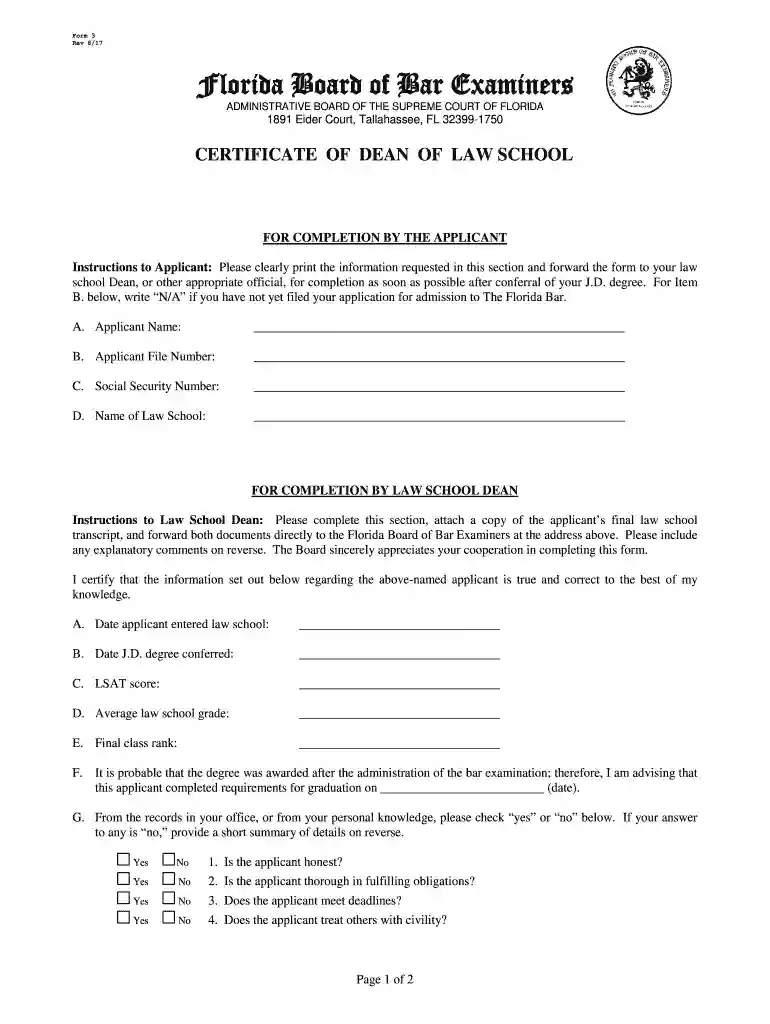
  2. Begin by filling out the applicant's information in Section A. Clearly print your name, file number, social security number, and law school name.
  3. Next, forward the form to your law school Dean for completion. They will need to fill out Section B, which includes important dates and scores related to your academic performance.
  4. Ensure that your Dean certifies the information provided is accurate and attaches a copy of your final transcript before sending it directly to the Florida Board of Bar Examiners.
  5. Review all sections for completeness and accuracy before submission. Use our platform’s editing tools to make any necessary adjustments easily.

Start using our platform today for free to streamline your Form 70P completion!

See more Form 70P versions

We've got more versions of the Form 70P form. Select the right Form 70P version from the list and start editing it straight away!
Versions Form popularity Fillable & printable
2019 4.8 Satisfied (66 Votes)
2017 4.2 Satisfied (107 Votes)
be ready to get more

Complete this form in 5 minutes or less

Get form

Got questions?

We have answers to the most popular questions from our customers. If you can't find an answer to your question, please contact us.
Contact us
If a public official fails to timely file his or her Form 700, the case will be referred to the FPPC Enforcement Division, and a penalty of up to $5,000 may be imposed.
Every elected official and public employee who makes or participates in making governmental decisions is required to submit a Statement of Economic Interests, also known as the Form 700. The Form 700 provides transparency and ensures accountability in governmental decisions.
The Form 700 is a public document. Only filers serving in active military duty may receive an extension on the filing deadline.
The Statement of Economic Interest (Form 700) is a document that public officials, candidates for public office, and certain government employees in California are required to file. The form is used to disclose financial interests and avoid potential conflicts of interest in public service.
The Form 700 is a public document. Only filers serving in active military duty may receive an extension on the filing deadline. You must also report interests held by your spouse or registered domestic partner. Your agencys conflict of interest code will help you to complete the Form 700.

Security and compliance

At DocHub, your data security is our priority. We follow HIPAA, SOC2, GDPR, and other standards, so you can work on your documents with confidence.

Learn more
ccpa2
pci-dss
gdpr-compliance
hipaa
soc-compliance

People also ask

The Form 700 provides transparency and ensures accountability in two ways: It provides necessary information to the public about an officials personal financial interests to ensure that officials are making decisions in the best interest of the public and not enhancing their personal finances.
Investments held in a government defined-benefit pension program plan (e.g., CalPERS) are not reportable. Investments held in a fund such as a defined contribution plan 401(k) or exchange traded fund (ETF) are not required to be disclosed if the fund meets the specific criteria outlined in Regulation 18237.
Charging and Collecting Late Fines Any person who files a Form 700 after the deadline imposed by the Act may be liable for a late fine pursuant to Government Code Section 91013. A filing officer can assess a fine of $10 per day for each day a statement is late up to a maximum of $100.

Related links