



Here's how it works



How to use or fill out ri estate tax lien with our platform

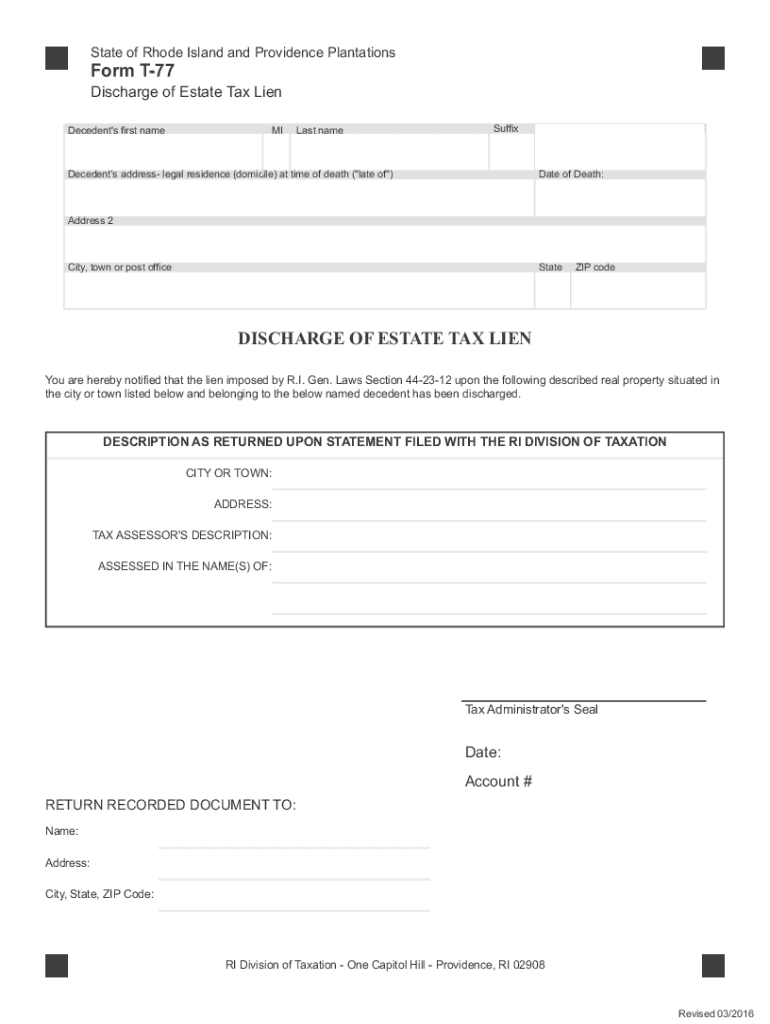
- Click ‘Get Form’ to open the Discharge of Estate Tax Lien (Form T-77) in the editor.
- Begin by entering the decedent's full name, including first name, middle initial, last name, and suffix if applicable.
- Fill in the decedent’s legal residence address at the time of death. Ensure accuracy as this is crucial for processing.
- Input the decedent's social security number and date of death in the designated fields.
- Specify the city or town where the property is located. Avoid using village names; only use official city or town designations.
- Provide a detailed description of the property as per the tax assessor's records, including plat and lot numbers or block and parcel information.
- Complete any additional required fields such as account number and return address for document submission.
Start filling out your ri estate tax lien form online for free today!
It's free
See more ri estate tax lien versions
Got questions?
How can I eSign my ri estate tax lien in Word?
Microsoft Word doesn’t have signing tools to create legitimate electronic signatures and enforceable paperwork. Fortunately, DocHub is an online eSignature-compliant editor that supports various file formats, such as .doc files. Log in to your account and upload the Word edition of your ri estate tax lien from your device and cloud, or URL - our editor will automatically convert it into an editable PDF. Make all essential adjustments in your form and click Sign to create your own legally-binding electronic signature. There are four signing options from which to choose.
What internet browser do I need to edit ri estate tax lien online?
If you want to edit your ri estate tax lien online easily, it does not matter what web browser you use. DocHub’s simple editing tools are accessible using any internet browser. Just open the appropriate tab within our editor, add your document, and fill it out without stress.
Security and compliance
At DocHub, your data security is our priority. We follow HIPAA, SOC2, GDPR, and other standards, so you can work on your documents with confidence.
Learn more