Type text, add images, blackout confidential details, add comments, highlights and more.
02. Sign it in a few clicks
Draw your signature, type it, upload its image, or use your mobile device as a signature pad.
03. Share your form with others
Send it via email, link, or fax. You can also download it, export it or print it out.
How to use or fill out HMO Premium Tax Minnesota Department of Revenue
Ease of Setup
DocHub User Ratings on G2
Ease of Use
DocHub User Ratings on G2
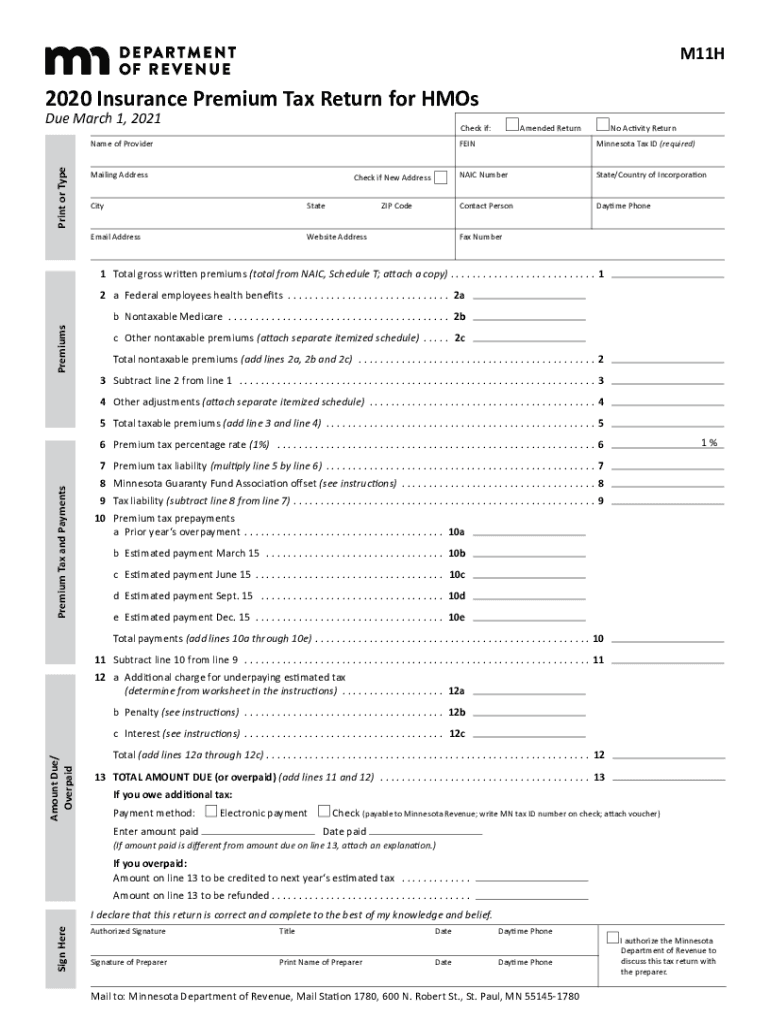
Click ‘Get Form’ to open the HMO Premium Tax form in our editor.
Begin by filling in your provider's name and mailing address. Ensure to check the box if you have a new address.
Enter your Minnesota Tax ID and FEIN. These are crucial for proper identification and processing of your return.
In Section 1, input the total gross written premiums from NAIC, Schedule T. Attach any necessary documentation.
For non-taxable premiums, complete lines 2a, 2b, and 2c with the respective amounts. Remember to attach an itemized schedule for any other nontaxable premiums.
Calculate your total taxable premiums by subtracting line 2 from line 1 and adding any adjustments on line 4.
Complete the premium tax liability calculation on lines 6 through 9, ensuring all figures are accurate before submission.
Finally, review all entries for accuracy, sign where indicated, and submit your completed form via our platform.
Start using our editor today to simplify your HMO Premium Tax filing process!
Fill out HMO Premium TaxMinnesota Department of Revenue online It's free
See more HMO Premium TaxMinnesota Department of Revenue versions
We've got more versions of the HMO Premium TaxMinnesota Department of Revenue form. Select the right HMO Premium TaxMinnesota Department of Revenue version from the list and start editing it straight away!
What is the health care provider tax in Minnesota?
MinnesotaCare Provider Tax applies to gross receipts that health care providers receive for providing patient services in Minnesota. The tax rate is 1.8%. You must file a Provider Tax Return if any of these apply: You are a self-employed health care provider who is regulated or required to be regulated by Minnesota.
Why am I getting mail from the Department of Revenue?
If you receive an IRS notice or letter We may send you a notice or letter if: You have a balance due. Your refund has changed. We have a question about your return.
Why is MN Revenue sending me a letter?
We notify you by mail 60 days before we file an offset claim with the U.S. Treasury Department to take your federal tax refunds or government payments. This letter informs you: Which agency is filing an offset claim. The dollar amount we plan to offset.
How do I find my health insurance premium for taxes?
Form 1095-A, Health Insurance Marketplace Statement The form will show coverage details such as the effective date, amount of the premium, and APTC paid on your and your tax familys behalf for the year of coverage.
Why did I get a check from MN Department of Revenue?
If your direct deposit fails because you closed your account, the Minnesota Department of Revenue will send you a paper check.
Related Searches
Hmo premium tax minnesota department of revenue phone numberHmo premium tax minnesota department of revenue numberHmo premium tax minnesota department of revenue addressHmo premium tax minnesota department of revenue loginIs life insurance taxable in minnesotaMn surplus lines taxArizona surplus lines taxes and feesWashington state surplus lines taxes and fees calculator
Security and compliance
At DocHub, your data security is our priority. We follow HIPAA, SOC2, GDPR, and other standards, so you can work on your documents with confidence.
The Minnesota Department of Revenue manages the states revenue system and administers state tax laws. Its mission is to ensure fairness, accuracy, and efficiency in the states revenue system and provide Minnesotans with services that foster a productive and healthy work environment.
Where is the premium tax credit reported?
If you are claiming net Premium Tax Credit (PTC) on Form 1040 or 1040-SR, Schedule 3, Line 8, you must file Form 8962 with your return and report net PTC on Line 26.
Why would I get a letter from mn Department of Revenue?
You may receive a letter from the Minnesota Department of Revenue indicating we received a suspicious Minnesota income tax or property tax refund return. In these cases, we stop processing the return to safeguard your information.
Related links
Working Paper Series
by A Knott 2001 Cited by 7 Managed care programs for Medicaid beneficiaries are a potential threat to rural county governments in two ways: revenues can be diverted away from county.Read more
The PFR database is the originating source of Quantity, Revenue and Transfer Cost infornlation in the Quarterly Product Financial PerfonnanceReports. Contact
Cookie consent notice
This site uses cookies to enhance site navigation and personalize your experience.
By using this site you agree to our use of cookies as described in our Privacy Notice.
You can modify your selections by visiting our Cookie and Advertising Notice.