



Here's how it works



How to use or fill out Printable 2020 Minnesota Form M11AR (Fire Insurance Tax (Retaliatory Schedule)) with DocHub

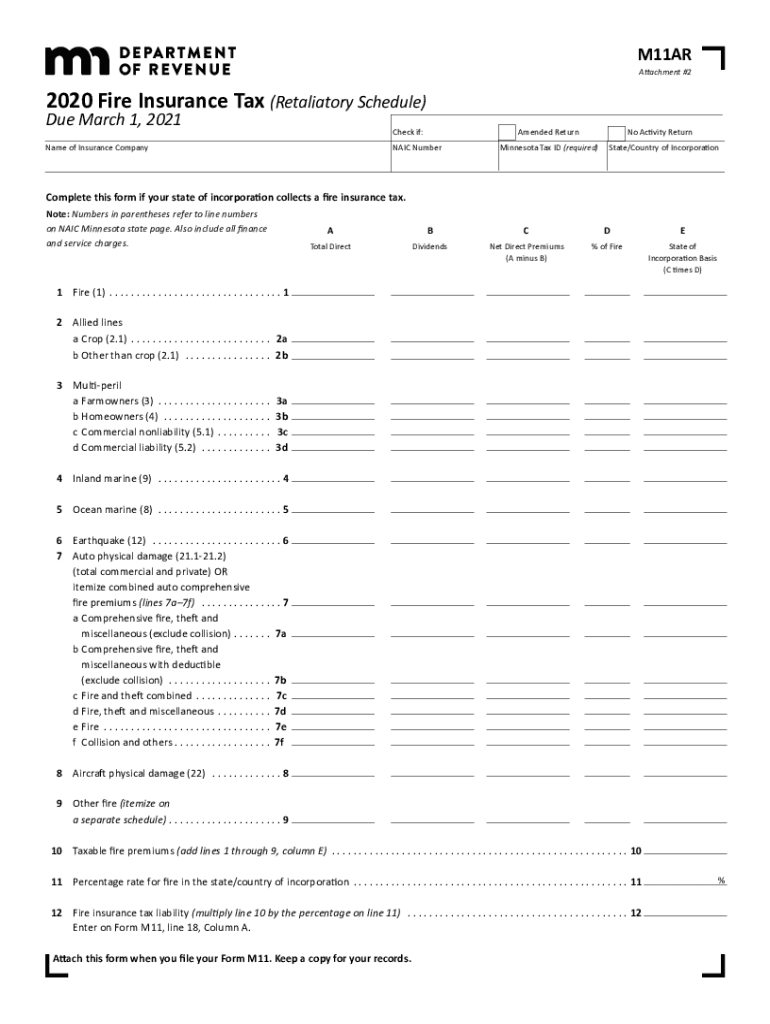
- Click ‘Get Form’ to open the Printable 2020 Minnesota Form M11AR in our editor.
- Begin by checking the appropriate boxes at the top of the form. Indicate if this is an Amended Return or a No Activity Return.
- Fill in the Name of Insurance Company and NAIC Number, along with your Minnesota Tax ID and State/Country of Incorporation.
- Proceed to enter all fire premiums written on Line 1. Ensure you include any finance or service charges.
- For Lines 2a and 2b, input crop premiums for allied lines and other than crop premiums respectively.
- Continue filling out Lines 3 through 9, entering multi-peril premiums, inland marine, ocean marine, earthquake premiums, and any other relevant information as specified in the instructions.
- Finally, calculate your Fire insurance tax liability on Line 12 by multiplying the taxable fire premiums by the percentage rate from Line 11.
Start using our platform today to easily complete your Printable 2020 Minnesota Form M11AR for free!
It's free
See more Printable 2020 Minnesota Form M11AR (Fire Insurance Tax (Retaliatory Schedule)) versions
Got questions?
Can I sign my Printable 2020 Minnesota Form M11AR (Fire Insurance Tax (Retaliatory Schedule)) on a mobile?
Sure, you’ll find many different applications for this on the web. Nonetheless, if you need to eSign your Printable 2020 Minnesota Form M11AR (Fire Insurance Tax (Retaliatory Schedule)) without installing additional software, DocHub is the optimum choice you can make. This robust editor works on mobile devices just like on desktops. Open our editor in your preferred internet browser, register or sign in to your account, and start processing your documents.
How do you modify Printable 2020 Minnesota Form M11AR (Fire Insurance Tax (Retaliatory Schedule)) from Google Drive?
If you store your papers in Google Drive, there is no need to download your Printable 2020 Minnesota Form M11AR (Fire Insurance Tax (Retaliatory Schedule)) on the computer and upload it back to our editor. A significantly simpler way is to install a browser extension developed by DocHub to simplify this flow. The extension allows editing PDFs in your internet browser. Alternatively, you can integrate your DocHub and Gmail accounts for more efficient editing.
Where can I pick up MN tax forms?
Are tax forms available at the post office?
What is the retaliatory tax on insurance premiums?
Security and compliance
At DocHub, your data security is our priority. We follow HIPAA, SOC2, GDPR, and other standards, so you can work on your documents with confidence.
Learn more