Provider Application, Part A Form, 2021 - State of Michigan-2026

Get Form
dhs 601 form Preview on Page 1

Here's how it works

01. Edit your dhs 601 form online
Type text, add images, blackout confidential details, add comments, highlights and more.

02. Sign it in a few clicks
Draw your signature, type it, upload its image, or use your mobile device as a signature pad.

03. Share your form with others
Send dhs 601 via email, link, or fax. You can also download it, export it or print it out.

How to use or fill out Provider Application, Part A Form, 2021 - State of Michigan with our platform

Form edit decoration
9.5
Ease of Setup
DocHub User Ratings on G2
9.0
Ease of Use
DocHub User Ratings on G2
  1. Click ‘Get Form’ to open the Provider Application, Part A Form in our editor.
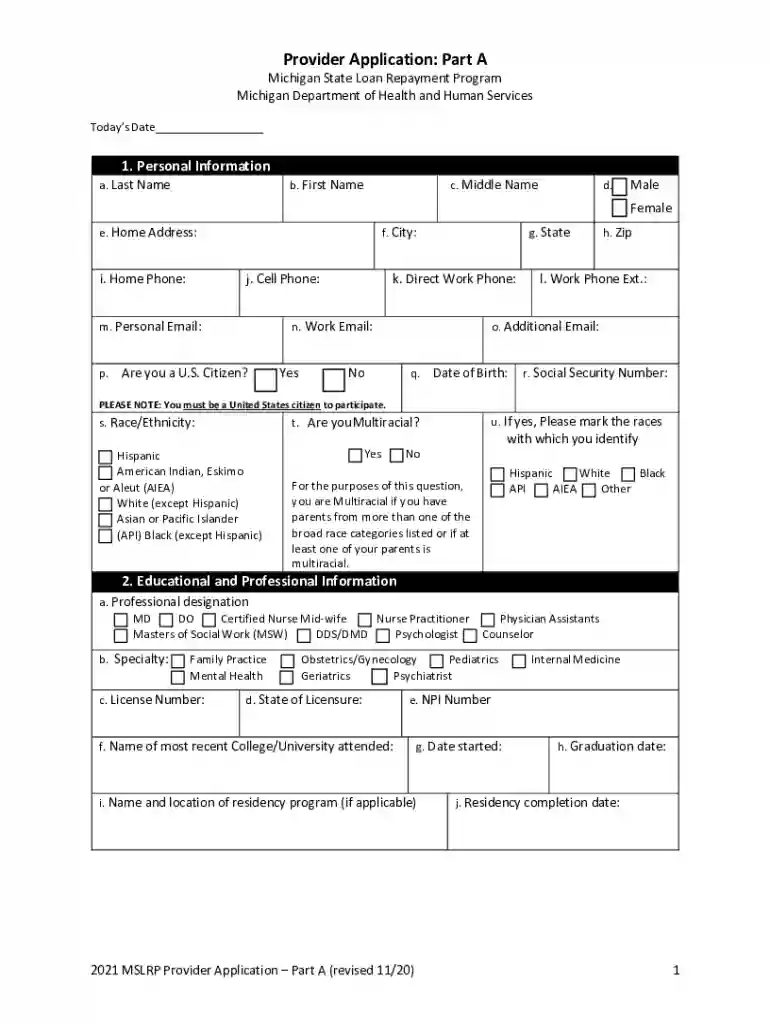
  2. Begin by filling out your Personal Information. Enter your last name, first name, middle name, and select your gender. Provide your home address, phone numbers, email addresses, and confirm U.S. citizenship status.
  3. Proceed to Educational and Professional Information. Indicate your professional designation and specialty. Fill in your license number, state of licensure, NPI number, and details about your education including college attended and graduation dates.
  4. In the MSLRP Agreement Information section, select the appropriate statement regarding employer contributions and indicate if you are applying for priority status.
  5. Complete the Participant Status Information by answering whether this is your first MSLRP loan repayment agreement and providing details of any current or past agreements.
  6. Fill out the Practice Site Information section with details about your employment at practice sites including expected hours worked per week.
  7. Finally, provide Loan Information by listing current loans and any original loans that have been consolidated. Ensure all information is accurate before signing the certification statement.

Start using our platform today to easily complete your Provider Application!

See more Provider Application, Part A Form, 2021 - State of Michigan versions

We've got more versions of the Provider Application, Part A Form, 2021 - State of Michigan form. Select the right Provider Application, Part A Form, 2021 - State of Michigan version from the list and start editing it straight away!
Versions Form popularity Fillable & printable
2021 4.8 Satisfied (54 Votes)
2020 4.3 Satisfied (190 Votes)
2018 4.1 Satisfied (37 Votes)
be ready to get more

Complete this form in 5 minutes or less

Get form

Got questions?

We have answers to the most popular questions from our customers. If you can't find an answer to your question, please contact us.
Contact us

Of course, you’ll find numerous applications for this on the web. Nonetheless, if you need to eSign your what is a michigan dhs 4487 form without installing additional software, DocHub is the best choice you can make. This robust editor works on mobile devices just like on desktops. Open our editor in any internet browser, register or log in to your account, and start processing your documents.

You can easily fill out, modify, and even eSign your mdhhs 5946 5 21 using DocHub. Create a new account and start your free trial. After that, you may upload the document with the form and easily make all the needed edits. No need to print on paper or use a third-party application to sign it, as you can put your electronic signature on your document quicker through DocHub.

MI DHS-4574 is a form used by the Michigan Department of Health and Human Services (MDHHS) to collect information regarding an individuals eligibility and circumstances related to public assistance programs.
You can find contact information for your local office at .michigan.gov/dhs-countyoffices. Call the information number and press 0 after the message. Tell the person who answers the phone that you dont know your workers name. They will take your name and connect you to the right person.
If you have questions regarding provider enrollment in CHAMPS, contact Provider Support Services at 800-979-4662 or visit the MDHHS Home Help provider website at Michigan.gov/HomeHelp. To find your local MDHHS office, visit: Michigan.gov/ContactMDHHS.

Security and compliance

At DocHub, your data security is our priority. We follow HIPAA, SOC2, GDPR, and other standards, so you can work on your documents with confidence.

Learn more
ccpa2
pci-dss
gdpr-compliance
hipaa
soc-compliance

People also ask

For assistance in enrolling please call 1-800-292-2550 option 4. MDHHS utilizes provider email address information entered in the CHAMPS provider enrollment application to communicate with providers.
Elizabeth Hertel is the director of the Michigan Department of Health and Human Services.

home help provider application