It 255 2026

Get Form
it 255 instructions Preview on Page 1

Here's how it works

01. Edit your it 255 instructions online
Type text, add images, blackout confidential details, add comments, highlights and more.

02. Sign it in a few clicks
Draw your signature, type it, upload its image, or use your mobile device as a signature pad.

03. Share your form with others
Send ny it 255 instructions via email, link, or fax. You can also download it, export it or print it out.

How to use or fill out IT-255 with our platform

Form edit decoration
9.5
Ease of Setup
DocHub User Ratings on G2
9.0
Ease of Use
DocHub User Ratings on G2
  1. Click ‘Get Form’ to open it in the editor.
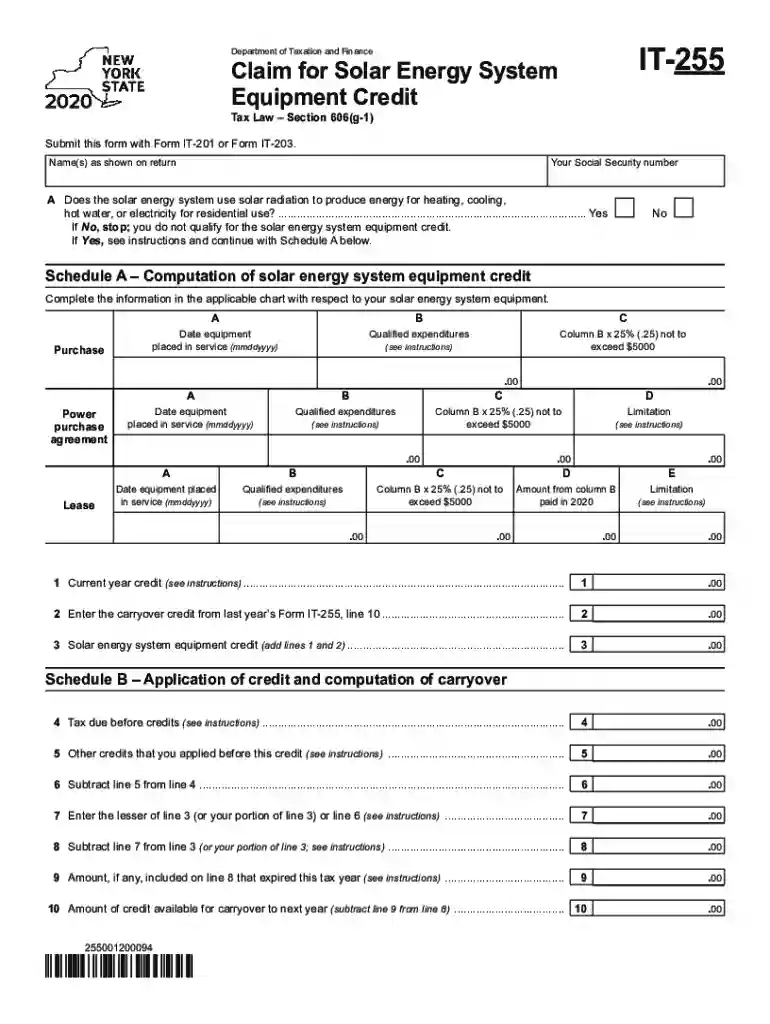
  2. Begin by entering your name(s) as shown on your tax return and your Social Security number in the designated fields.
  3. Indicate whether your solar energy system uses solar radiation for residential energy needs by selecting 'Yes' or 'No'. If you select 'No', you do not qualify for the credit.
  4. Proceed to Schedule A. Fill in the date the equipment was placed in service and the qualified expenditures. Calculate 25% of these expenditures, ensuring it does not exceed $5,000.
  5. Complete any additional sections for power purchase agreements or leases as applicable, following similar instructions for dates and expenditures.
  6. In Schedule B, apply the credits calculated from Schedule A against your tax due before credits, following the provided instructions carefully.

Start using our platform today to easily complete your IT-255 form online for free!

See more it 255 versions

We've got more versions of the it 255 form. Select the right it 255 version from the list and start editing it straight away!
Versions Form popularity Fillable & printable
2023 4.9 Satisfied (60 Votes)
2022 4.3 Satisfied (51 Votes)
2021 4.8 Satisfied (73 Votes)
2020 4 Satisfied (66 Votes)
be ready to get more

Complete this form in 5 minutes or less

Get form

Got questions?

We have answers to the most popular questions from our customers. If you can't find an answer to your question, please contact us.
Contact us
The solar panel tax credit allows filers to take a tax credit equal to up to 30% of eligible costs. There is no income limit to qualify, and you can claim the credit each year youre eligible for it. The credit amount will remain 30% through 2032.
The IRS verifies solar tax credit eligibility by assessing whether taxpayers meet specific criteria established under federal law. The solar energy system must be installed at a qualifying property, such as a residential or commercial building, and used to generate electricity.
To claim the solar tax credit, youll need all the receipts from your solar installation, as well as IRS form 1040 and form 5695 and instructions for both of those forms.
You must own the system: To use the tax credit, you must purchase the solar panels with cash or a loan. You will not get the tax credit if your solar panels are installed through a solar lease or a power purchase agreement (PPA) because you are not the owner of the system. You must have taxable income.
If you purchase power generated by solar equipment through a lease agreement or power purchase agreement, you arent the system owner and thus cant claim the credit on your taxes.

Security and compliance

At DocHub, your data security is our priority. We follow HIPAA, SOC2, GDPR, and other standards, so you can work on your documents with confidence.

Learn more
ccpa2
pci-dss
gdpr-compliance
hipaa
soc-compliance

People also ask

How it works. The Residential Clean Energy Credit equals 30% of the costs of new, qualified clean energy property for your home installed anytime from 2022 through 2032. The credit percentage rate phases down to 26 percent for property placed in service in 2033 and 22 percent for property placed in service in 2034.
IT-225 is a modification form that is used to report additions or subtractions to federal adjusted gross income and has been updated to include a reason code (S-143) that is specifically used to identify HWB income.

form 255