



Here's how it works



How to use or fill out 203 s with our platform

- Click ‘Get Form’ to open the IT-203-S in the editor.
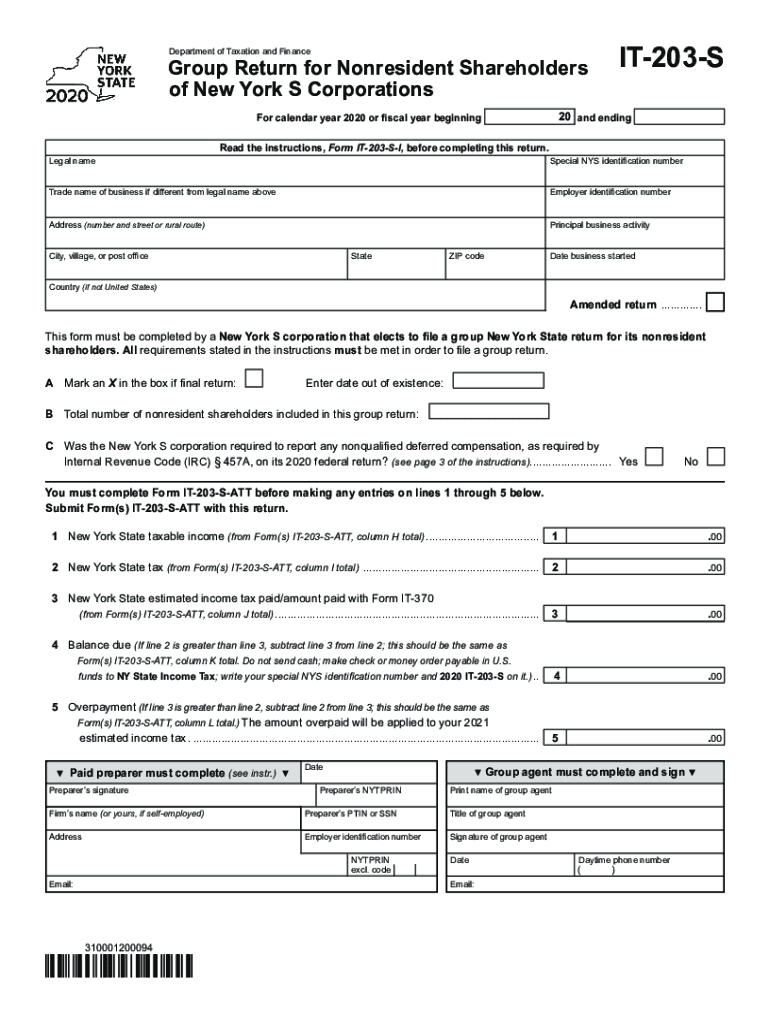
- Begin by entering the legal name of the corporation and its special NYS identification number. If applicable, include the trade name and employer identification number.
- Fill in the address details, including street, city, state, ZIP code, and country if not in the United States. Also, indicate the date the business started.
- Mark an 'X' in the box if this is a final return and provide the date of dissolution if applicable.
- Enter the total number of nonresident shareholders included in this group return.
- Answer whether the corporation was required to report any nonqualified deferred compensation on its federal return by selecting 'Yes' or 'No'.
- Complete lines 1 through 5 based on information from Form(s) IT-203-S-ATT. Ensure all calculations are accurate before submission.
Start filling out your IT-203-S form online for free today!
It's free
See more 203 s versions
Got questions?
How can I send my 203 s from Google Drive for signing?
If you frequently deal with documents stored in your Google Drive, DocHub is a superb option for you to easily and quickly fill out, modify, and approve them. This editor integrates properly with Google services, so you can export your 203 s from your Google Drive to the editor without the need of downloading and re-uploading it. Right-click on your file, choose Open With → DocHub PDF Sign and Edit. In our editor, add and assign Signature Fields for all people involved, then click on the Menu option above → Send → select how you want to share your form.
How do you fill out 203 s online?
You can find and edit your 203 s online with the help of DocHub. Its straightforward yet feature-rich design allows you to begin productive work immediately after you sign up your account. Create your account and add your file, then our user interface will guide you through our stress-free form completion experience.
Security and compliance
At DocHub, your data security is our priority. We follow HIPAA, SOC2, GDPR, and other standards, so you can work on your documents with confidence.
Learn more


Related forms