




Here's how it works

01. Edit your discretionary sales surtax calculator online
Type text, add images, blackout confidential details, add comments, highlights and more.

02. Sign it in a few clicks
Draw your signature, type it, upload its image, or use your mobile device as a signature pad.

03. Share your form with others
Send surtax florida via email, link, or fax. You can also download it, export it or print it out.
How to use or fill out fl discretionary sales surtax with our platform

- Click ‘Get Form’ to open the fl discretionary sales surtax document in the editor.
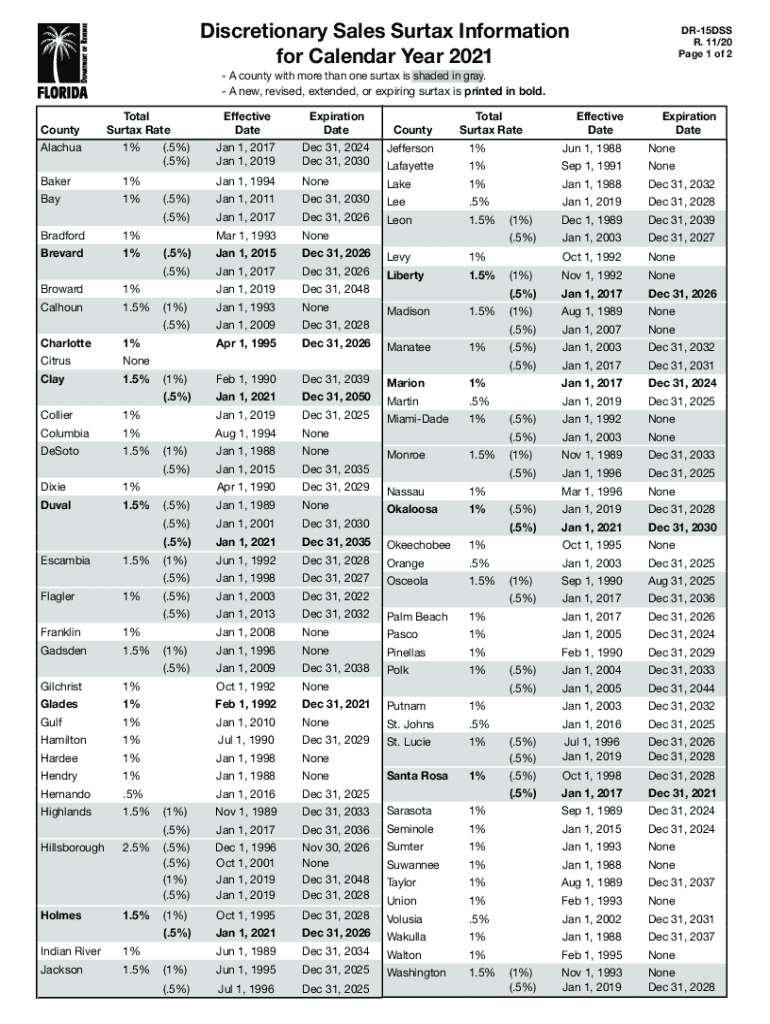
- Begin by reviewing the county list provided. Identify your county and note the corresponding surtax rate, effective date, and expiration date.
- Fill in your personal information at the top of the form, including your name, address, and contact details.
- In the designated section, input the total amount of sales subject to surtax for your county. Ensure accuracy to avoid discrepancies.
- Review any additional notes regarding changes in surtax rates for your county as indicated in bold text within the document.
- Once all fields are completed, utilize our platform’s features to save or print your filled form for submission.
Start using our platform today to easily complete your fl discretionary sales surtax form online for free!
Fill out fl discretionary sales surtax online
It's free
See more fl discretionary sales surtax versions
We've got more versions of the fl discretionary sales surtax form. Select the right fl discretionary sales surtax version from the list and start editing it straight away!
| Versions | Form popularity | Fillable & printable |
|---|---|---|
| 2025 | 4.7 Satisfied (30 Votes) | |
| 2024 | 4.7 Satisfied (27 Votes) | |
| 2023 | 4.9 Satisfied (38 Votes) | |
| 2022 | 4.7 Satisfied (45 Votes) | |
| 2021 | 4.9 Satisfied (41 Votes) | |
| 2021 | 4.3 Satisfied (188 Votes) | |
| 2019 | 4.4 Satisfied (502 Votes) | |
| 2018 | 4.4 Satisfied (168 Votes) | |
| 2017 | 4.3 Satisfied (139 Votes) | |
| 2014 | 4.3 Satisfied (122 Votes) | |
| 2011 | 4 Satisfied (33 Votes) |
Security and compliance
At DocHub, your data security is our priority. We follow HIPAA, SOC2, GDPR, and other standards, so you can work on your documents with confidence.
Learn more


Related forms

Patient Comfort Assessment Guide
The document is a comprehensive Patient Comfort Assessment Guide designed to evaluate and record various aspects of a pa ...
Labor Studies: Online Courses - ILR School - Cornell University
The document outlines an online Labor Studies program offering college-credit courses for union activists, enabling them ...

HELPFUL HINTS - College of Human Ecology - Cornell University
The document provides comprehensive information about the Office of Administrative Support (OAS) at Cornell University's ...

Wednesday March 13, 2013 10:00 AM 3:00 PM - Cornell University - counties cce cornell
The document provides directions and details for the Dairy & Livestock Day 2013 event organized by Cornell University Co ...

305 Kaposi's Sarcoma and Pneumocystis - dspace creighton
The document from the Centers for Disease Control discusses the unusual rise of Kaposi's sarcoma (KS) and Pneumocystis p ...