
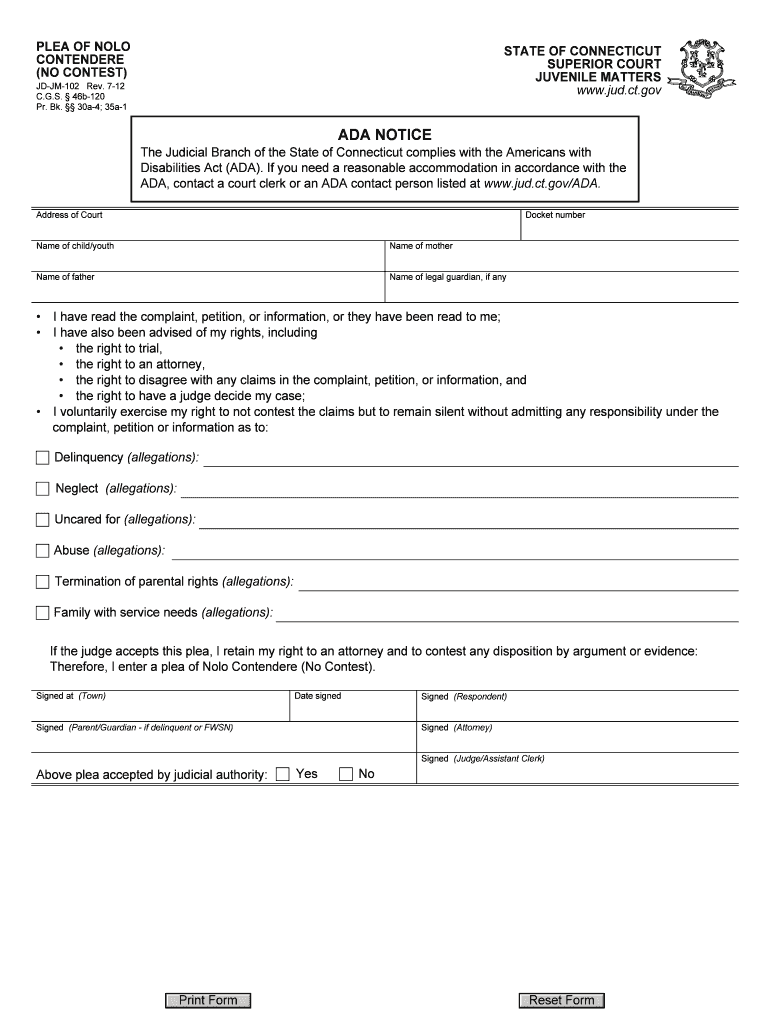




Here's how it works

01. Edit your plead nolo online
Type text, add images, blackout confidential details, add comments, highlights and more.

02. Sign it in a few clicks
Draw your signature, type it, upload its image, or use your mobile device as a signature pad.

03. Share your form with others
Send what is no contest in court via email, link, or fax. You can also download it, export it or print it out.
How to use or fill out nolo contest jud get with our platform

- Click ‘Get Form’ to open the nolo contest jud get in the editor.
- Begin by entering the address of the court and the docket number at the top of the form. This information is crucial for identifying your case.
- Fill in the names of the child/youth, mother, father, and any legal guardian. Ensure that all names are spelled correctly to avoid any issues.
- Review the list of rights provided in the form. Acknowledge that you have read or had them read to you before proceeding.
- In the section regarding allegations, clearly indicate your stance on each claim by filling in relevant details as necessary.
- Sign and date the form at the bottom. If applicable, ensure that a parent or guardian also signs if you are a minor.
- Once completed, utilize our platform’s features to save, print, or share your document as needed.
Start using our platform today for free to streamline your document editing and signing process!
Fill out nolo contest jud get online
It's free
Security and compliance
At DocHub, your data security is our priority. We follow HIPAA, SOC2, GDPR, and other standards, so you can work on your documents with confidence.
Learn more


Related forms

In The Supreme Court of the United States - Southern Illinois - law siu
The document is a legal brief for the respondent, Faith Mbole, in a case against Pharmex, Inc. regarding corporate liabi ...
SMU Student Life Handbook 2006-2007 - Southern Methodist - smu
The document is a comprehensive guide for students at Southern Methodist University (SMU), detailing the Student Handboo ...

Re-Inventing CARD MRI's Information Technology Strategy - SNHU
The document outlines a comprehensive strategy for re-inventing the information technology (IT) framework of the Center ...

COMM2400-012 Leadership and Public Speaking - Faculty Web Pages
The document outlines a public speaking course titled 'Zombie Apocalypse Public Speaking' at Southern Polytechnic State ...

) Master File No - securities stanford
The document addresses a 404 error encountered on the Securities Class Action Clearinghouse (SCAC) website, explaining t ...

Full text of andquot;Air Force Registerandquot; - Internet Archive
The document is an appellate brief submitted to the United States Court of Appeals for the Armed Forces by Staff Sergean ...

Download Preview - American Economic Association - www-siepr stanford
The document is a discussion paper by the Stanford Institute for Economic Policy Research that investigates the impact o ...

Executive Summary Innovations in E-Commerce The Stanford
The document is an executive summary of a roundtable hosted by the Stanford Global Supply Chain Management Forum and the ...