Type text, add images, blackout confidential details, add comments, highlights and more.
02. Sign it in a few clicks
Draw your signature, type it, upload its image, or use your mobile device as a signature pad.
03. Share your form with others
Send it via email, link, or fax. You can also download it, export it or print it out.
How to use or fill out connecticut jd hm 16 with our platform
Ease of Setup
DocHub User Ratings on G2
Ease of Use
DocHub User Ratings on G2
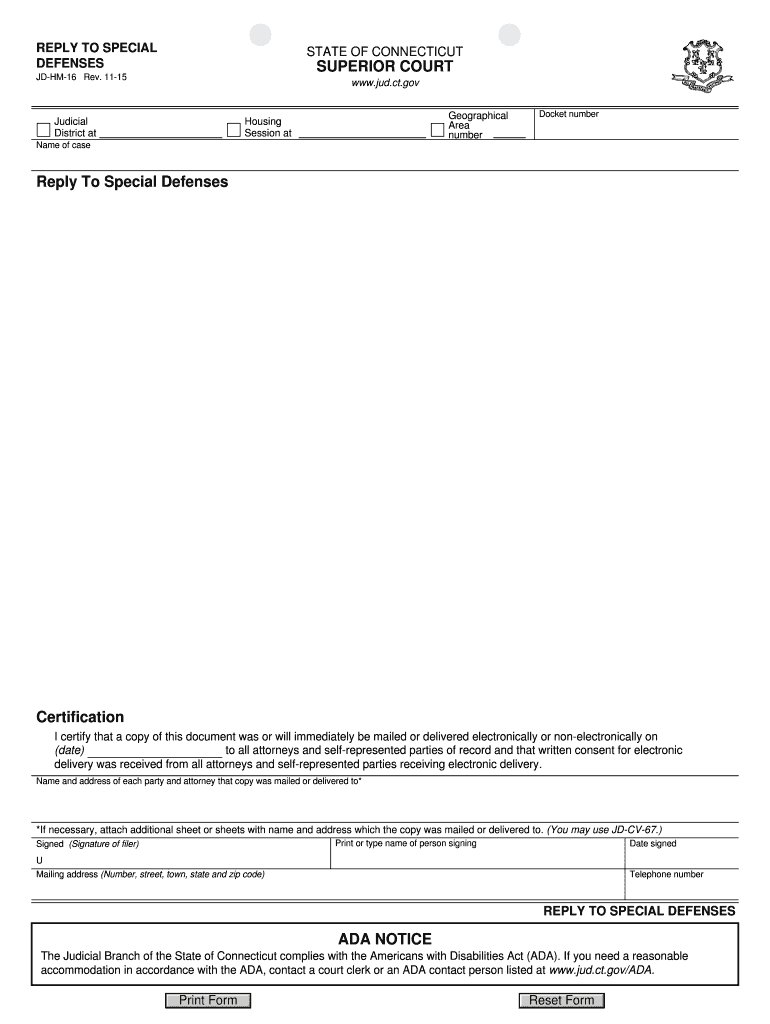
Click ‘Get Form’ to open the Connecticut JD-HM-16 in the editor.
Begin by entering the Judicial District and Geographical Area number at the top of the form. This information is crucial for proper case identification.
Fill in the Housing Session and Docket number, ensuring accuracy as these details link your response to the specific case.
In the 'Name of case' section, clearly state the title of your case as it appears in court documents.
Complete the 'Reply To Special Defenses' section by providing your responses to any defenses raised by opposing parties.
In the Certification area, indicate the date you will mail or deliver this document and list all parties involved, ensuring compliance with electronic delivery requirements if applicable.
Sign and date the form at the bottom, including your telephone number and mailing address for contact purposes.
Start using our platform today to fill out your Connecticut JD-HM-16 form online for free!
We've got more versions of the connecticut jd hm 16 form. Select the right connecticut jd hm 16 version from the list and start editing it straight away!
Minors 14 and 15 years of age may not work: during school hours, before 7 a.m. or after 7 p.m., more than 3 hours a day, or more than 18 hours a week. Minors 16 and 17 years of age may not work:Before 6 a.m. and after 11 p.m., more than 6 hours a day, or more than 8 hours per day on Friday, Saturday, and Sunday.
Can you work any job at 16?
At 16, you might find employment opportunities such as working in retail stores, fast-food restaurants, as a camp counselor, lifeguard, or babysitter. However, available options can vary based on your location and local labor laws.
How late can a 16 year old work in the US?
Night work is not allowed for minors of these ages during these hours: 14 and 15: May not work before 7 AM or after 7 PM (9 PM June 1 through Labor Day). 16 and 17: May not work before 6 AM or past 10:30 PM (11 PM with parental permission) preceding school day or 1 AM preceding non-school day.
What is the 4 hour rule in CT?
The 4-hour rule in Connecticut guarantees a minimum payment for employees who report to work but are sent home before completing their scheduled shift. If an employee is scheduled to work eight hours but is dismissed after two, the employer must still pay for at least four hours.
What are special defenses in Connecticut?
Denials or do not know claims are contested issues. These are the issues that will be argued by the Plaintiff and Defendant for considerations by the Court. A Special Defense is a legal reason why the Defendant should not be found liable, or responsible, for an allegation.
Related Searches
Jd hm 8JD-HM-32Jd hm 21JD-HM-7Jd hm 41JD HM-5Summary process (eviction CT)Reply to special defenses ct
Security and compliance
At DocHub, your data security is our priority. We follow HIPAA, SOC2, GDPR, and other standards, so you can work on your documents with confidence.
REPLY TO SPECIAL DEFENSES - Connecticut Judicial Branch
CONNECTICUT JUDICIAL BRANCH. REPLY TO SPECIAL DEFENSES JD-HM-16 Rev. Judicial District Housing Session Docket number (date) to all counsel and self-represented
It is the policy of the University of Connecticut to prohibit discrimination in education, employment, and in the provision of services on the basis of race,Read more
Cookie consent notice
This site uses cookies to enhance site navigation and personalize your experience.
By using this site you agree to our use of cookies as described in our Privacy Notice.
You can modify your selections by visiting our Cookie and Advertising Notice.