Form pc 242 2025

Get Form
ct probate form pc 242 instructions Preview on Page 1

Here's how it works

01. Edit your ct probate form pc 242 instructions online
Type text, add images, blackout confidential details, add comments, highlights and more.

02. Sign it in a few clicks
Draw your signature, type it, upload its image, or use your mobile device as a signature pad.

03. Share your form with others
Send it via email, link, or fax. You can also download it, export it or print it out.

How to use or fill out form pc 242 with our platform

Form edit decoration
9.5
Ease of Setup
DocHub User Ratings on G2
9.0
Ease of Use
DocHub User Ratings on G2
  1. Click ‘Get Form’ to open it in the editor.
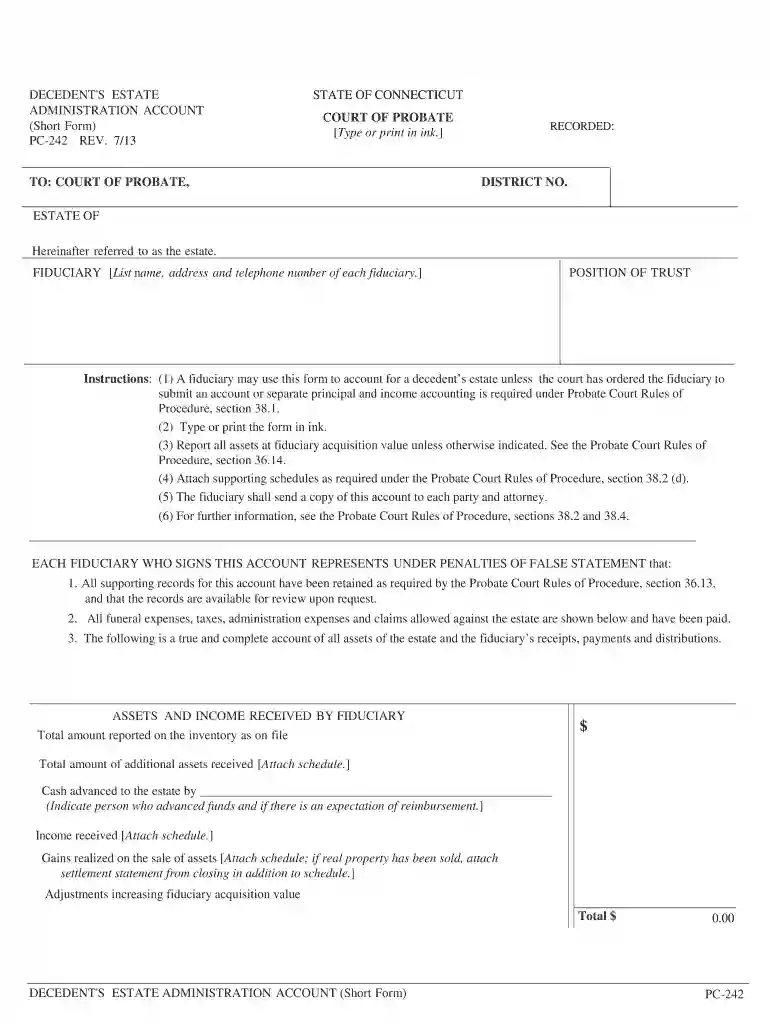
  2. Begin by entering the estate name and the fiduciary's details, including name, address, and telephone number. Ensure all information is accurate and clearly printed.
  3. In the 'Assets and Income Received' section, report all assets at fiduciary acquisition value. Attach any necessary schedules for additional assets or income received.
  4. Proceed to the 'Payments and Distributions by Fiduciary' section. List funeral expenses, administration expenses, and any claims paid. Again, attach supporting schedules as required.
  5. Complete the 'Cash Account' section by detailing cash reported on inventory, additional receipts, and expenditures. Ensure totals are calculated correctly.
  6. Finally, sign and date the form where indicated. Certify that copies of this account have been sent to all relevant parties.

Start using our platform today for free to streamline your form completion process!

See more form pc 242 versions

We've got more versions of the form pc 242 form. Select the right form pc 242 version from the list and start editing it straight away!
Versions Form popularity Fillable & printable
2019 4.8 Satisfied (52 Votes)
2013 4.3 Satisfied (106 Votes)
2005 4.3 Satisfied (84 Votes)
be ready to get more

Complete this form in 5 minutes or less

Get form

Got questions?

We have answers to the most popular questions from our customers. If you can't find an answer to your question, please contact us.
Contact us
The difference between a simple PC 242 Battery Hotlink and the more serious PC 243(d) Aggravated Battery charge is the degree of harm. When a battery results in a serious bodily injury, a defendant can face PC 243(d) charges. Serious bodily injury is a serious harm to ones physical condition.
A petition for administration or probate of Will should be submitted to the Probate Court within 30 days of the decedents death. It should be accompanied by the original Will and codicils, if any, and a certified copy of the death certificate.
be ready to get more

Complete this form in 5 minutes or less

Get form