




Here's how it works

01. Edit your form online
Type text, add images, blackout confidential details, add comments, highlights and more.

02. Sign it in a few clicks
Draw your signature, type it, upload its image, or use your mobile device as a signature pad.

03. Share your form with others
Send it via email, link, or fax. You can also download it, export it or print it out.
How to use or fill out doctors claim form with our platform

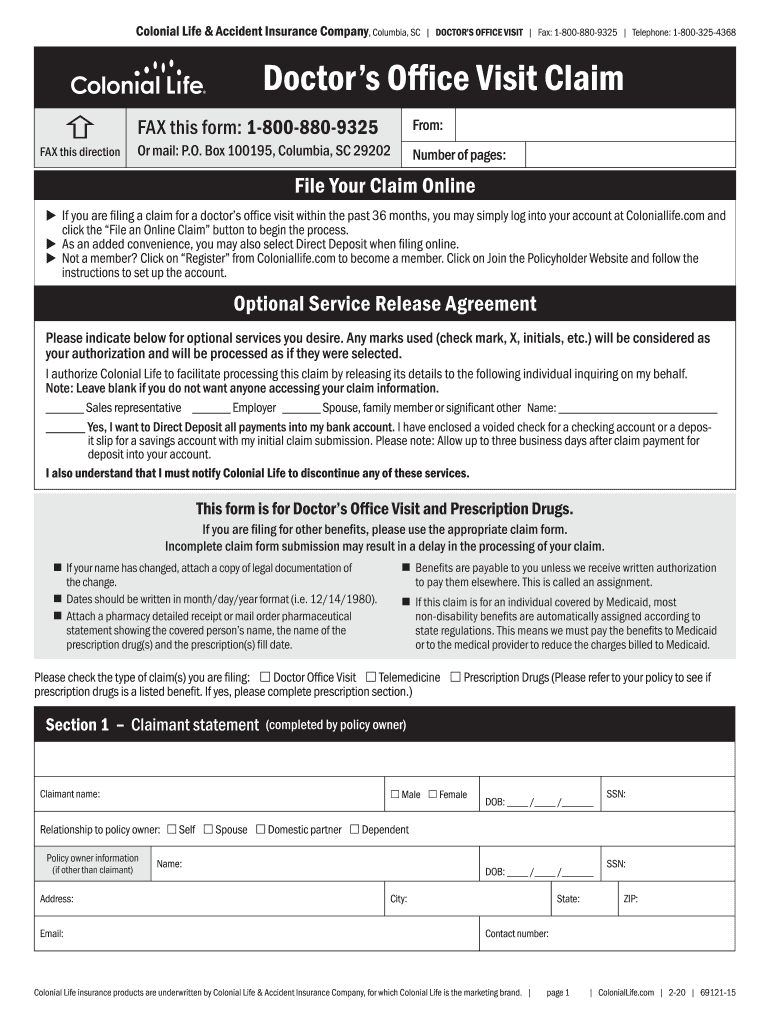
- Click ‘Get Form’ to open the Doctor's Office Visit Claim in the editor.
- Begin by filling out the Claimant Statement section. Enter the claimant's name, date of birth, and Social Security Number (SSN). Indicate the relationship to the policy owner.
- In the Policy Owner Information section, provide details such as name, address, email, and SSN if different from the claimant.
- Specify the type of claims you are filing by checking the appropriate boxes for Doctor Office Visit, Telemedicine, or Prescription Drugs.
- Complete the visit details for each physician or facility visited. Include dates of visits and check whether they were in-office or telemedicine appointments.
- If applicable, fill out the prescriptions section by providing pharmacy names, prescription numbers, and dates filled. Attach copies of receipts.
- Review all entries for accuracy. Sign and date where indicated to certify that all information is correct before submitting your claim.
Start using our platform today to streamline your claims process for free!
Fill out doctors claim form online
It's free
It's free
See more doctors claim form versions
We've got more versions of the doctors claim form form. Select the right doctors claim form version from the list and start editing it straight away!
Security and compliance
At DocHub, your data security is our priority. We follow HIPAA, SOC2, GDPR, and other standards, so you can work on your documents with confidence.
Learn more


Related forms

2022 Form 8453-FE
The document is the Louisiana Department of Revenue's Fiduciary Income Tax Declaration for Electronic Filing (LA8453-F) ...

8453(107)F
The document is the Louisiana LA 8453 form for the 2024 Individual Income Tax Declaration for Electronic Filing. It incl ...

IT-203-SI - Department of Taxation and Finance - NY
The document outlines the requirements and instructions for New York S corporations to file a group return for their non ...

Form IT-637 Alternative Fuels and Electric Vehicle Recharging Property Credit Tax Year 2024
Form IT-637 Alternative Fuels and Electric Vehicle Recharging Property Credit Tax Year 2024
The document outlines the IT-637 form for claiming the Alternative Fuels and Electric Vehicle Recharging Property Credit ...

Form 900-XM Application for Five-Year Ad Valorem Tax Exemption for Oklahoma Manufacturing or Researc
Form 900-XM Application for Five-Year Ad Valorem Tax Exemption for Oklahoma Manufacturing or Researc
The document outlines the application process for a Five-Year Ad Valorem Tax Exemption for manufacturing or research and ...

Form IT-219 Credit for New York City Unincorporated Business Tax Tax Year 2024
The document IT-219 provides instructions for claiming a credit for the New York City Unincorporated Business Tax. It ou ...

Dof-1
The document is a form (DOF-1) used to report changes in a business's name, billing or business address, or telephone nu ...

TN Business Now Have Option Not to File the Tangible
The document is a Tangible Personal Property Schedule for reporting commercial and industrial personal property in Loudo ...