




Here's how it works

01. Edit your dochub com fillable form online
Type text, add images, blackout confidential details, add comments, highlights and more.

02. Sign it in a few clicks
Draw your signature, type it, upload its image, or use your mobile device as a signature pad.

03. Share your form with others
Send maine residency affidavit via email, link, or fax. You can also download it, export it or print it out.
How to use or fill out affidavit for residency form maine with DocHub

- Click ‘Get Form’ to open the affidavit for residency form maine in our platform's editor.
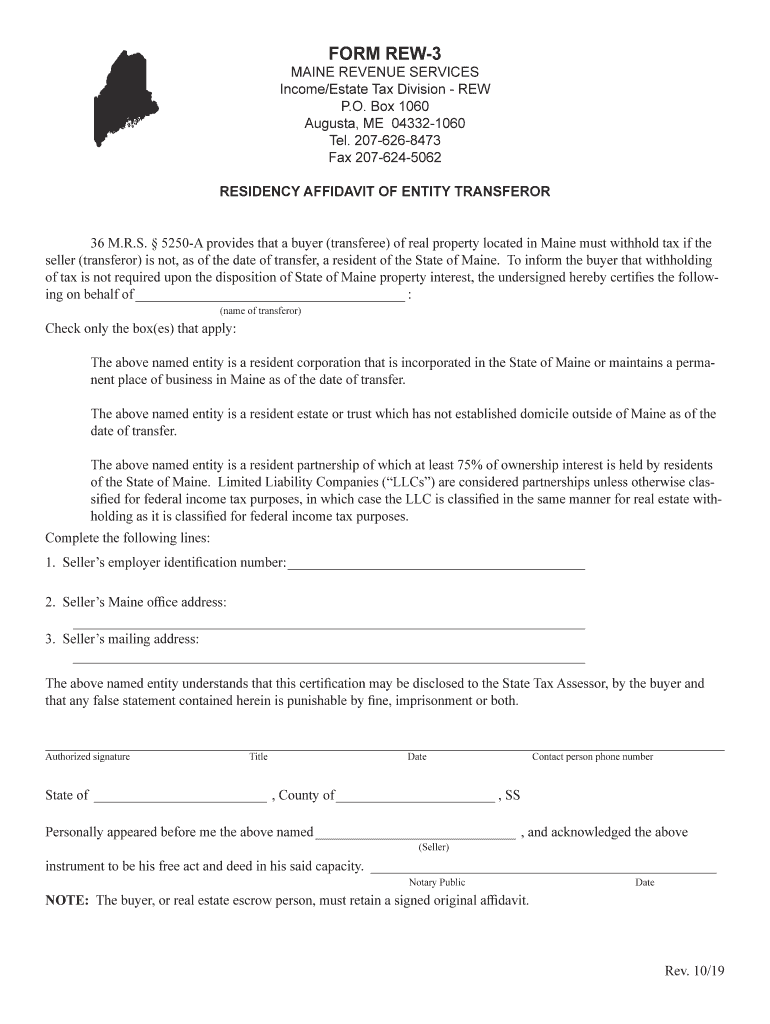
- Begin by entering the name of the transferor in the designated field. This is crucial as it identifies the entity involved in the property transfer.
- Next, check the appropriate box(es) that apply to your entity's residency status. Ensure you select all that are relevant to accurately reflect your situation.
- Fill in the seller’s employer identification number and both the Maine office address and mailing address in their respective fields. This information is essential for tax purposes.
- Provide an authorized signature, title, and date at the bottom of the form. Make sure this is completed by someone with authority to sign on behalf of the entity.
- Lastly, ensure a notary public witnesses and signs the document where indicated. This step is vital for legal validation.
Start using our platform today to fill out your affidavit for residency form maine quickly and efficiently!
Fill out affidavit for residency form maine online
It's free
It's free
See more affidavit for residency form maine versions
We've got more versions of the affidavit for residency form maine form. Select the right affidavit for residency form maine version from the list and start editing it straight away!
Got questions?
We have answers to the most popular questions from our customers. If you can't find an answer to your question, please contact us.
Contact us
How to fill out a residency affidavit?
General Residency Affidavit It typically requires your full name, address, date of birth, contact details, and residency duration. It also needs a witness or notary public signature confirming your signature on the document.
How do I write a resident affidavit?
Step-by-Step Guide to Writing Your Affidavit Begin by clearly stating your purpose. Provide your full legal name as it appears on official documents like your drivers license. Include your complete and accurate current residential address. State how long you have lived at the declared address.
What is a proof of residency affidavit?
A residency affidavit is a sworn, docHubd statement confirming your residence address. You might need one for a driver license or identification card renewal for various situations that need to meet residency requirements, such as: Enrolling your child in school. Getting a drivers license or identification card.
How do I fill out an affidavit form?
The following are six critical sections that must be included: Title. This is either your name (Affidavit of Jane Doe) or the specific case information. Statement of identity. The next paragraph tells the court about yourself. Statement of truth. Statement of facts. Closing statement of truth. Sign and docHub.
How to fill an affidavit of residence?
What do you need to get an Affidavit of Proof of Residence in Kenya? Full name. National ID number or passport number. Residential address (specific location, sub-county, and county). Contact information, such as your phone number.
Security and compliance
At DocHub, your data security is our priority. We follow HIPAA, SOC2, GDPR, and other standards, so you can work on your documents with confidence.
Learn more


Related forms
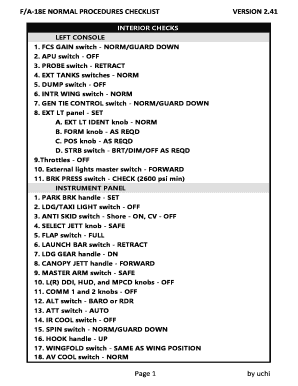
F A-18E NORMAL PROCEDURES CHECKLIST
The document is a detailed checklist for the F/A-18E aircraft, outlining normal procedures for various phases of operati ...

Three mile Fun Run Walk to benefit the Kootenai County Juvenile Probation Mentoring Program - kcgov
Three mile Fun Run Walk to benefit the Kootenai County Juvenile Probation Mentoring Program - kcgov
The document outlines the details for the 'Mentor Miles' Fun Run/Walk event scheduled for March 28, 2009, at Higgins Poi ...

McClellan was excused - minidoka id
The Minidoka County Commissioners meeting on July 25, 2011, addressed various administrative matters including the denia ...

Also attended by: Clerk Temple and Deputy Prosecuting Attorney Alan Goodman - minidoka id
Also attended by: Clerk Temple and Deputy Prosecuting Attorney Alan Goodman - minidoka id
The Minidoka County Commissioners meeting held on September 10, 2012, addressed various indigent matters, administrative ...

Minnehaha County 4-H News May 2012 - minnehahacounty
The document provides a comprehensive overview of upcoming events, deadlines, and important information for Minnehaha Co ...

TO SHOW A DIVISION OF PROPERTY WHICH COULD - co missoula mt
The document is a Certificate of Survey for a division of property located in Missoula County, Montana, specifically in ...

Minutes of May 15, 2012 Regular Meeting of - Mobile County - mobilecountyal
The Mobile County Commission held a regular meeting on May 15, 2012, where various agenda items were discussed and appro ...
People also ask
How do I prove Im a Maine resident?
How to Prove Maine Residency Conditional order of restoration, Contract in your name, Document issued by a government entity, Maine resident hunting or fishing license, Maine vehicle registration, Paycheck stub, Recent Maine drivers license with your physical address, Tax bill,
Does an affidavit count as proof of residency?
Whether youre applying for public assistance, registering to vote, or dealing with legal matters, this affidavit helps establish your standing. It provides proof of your address which is required for many legal and government purposes.
Where can I get an affidavit of residency form?
Download a ready-made template on docHub or complete it online. Write in all the required personal information step by step, including your full legal name, address and length of residence in your home, roommates, if any, and date of birth. Place your signature and have it docHubd online or at your local notary.