Type text, add images, blackout confidential details, add comments, highlights and more.

02. Sign it in a few clicks
Draw your signature, type it, upload its image, or use your mobile device as a signature pad.

03. Share your form with others
Send it via email, link, or fax. You can also download it, export it or print it out.

How to use or fill out sales reconciliation with our platform
Ease of Setup
DocHub User Ratings on G2
Ease of Use
DocHub User Ratings on G2
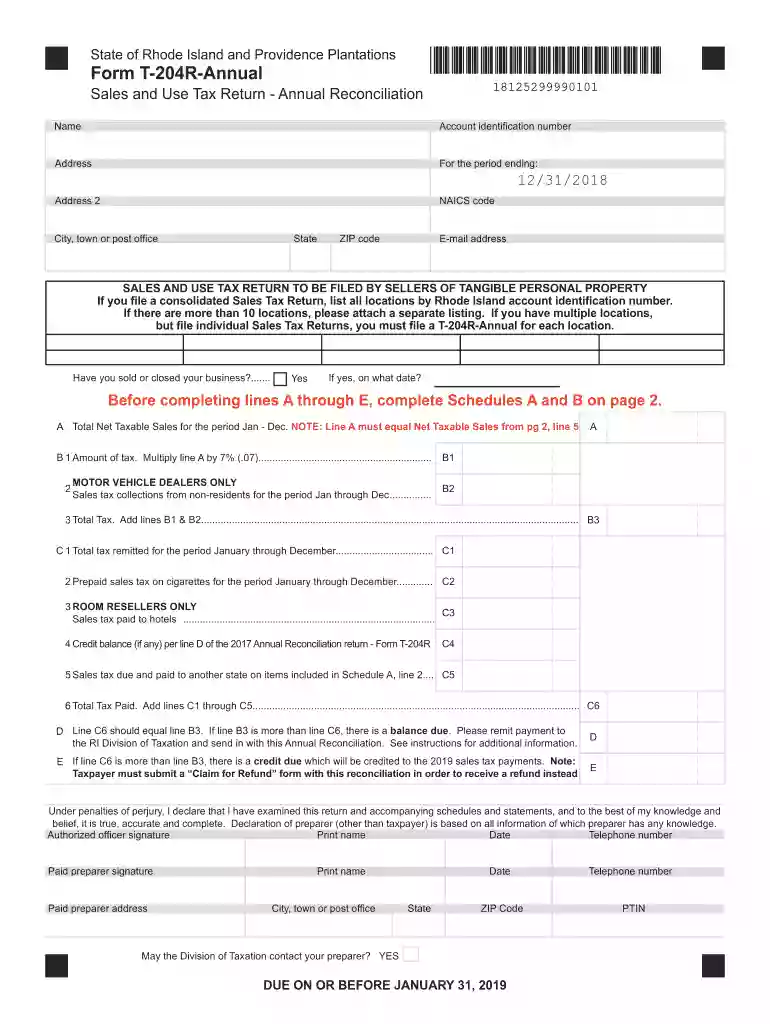
Click ‘Get Form’ to open the Sales and Use Tax Return - Annual Reconciliation in the editor.
Begin by entering your name, account identification number, and address in the designated fields. Ensure that all information is accurate for proper processing.
For the period ending, input the date (e.g., 12/31/2018) and provide your NAICS code along with your city, state, and ZIP code.
Complete Schedules A and B on page 2 before filling lines A through E. Schedule A requires you to categorize your total net taxable sales for the year.
In Schedule A, enter gross sales under specific categories (lines 1a to 1i) and calculate total deductions in Schedule B (lines 4a to 4l).
Ensure that line C6 equals line B3. If not, remit payment or file a claim for a refund as necessary.
Finally, complete the certification section at the bottom of page 1 by signing and dating it before submission.
Start using our platform today to streamline your sales reconciliation process for free!
We've got more versions of the sales reconciliation form. Select the right sales reconciliation version from the list and start editing it straight away!
The point-of-sale reconciliation process consists of several phases that make sure that sales data, payments, and financial records are in sync. With more payment choices and complex transactions, using a structured strategy is critical.
What is reconciliation in simple words?
Here are the steps that are necessary for reconciliation, particularly when offenses have not been resolved the right way in the past. Seek an understanding. Listen with empathy. Confess and take responsibility. Make a genuine apology. Determine what needs to be done to make amends and do it.
How to prepare sales reconciliation?
Compare the recorded transactions in your books with these external statements. Identify any discrepancies, such as missing transactions or incorrect amounts. Investigate the discrepancies and resolve the differences by making necessary corrections. Document the reconciliation process for future reference and audits.
How do you reconcile daily sales?
Steps for Effective End of Day Reconciliation Gather All Necessary Reports and Documents. Collect all sales receipts for the day. Count and Record Cash. Reconcile Credit Card Transactions. Verify POS Data. Compare Totals. Investigate and Resolve Discrepancies. Prepare Bank Deposit. Record Any Adjustments.
Related Searches
Sales reconciliation templateSales Reconciliation Format in ExcelSales reconciliation ReportSales reconciliation in accountingSales reconciliation processDaily sales reconciliationReconciliation in accounting exampleBank reconciliation
Security and compliance
At DocHub, your data security is our priority. We follow HIPAA, SOC2, GDPR, and other standards, so you can work on your documents with confidence.
Management believes that this non-GAAP financial measure provides useful supplemental information to investors regarding the Companys ability to generate cash
Reconciliation is the process of comparing transactions and activity to supporting documentation. Further, reconciliation involves resolving any discrepancies.
Annual Reconciliation of Apportionable Income. For help with account set up, updating information on your account, adding/editing/removing user access.
Cookie consent notice
This site uses cookies to enhance site navigation and personalize your experience.
By using this site you agree to our use of cookies as described in our Privacy Notice.
You can modify your selections by visiting our Cookie and Advertising Notice.