




Here's how it works

01. Edit your n196 online
Type text, add images, blackout confidential details, add comments, highlights and more.

02. Sign it in a few clicks
Draw your signature, type it, upload its image, or use your mobile device as a signature pad.

03. Share your form with others
Send n 196 via email, link, or fax. You can also download it, export it or print it out.
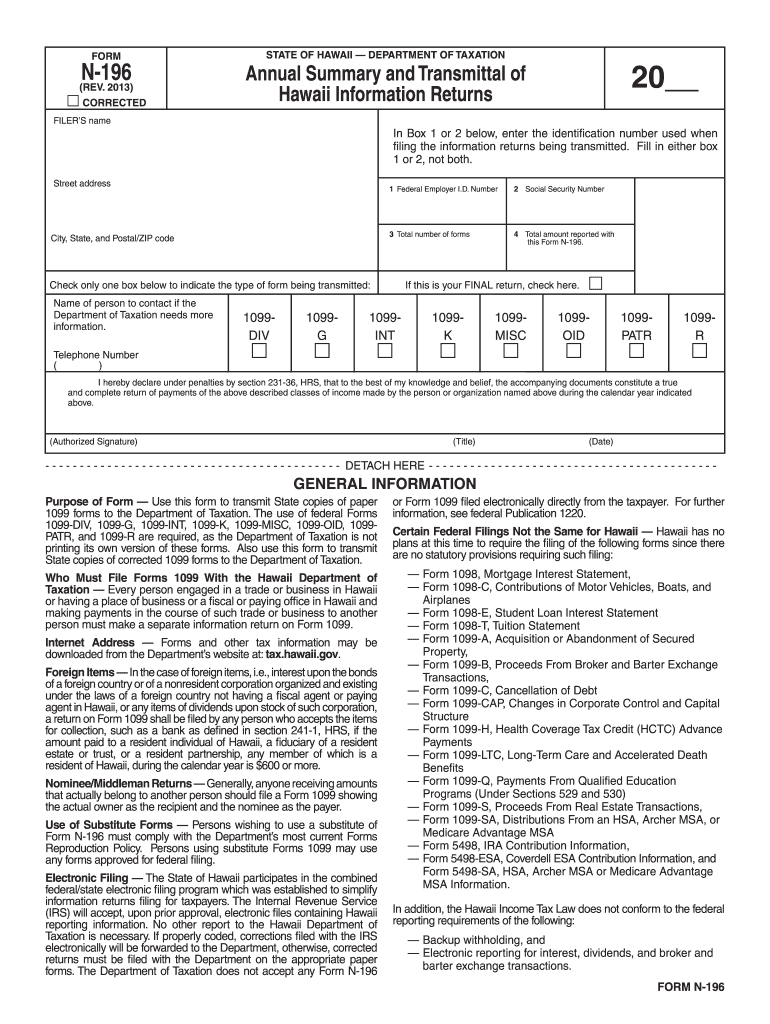
How to use or fill out state of hawaii n 196 form with our platform

- Click ‘Get Form’ to open the state of Hawaii N-196 form in the editor.
- Enter the last two digits of the calendar year in the upper right corner for which you are completing this form.
- Fill in your name and address in the designated fields on the form.
- In either Box 1 or Box 2, enter your taxpayer identification number. Use Box 1 for Federal Employer I.D. Number and Box 2 for Social Security Number, ensuring not to fill both.
- Indicate the total number of Forms 1099 you are submitting in Box 3, excluding any blank or voided forms.
- In Box 4, input the total amounts from specific boxes of the relevant Forms 1099 you are filing.
- Check the appropriate box to indicate which type of Form 1099 you are transmitting. If filing multiple types, submit separate N-196 forms for each type.
- Provide a contact person's name and telephone number if further information is needed by the Department of Taxation.
- Ensure that someone authorized signs the form before submission. This can include transmitters or agents under certain conditions.
Start using our platform today to easily complete your state of Hawaii N-196 form online for free!
Fill out state of hawaii n 196 form online
It's free
It's free
See more state of hawaii n 196 form versions
We've got more versions of the state of hawaii n 196 form form. Select the right state of hawaii n 196 form version from the list and start editing it straight away!
Security and compliance
At DocHub, your data security is our priority. We follow HIPAA, SOC2, GDPR, and other standards, so you can work on your documents with confidence.
Learn more


Related forms

Music counts answer key
The document is a music education worksheet designed for students to practice musical notation and counting. It includes ...

CP ROTARY COMPRESSOR COMMISSIONING REPORT
The document is a commissioning report for CP rotary compressors, which must be completed and signed by both the authori ...

Description of the Updated One Page Stuttering Assessment docx
The One Page Stuttering Assessment by Stephen Groner is a comprehensive tool designed for evaluating clients who stutter ...
Periodic table relationships worksheet answers
The document consists of exercises related to the periodic table, where students identify relationships among sets of te ...

Roman Catholic Diocese of Stockholm - Simple English
The document is a prenuptial enquiry form issued by the Roman Catholic Diocese of Stockholm, Sweden. It collects detaile ...
Counter petition sample
The document provides instructions for completing the Florida Supreme Court Approved Family Law Form 12.903(c)(1), which ...

Child care daily health check form
The document is a Daily Health Check Recording Form for Sunny Days Child Care Center, designed to track the health obser ...

Usa Boxing Physical Form - Fill Online, Printable, Fillable,
The document is a Medical Claim Form for USA Boxing, intended for individuals who have sustained injuries during USA Box ...