




Here's how it works

01. Edit your dochub com fillable form online
Type text, add images, blackout confidential details, add comments, highlights and more.

02. Sign it in a few clicks
Draw your signature, type it, upload its image, or use your mobile device as a signature pad.

03. Share your form with others
Send nis form via email, link, or fax. You can also download it, export it or print it out.
How to use or fill out nis jamaica direct deposit authorization form 74 176 with our platform

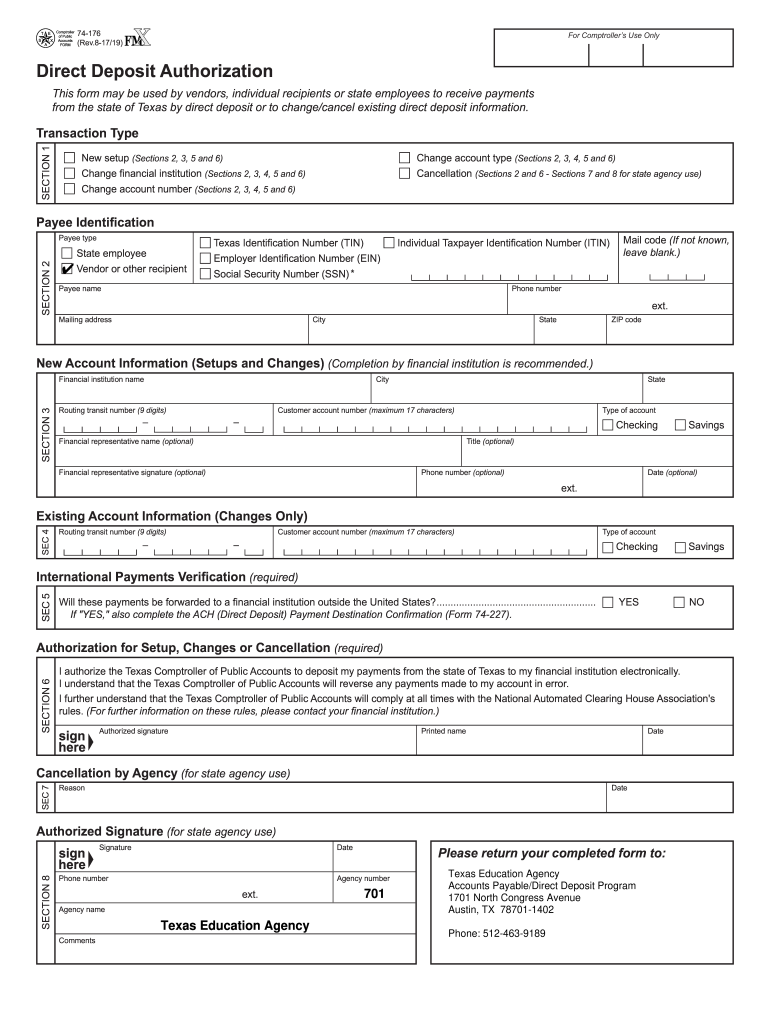
- Click ‘Get Form’ to open it in the editor.
- Begin with Section 1, where you will select the appropriate transaction type: New setup, Change financial institution, Change account number, Change account type, or Cancellation.
- In Section 2, provide your Payee Identification details. Select your payee type and enter your Texas Identification Number (TIN), Employer Identification Number (EIN), Social Security Number (SSN), or Individual Taxpayer Identification Number (ITIN). Fill in your name, contact number, and mailing address.
- Proceed to Section 3 for New Account Information. Enter the financial institution's name, city, routing transit number, customer account number, and type of account (checking or savings).
- If applicable, complete Section 4 with Existing Account Information for changes. This ensures verification of your existing banking details.
- In Section 5, indicate if payments will be forwarded internationally by selecting 'YES' or 'NO'. If 'YES', complete the additional form as required.
- Finally, in Section 6, authorize the setup or changes by signing and dating the form. Ensure all information is accurate before submission.
Start using our platform today to easily fill out and manage your nis jamaica direct deposit authorization form for free!
Fill out nis jamaica direct deposit authorization form 74 176 online
It's free
See more nis jamaica direct deposit authorization form 74 176 versions
We've got more versions of the nis jamaica direct deposit authorization form 74 176 form. Select the right nis jamaica direct deposit authorization form 74 176 version from the list and start editing it straight away!
Security and compliance
At DocHub, your data security is our priority. We follow HIPAA, SOC2, GDPR, and other standards, so you can work on your documents with confidence.
Learn more


Related forms

Ricahrd and Elise Martino - New York State Department of - dec ny
The document outlines enforcement proceedings initiated by the New York State Department of Environmental Conservation a ...

Nicholas Morcos, Order Commissioner's Order - dec ny
The document is an administrative enforcement order from the New York State Department of Environmental Conservation aga ...

Circular Letter No 19 (1966): WITHDRAWN Circular Letter No 22 (1986): "Chapter 365 of the Laws of 19
Circular Letter No 19 (1966): WITHDRAWN Circular Letter No 22 (1986): "Chapter 365 of the Laws of 19
The document is a circular letter from the New York State Insurance Department, dated October 10, 1966, informing proper ...

STATE RESIDENCE AND RESPONSIBILTY FOR ASSISTANCE
The document outlines the policies and procedures for Medicaid recipients in New York State who change their residency t ...

Kindlon-II-01-25-08 - NYS Joint Commission on Public Ethics - New - jcope ny
The document is a transcript of sworn testimony from Terence L. Kindlon, Esquire, regarding an investigation by the New ...
September 15, 2006 - Public Service Commission - New York State
The document is a transcript of a procedural conference held by the New York Public Service Commission on September 15, ...

2010-11 Application single paged indd - New York State Senate - nysenate
The document outlines the application process for the New York State Senate Annual Fellowships, which include various po ...

Copart of Connecticut, Inc
The document is a decision from the Supreme Court of New York regarding a case between Copart of Connecticut, Inc. and L ...