




Here's how it works

01. Edit your form 941 instructions 2020 online
Type text, add images, blackout confidential details, add comments, highlights and more.

02. Sign it in a few clicks
Draw your signature, type it, upload its image, or use your mobile device as a signature pad.

03. Share your form with others
Send schedule r 941 via email, link, or fax. You can also download it, export it or print it out.
How to use or fill out Instructions for Schedule R (Form 941) (Rev. June 2020) with our platform

- Click ‘Get Form’ to open it in the editor.
- Begin by entering your Employer Identification Number (EIN) and business name at the top of Schedule R, ensuring they match exactly with those on Form 941.
- Select the appropriate 'Type of filer' box to indicate if you are a section 3504 agent, CPEO, or another type of third-party payer.
- Indicate the calendar year applicable to the quarter you are filing for by checking the corresponding box.
- For each client, fill in their EIN and report wages, tips, and other compensation in the designated columns. Ensure that amounts over 999.99 do not include commas.
- Complete all necessary continuation sheets if you have more than five clients, attaching them to your aggregate Form 941.
- Review all entries for accuracy before submitting your completed Schedule R along with Form 941.
Start using our platform today to streamline your document editing and form completion process for free!
Fill out Instructions for Schedule R (Form 941) (Rev. June 2020). Instructions for Schedule R (Form 941), Allocation Schedule for Aggregate Form 941 Filers online
It's free
See more Instructions for Schedule R (Form 941) (Rev. June 2020). Instructions for Schedule R (Form 941), Allocation Schedule for Aggregate Form 941 Filers versions
We've got more versions of the Instructions for Schedule R (Form 941) (Rev. June 2020). Instructions for Schedule R (Form 941), Allocation Schedule for Aggregate Form 941 Filers form. Select the right Instructions for Schedule R (Form 941) (Rev. June 2020). Instructions for Schedule R (Form 941), Allocation Schedule for Aggregate Form 941 Filers version from the list and start editing it straight away!
Security and compliance
At DocHub, your data security is our priority. We follow HIPAA, SOC2, GDPR, and other standards, so you can work on your documents with confidence.
Learn more


Related forms

INFORMED CONSENT FOR NEUROTOXIN INJECTION (

Minor Variance Application - thecounty ca
The document provides a comprehensive guide for applicants seeking a Minor Variance in the County of Prince Edward. It o ...
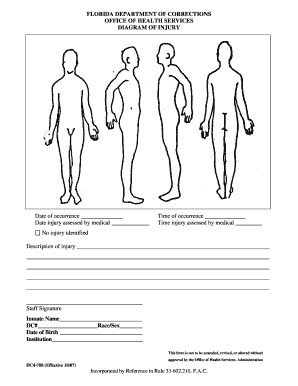
DIAGRAM OF INJURY
The document is a form from the Florida Department of Corrections' Office of Health Services, used to record details abo ...

Final Fieldwork Verification Form
The document is a Fieldwork Verification Form for trainees completing fieldwork under multiple supervisors at one organi ...

SHAHEEN AIRPORT SERVICES
The document is an admission form for SAPS Aviation College, a subsidiary of Shaheen Foundation, PAF. It requires person ...

Application Form for Marriage License - City of New Haven
The document is a Marriage License Application that outlines the necessary information and requirements for couples seek ...