Mo 1040 2019-2026

Get Form
mo 1040 Preview on Page 1

Here's how it works

01. Edit your mo 1040 online
Type text, add images, blackout confidential details, add comments, highlights and more.

02. Sign it in a few clicks
Draw your signature, type it, upload its image, or use your mobile device as a signature pad.

03. Share your form with others
Send missouri 1040 tax form via email, link, or fax. You can also download it, export it or print it out.

How to use or fill out mo 1040 2019 with our platform

Form edit decoration
9.5
Ease of Setup
DocHub User Ratings on G2
9.0
Ease of Use
DocHub User Ratings on G2
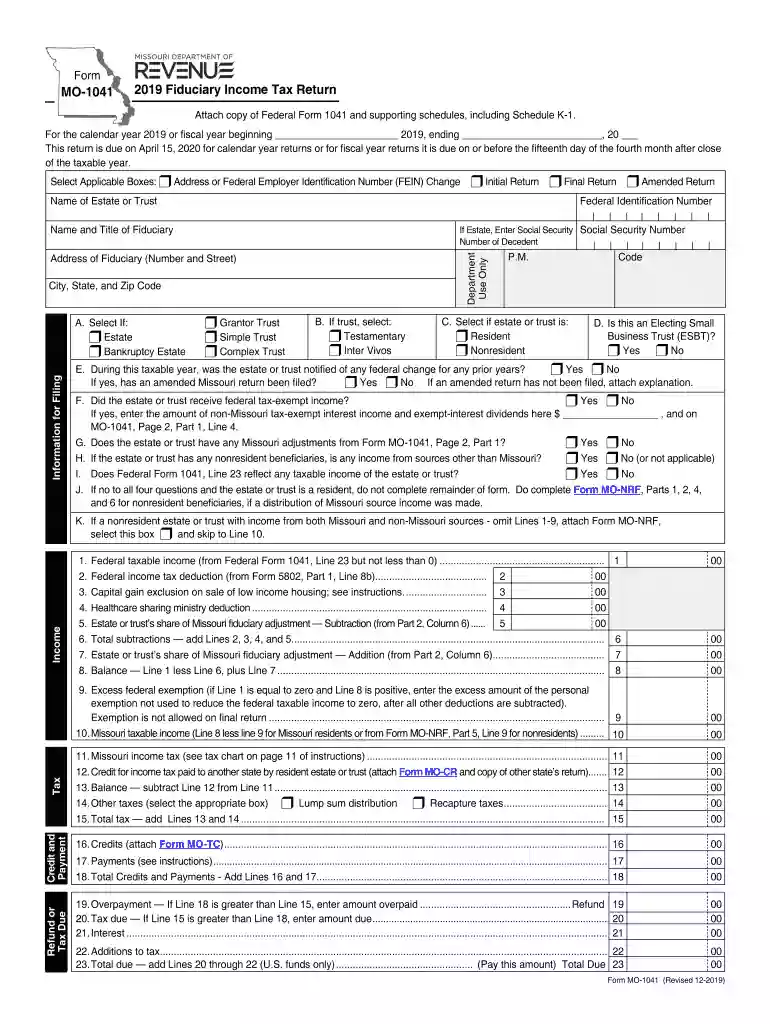
  1. Click ‘Get Form’ to open the MO-1041 in the editor.
  2. Begin by entering the calendar year at the top of the form. Ensure you select whether this is an initial, final, or amended return.
  3. Fill in the name of the estate or trust and provide the fiduciary's details, including their address and federal identification number.
  4. In Section A, check the appropriate boxes regarding the type of estate or trust and any relevant federal identification numbers.
  5. Proceed to complete Part 1 by entering federal taxable income from Federal Form 1041 and any applicable deductions.
  6. Continue through each line carefully, ensuring all required information is filled out accurately, especially for credits and payments.
  7. Once completed, review your entries for accuracy before saving or exporting your document for submission.

Start using our platform today to simplify your MO-1041 filing process!

See more mo 1040 2019 versions

We've got more versions of the mo 1040 2019 form. Select the right mo 1040 2019 version from the list and start editing it straight away!
Versions Form popularity Fillable & printable
2023 4.6 Satisfied (51 Votes)
2022 4.8 Satisfied (29 Votes)
2021 4.8 Satisfied (60 Votes)
2020 4.4 Satisfied (205 Votes)
2019 4.3 Satisfied (64 Votes)
2018 4.3 Satisfied (129 Votes)
2017 4.1 Satisfied (53 Votes)
2016 4.3 Satisfied (63 Votes)
be ready to get more

Complete this form in 5 minutes or less

Get form

Got questions?

We have answers to the most popular questions from our customers. If you can't find an answer to your question, please contact us.
Contact us
The Individual Income Tax Return (Form MO-1040) is Missouris long form. It is a universal form that can be used by any individual taxpayer. If you do not have any of the special filing situations described below and you choose to file a paper tax return, try filing a short form (Form MO-1040A).
Form 1040 is used by U.S. taxpayers to file an annual income tax return. Form 1040-SR is available as an optional alternative to using Form 1040 for taxpayers who are age 65 or older.
Is Form 1040 the Same As a W-2? Form 1040 is different from a W-2. A W-2 is a wage and tax statement that an employee receives from a company they worked for during the tax year. The information listed on the W-2 is used to fill out Form 1040.
Picking up copies at an IRS Taxpayer Assistance Center. Going to the IRS Small Business and Self-Employed Tax Center page. Requesting copies by phone 800-TAX-FORM (800-829-3676). Hours of operation are 7 a.m. to 10 p.m., Monday-Friday, your local time except Alaska and Hawaii which are Pacific time.
Get federal tax forms for current and prior years Download them from IRS.gov. Order online and have them delivered by U.S. mail. Order by phone at 1-800-TAX-FORM (1-800-829-3676)

Security and compliance

At DocHub, your data security is our priority. We follow HIPAA, SOC2, GDPR, and other standards, so you can work on your documents with confidence.

Learn more
ccpa2
pci-dss
gdpr-compliance
hipaa
soc-compliance

People also ask

You can still file 2019 tax returns Even though the deadline has passed, you can file your 2019 taxes online in a few simple steps. Our online income tax software uses the 2019 IRS tax code, calculations, and forms. File your 2017, 2018, 2019, 2020, 2021, 2022, and 2023 tax returns.

mo 1040 instructions