Application mileage form 2026

Get Form
application mileage form Preview on Page 1

Here's how it works

01. Edit your form online
Type text, add images, blackout confidential details, add comments, highlights and more.

02. Sign it in a few clicks
Draw your signature, type it, upload its image, or use your mobile device as a signature pad.

03. Share your form with others
Send it via email, link, or fax. You can also download it, export it or print it out.

How to use or fill out application mileage form with our platform

Form edit decoration
9.5
Ease of Setup
DocHub User Ratings on G2
9.0
Ease of Use
DocHub User Ratings on G2
  1. Click ‘Get Form’ to open the application mileage form in the editor.
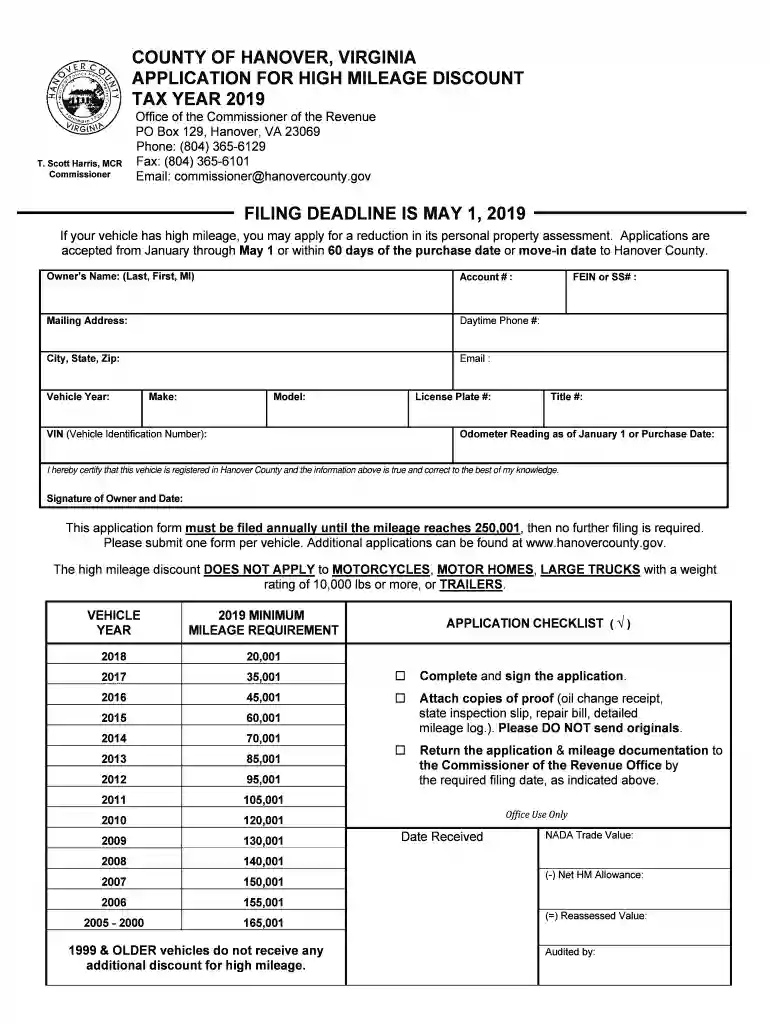
  2. Begin by entering your Owner’s Name, Account Number, and Mailing Address in the designated fields. Ensure all information is accurate for processing.
  3. Provide your Daytime Phone Number, Email, and Vehicle details including Year, Make, Model, License Plate Number, and VIN. This information is crucial for identifying your vehicle.
  4. Input the Odometer Reading as of January 1 or your Purchase Date. This will determine eligibility for the high mileage discount.
  5. Review the minimum mileage requirements listed on the form to ensure your vehicle qualifies for a discount based on its year.
  6. Attach copies of proof such as oil change receipts or detailed mileage logs. Remember not to send original documents.
  7. Finally, sign and date the application before submitting it to the Commissioner of the Revenue Office by May 1st or within 60 days of moving to Hanover County.

Start filling out your application mileage form today using our platform for free!

See more application mileage form versions

We've got more versions of the application mileage form form. Select the right application mileage form version from the list and start editing it straight away!
Versions Form popularity Fillable & printable
2023 4.5 Satisfied (39 Votes)
2022 4.1 Satisfied (27 Votes)
2021 4.8 Satisfied (57 Votes)
2020 4.1 Satisfied (67 Votes)
2019 4.3 Satisfied (168 Votes)
2018 4.2 Satisfied (100 Votes)
2016 4.4 Satisfied (283 Votes)
2015 4 Satisfied (35 Votes)
be ready to get more

Complete this form in 5 minutes or less

Get form

Got questions?

We have answers to the most popular questions from our customers. If you can't find an answer to your question, please contact us.
Contact us
What to record in your log book Total mileage for the year. Odometer readings at the start and end of the year. Mileage for each business trip. Time of the trip (the day will suffice) Place (your destination) Purpose of the trip.
The best evidence for claiming the deduction for business use of a vehicle is a written record kept during the time the business miles are driven. This can be a written log, spreadsheet, mileage tracking app, or something similar. The record should include miles traveled, destination, and business purpose.
How to Fill Out a Mileage Claim Form: A Step-by-Step Guide Step 1: Get the Correct Form. Step 2: Record the Date of Travel. Step 3: Mention the Starting Point and Destination. Step 4: Include the Purpose of the Journey. Step 5: Record the Number of Miles Driven. Step 6: Apply the Reimbursement Rate.
An IRS-compliant mileage log should include: Total annual mileage: The total number of miles driven throughout the year for both business and personal use. Annual business mileage: The total number of miles driven specifically for business purposes during the year.

Security and compliance

At DocHub, your data security is our priority. We follow HIPAA, SOC2, GDPR, and other standards, so you can work on your documents with confidence.

Learn more
ccpa2
pci-dss
gdpr-compliance
hipaa
soc-compliance