




Here's how it works

01. Edit your south carolina hotel tax exempt form online
Type text, add images, blackout confidential details, add comments, highlights and more.

02. Sign it in a few clicks
Draw your signature, type it, upload its image, or use your mobile device as a signature pad.

03. Share your form with others
Send south carolina hotel tax exemption via email, link, or fax. You can also download it, export it or print it out.
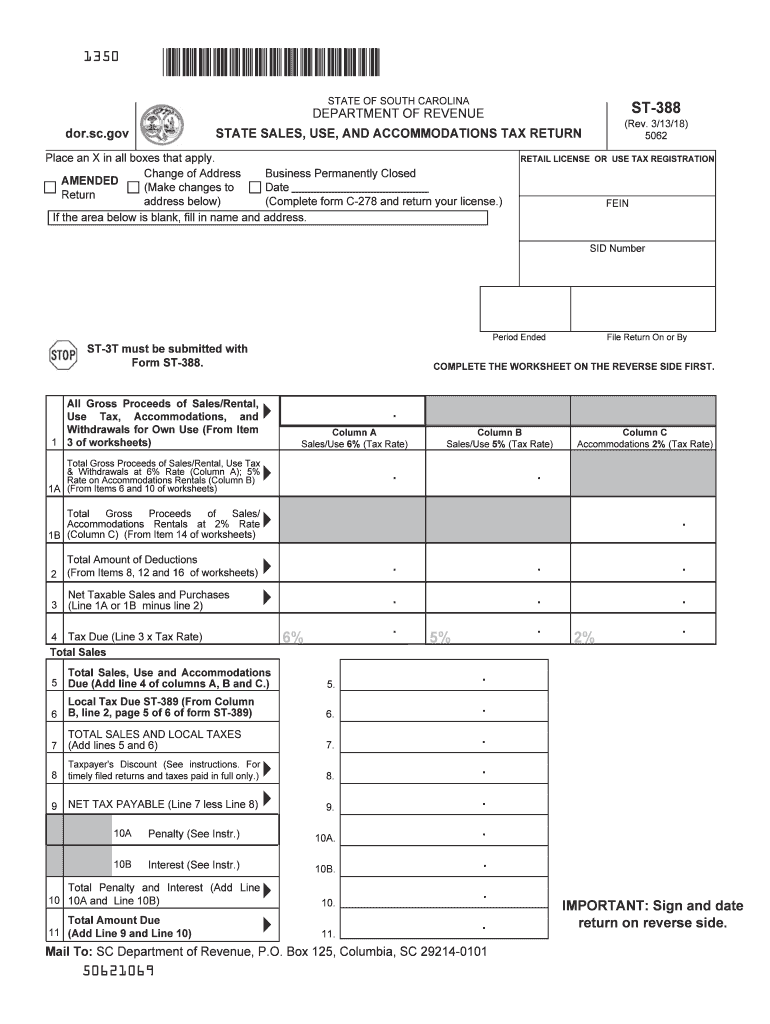
How to use or fill out SC Accommodations Tax Form ST-388 with DocHub

- Click ‘Get Form’ to open the SC Accommodations Tax Form ST-388 in our editor.
- Begin by filling in your Retail License or Use Tax Registration number, along with your FEIN and SID Number. Ensure that the Period Ended is correctly noted.
- Complete the worksheet on the reverse side first. Enter all Gross Proceeds of Sales/Rental, Use Tax, and Withdrawals for Own Use in Column A for the 6% tax rate.
- For accommodations rentals, report totals in Column B (5% tax rate) and Column C (2% tax rate). Make sure to calculate deductions accurately from the worksheets provided.
- Calculate your Net Taxable Sales and Purchases by subtracting total deductions from gross proceeds. This will help you determine the tax due.
- Finally, review all entries for accuracy, sign and date the return on the reverse side before submitting it to ensure compliance.
Start using our platform today to fill out your SC Accommodations Tax Form ST-388 easily and for free!
Fill out sc accommodations tax form st 388 online
It's free
It's free
See more sc accommodations tax form st 388 versions
We've got more versions of the sc accommodations tax form st 388 form. Select the right sc accommodations tax form st 388 version from the list and start editing it straight away!
Security and compliance
At DocHub, your data security is our priority. We follow HIPAA, SOC2, GDPR, and other standards, so you can work on your documents with confidence.
Learn more


Related forms

State of Oregon: Environmental Cleanup - How To Report A Spill
The document provides guidance on the decision-making process for closing out a spill cleanup, emphasizing the importanc ...

Five Streams Unit Management Plan Five Streams Unit Management Plan- A unit management plan consisti
Five Streams Unit Management Plan Five Streams Unit Management Plan- A unit management plan consisti
The Five Streams Unit Management Plan outlines the management strategies for three state forests in Chenango County, New ...

Chapter 5: Green Infrastructure Practices
Chapter 5 of the New York State Stormwater Management Design Manual focuses on green infrastructure practices aimed at r ...

Department of Health and Human Services Centers for Disease Control and Prevention
The document outlines the Recommended Childhood and Adolescent Immunization Schedule for the United States as of 2006, d ...

DTP-421 - DMV - New York State
This document is a notice of intent to conduct a 30-hour basic instructor's course for driver training programs, detaili ...

Joe Martens
The 2007-08 Annual Report of the New York State Olympic Regional Development Authority (ORDA) outlines its mission to ma ...

Corrected List of January 10, 2012 to reflect proper entry date - courts state ny
The document is a corrected list of decisions from the Supreme Court, Appellate Division, First Department, dated Januar ...

First American Tit Ins Co of NY v Jones - Unified Court System
The document is a court order from the Supreme Court of Nassau County regarding the case First American Title Insurance ...


