PRIOR APPROVAL REQUEST Member Information 2026

Get Form
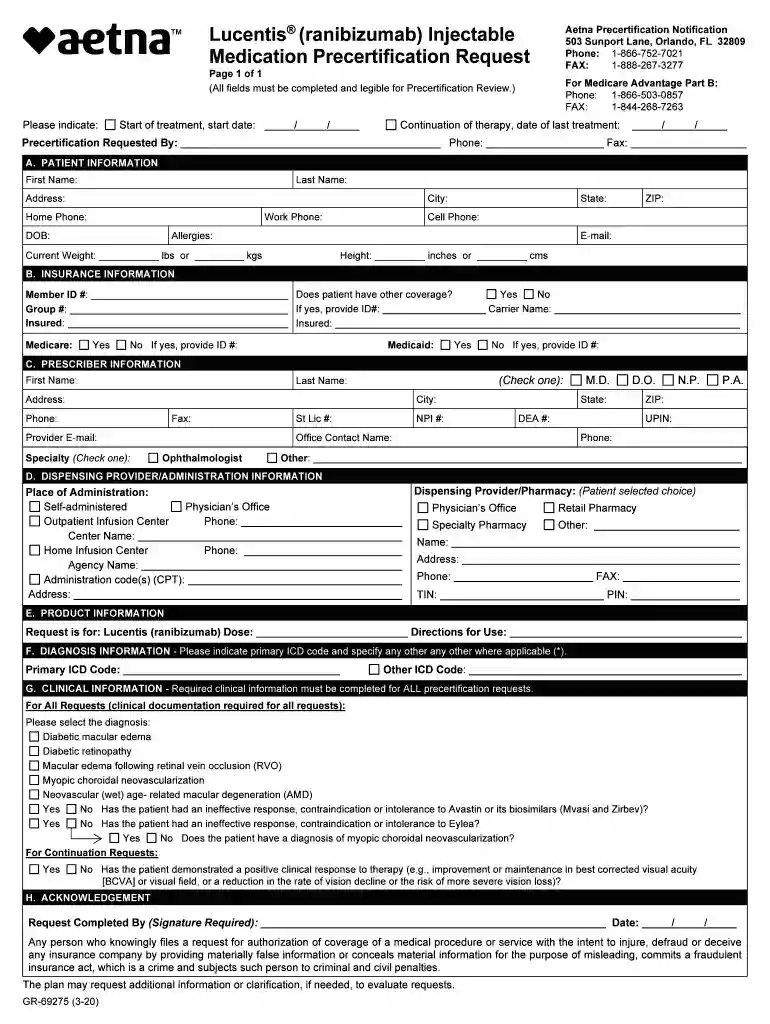
PRIOR APPROVAL REQUEST Member Information Preview on Page 1

Here's how it works

01. Edit your form online
Type text, add images, blackout confidential details, add comments, highlights and more.

02. Sign it in a few clicks
Draw your signature, type it, upload its image, or use your mobile device as a signature pad.

03. Share your form with others
Send it via email, link, or fax. You can also download it, export it or print it out.

How to use or fill out PRIOR APPROVAL REQUEST Member Information with our platform

Form edit decoration
9.5
Ease of Setup
DocHub User Ratings on G2
9.0
Ease of Use
DocHub User Ratings on G2
  1. Click ‘Get Form’ to open the PRIOR APPROVAL REQUEST Member Information in the editor.
  2. Begin by filling out the 'Patient Information' section. Enter the patient's first and last name, address, date of birth, and contact numbers. Ensure all fields are legible.
  3. In the 'Insurance Information' section, indicate if the patient has other coverage. If yes, provide the necessary ID numbers and details.
  4. Complete the 'Prescriber Information' section by entering the prescriber's details including their name, address, phone number, and specialty.
  5. Fill out the 'Dispensing Provider/Administration Information' to specify where and how the medication will be administered.
  6. In 'Product Information', indicate that the request is for Lucentis (ranibizumab) along with dosage and directions for use.
  7. Provide diagnosis information by entering primary ICD codes in the designated fields.
  8. Complete any required clinical information based on your specific request type before signing off in the 'Acknowledgement' section.

Start using our platform today to streamline your document editing and submission process for free!

See more PRIOR APPROVAL REQUEST Member Information versions

We've got more versions of the PRIOR APPROVAL REQUEST Member Information form. Select the right PRIOR APPROVAL REQUEST Member Information version from the list and start editing it straight away!
Versions Form popularity Fillable & printable
2021 4.9 Satisfied (23 Votes)
2020 4.8 Satisfied (80 Votes)
2020 4.3 Satisfied (227 Votes)
2020 4.2 Satisfied (47 Votes)
2017 4.2 Satisfied (59 Votes)
be ready to get more

Complete this form in 5 minutes or less

Get form

Got questions?

We have answers to the most popular questions from our customers. If you can't find an answer to your question, please contact us.
Contact us
The purpose of a cost extension is to provide an orderly completion/closeout of critical activities or a temporary continuation of support to prevent loss of research resources or hardship of personnel. Additional funding support through a cost extension is contingent on the availability of NCATS resources and funding.
A separate prior approval letter does not need to be sent to NIH. An increase in effort greater than 25% for key personnel should also be reviewed to assess whether there has been a change in the scope of work and the impact, if any, on other sponsored agreements.
Login to EHBs, go to the Tasks tab and select Prior Approvals or go to the menu and select Prior Approvals. Select Create New Prior Approval From the list, locate the applicable grant and select Request Prior Approval. Select the Acknowledgment boxes and select Continue.
be ready to get more

Complete this form in 5 minutes or less

Get form