
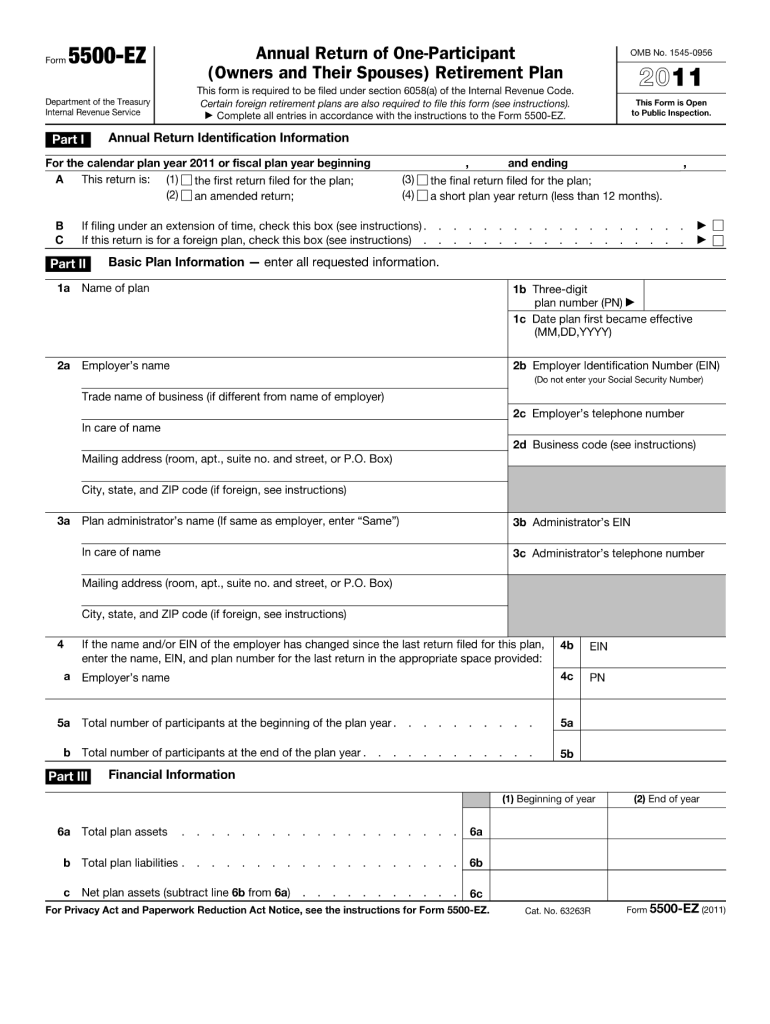







Definition & Meaning of the 5500-EZ Form
The 5500-EZ form, officially titled the "Form 5500-EZ Annual Return of One-Participant (Owners and Their Spouses) Retirement Plan," is a document mandated under section 6058(a) of the Internal Revenue Code. It's used by some private retirement plans to report plan financial conditions to the Department of Labor and the Internal Revenue Service (IRS). This form is specifically designed for self-employed individuals and small businesses that oversee a single-participant retirement plan, typically involving only the qualified owner and their spouse without additional employees.
Key Features
- Purpose: Used to report annual plan information to the IRS and Department of Labor.
- Audience: Targeted at one-participant retirement plans or plans that only involve the owner and their spouse.
- Regulatory Basis: Required under section 6058(a) of the Internal Revenue Code.
How to Use the 5500-EZ Form
Utilizing the 5500-EZ form involves gathering specific financial data about your retirement plan. It details contributions, distributions, investments, and other significant transactions that have affected the plan over the past year. This process can seem daunting, especially for those not familiar with IRS reporting, but following a structured approach can simplify it.
Step-by-Step Usage
- Gather Documentation: Collect all relevant financial documents related to your retirement plan, such as bank statements, investment records, and previous tax filings.
- Review Plan Details: Ensure you have an accurate understanding of the plan's structure, including participant details and account transactions.
- Complete the Form: Carefully fill out each section of the 5500-EZ form, ensuring all entered information is accurate.
- Verify: Double-check all inputs for precision to avoid submission errors.
- Submit: File the form directly through electronic submission or via mail, adhering to IRS guidelines.
How to Obtain the 5500-EZ Form
The 5500-EZ form can be acquired through various channels, which are designed to ensure ease of access for all eligible plan administrators. Understanding how to acquire this form is the first step in meeting your compliance responsibilities.
Acquisition Methods
- IRS Website: Download the form directly from the IRS's official website where the form is available for print.
- Financial Advisors or Accountants: Many professionals in finance and taxation can provide the form or guide you in obtaining it.
- Tax Software: Most comprehensive tax software options include the ability to complete and file this form electronically.
Steps to Complete the 5500-EZ Form
Filling out the 5500-EZ form is intricate and requires attention to detail. Here is a breakdown of the process to mitigate errors and streamline submission.
Detailed Completion Process
- Section 1 - Plan Information: Input your plan's name, plan number, and sponsor's details.
- Section 2 - Financial Information: Report financial transactions, including contributions and distributions.
- Section 3 - Transactions: Document particulars of plan participants and any significant financial activities.
- Section 4 - Trust Information: Include details about trustees managing the plan.
- Signature: Ensure that the form is signed by the plan administrator or other authorized individual.
Why You Should Use the 5500-EZ Form
Filing the 5500-EZ is not just regulatory; it conveys several benefits that extend beyond mere compliance. It facilitates transparency between the business owner and regulatory bodies, ensuring the financial soundness of retirement plans.
Benefits
- Regulatory Compliance: Meets legal obligations under the IRS code.
- Financial Insight: Offers a detailed overview of plan finances.
- Transparency: Builds trust with oversight entities, potentially simplifying future interactions.
Who Typically Uses the 5500-EZ Form
Understanding who primarily uses the 5500-EZ form can align its utilization with your business context. It's predominantly leveraged by self-employed individuals and small business owners managing their retirement plans.


Typical Users
- Self-Employed Individuals: Those running a business without other full-time employees.
- Business Owners: Particularly sole proprietors who provide retirement benefits to themselves and potentially their spouses.
- Small Enterprises: Employers with retirement plans that exclusively benefit owners and their spouses.
IRS Guidelines for the 5500-EZ Form
The IRS sets out comprehensive guidelines for filing the 5500-EZ form, designed to ensure clarity and completeness of filing.
Filing Guidelines
- Eligibility: Intended for plans covering only owners and their spouses.
- Submission: Can be filed electronically or via paper, though electronic is preferred for security and efficiency.
- Deadlines: Generally due by the last day of the seventh month after the plan year ends.
Filing Deadlines and Important Dates
Adhering to deadlines is crucial in preventing late fees and penalties, and it ensures your retirement plan remains in good standing with regulatory agencies.
Critical Deadlines
- Annual Deadline: Typically due by the end of July (for calendar-year plans) following the plan year.
- Extensions: Available by filing Form 5558 prior to the due date, granting an automatic 2.5-month extension.
Each of these sections gives insight into various facets associated with the 5500-EZ form. By breaking down the form's usage, obtaining methods, and filing guidelines, users are better equipped to meet compliance standards while benefiting from the form's comprehensive financial reporting capabilities.




