
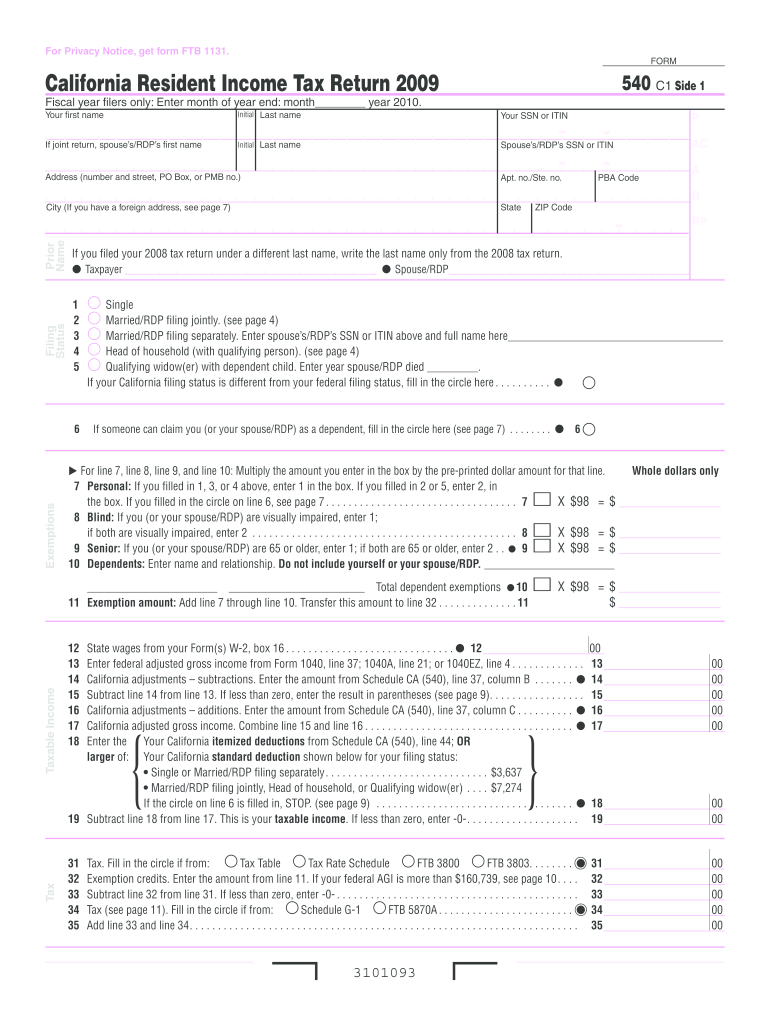







Definition and Meaning
The "2009 540 form," officially known as the California Resident Income Tax Return, is a tax document used by residents of California to report their income for the year 2009. This form is essential for calculating state income tax obligations. It includes sections for personal information, filing status, exemptions, taxable income calculations, tax credits, and payment details. Understanding this form helps California residents ensure compliance with state tax laws while securing potential refunds.
How to Use the 2009 540 Form
To successfully use the 2009 540 form, follow these steps:
- Personal Information: Begin by providing your personal details, including your name, address, and social security number. Ensure accuracy to avoid processing delays.
- Filing Status Selection: Select your filing status, e.g., single, married filing jointly, etc. The chosen status affects your tax rate and deductions.
- Exemptions and Deductions: List all applicable exemptions and deductions to reduce your tax liability.
- Income Reporting: Enter your total income from all sources, including wages, business income, and investments.
- Tax Credits: Claim any eligible tax credits. Familiarize yourself with available credits to maximize your savings.
- Calculate Taxes Owed or Refund Due: Use the provided worksheets to calculate if you owe additional taxes or are eligible for a refund.
- Payment Details: If taxes are owed, provide payment information and choose your payment method.
Steps to Complete the 2009 540 Form
Completing the 2009 540 form can be detailed; here is a step-by-step guide:
- Gather Your Documents: Collect all necessary documents before you begin, like your W-2s, 1099s, and other income and expense records.
- Fill Personal Information: Accurately enter your personal data in the form’s relevant sections.
- Choose Correct Filing Status: Determine your filing status to ensure correct tax calculations.
- Report All Income Sources: Report income from wages, interests, dividends, rentals, and other sources. Be thorough to avoid errors.
- Apply Deductions and Credits:
- Use itemized deductions if they exceed the standard deduction amount.
- Apply for state-specific credits available for the 2009 tax year.
- Calculate Taxable Income: Subtract deductions from total income to find taxable income.
- Finalize Payments or Refunds: Calculate your final tax obligation or refund owed to you, considering any withheld taxes during the year.
Who Typically Uses the 2009 540 Form
The following groups commonly utilize the 2009 540 form:
- California Residents: All residents filing state income taxes for 2009 use this form.
- Individuals Filing Jointly: Married couples choosing to file jointly would also complete this form.
- Self-Employed Individuals: Those with business income need the form to report earnings and expenses.
- Retirees: Individuals receiving pensions or retirement income must report it using this form.
- Students: Those earning income in California, whether part or full-time, use this form to declare their income.


Key Elements of the 2009 540 Form
Familiarize yourself with these crucial elements of the 2009 540 form:
- Income Section: Covers employer, self-employment, and investment income.
- Deduction Section: Offers standard or itemized deductions.
- Tax Credits: Includes child support, dependent care, and other state-specific credits.
- Signature and Date: Requires filer's signature and date for submission validation.
Required Documents
To accurately fill out the 2009 540 form, have these documents ready:
- W-2 Form: For wages and salary details.
- 1099 Forms: For miscellaneous income, such as dividends or freelance earnings.
- Mortgage Interest Statement: To claim interest deductions if applicable.
- Investment Documents: Detailing dividends and interests.
- Previous Year's Tax Return: Often useful for reference and ensuring consistency.
Filing Deadlines and Important Dates
Being aware of important deadlines ensures timely filing:
- Standard Deadline: Generally due by April 15 each year, with extensions possible if requested properly.
- Extension Requests: File by the April deadline to avoid penalties.
- Estimated Tax Payments Deadlines: Throughout the year, especially if self-employed.
Penalties for Non-Compliance
Failing to file or comply can result in consequences:
- Late Filing Penalties: Imposed for missing the filing deadline.
- Accuracy-Related Penalties: Levied for significant underreporting or errors.
- Interest on Unpaid Taxes: Accrues daily on any owed amount until fully paid.
Thoroughly understanding these elements, processes, and compliance guidelines is essential for anyone using the 2009 540 form in California. Proper preparation and timely filing help avoid unnecessary penalties and ensure you maximize any potential tax benefits.




