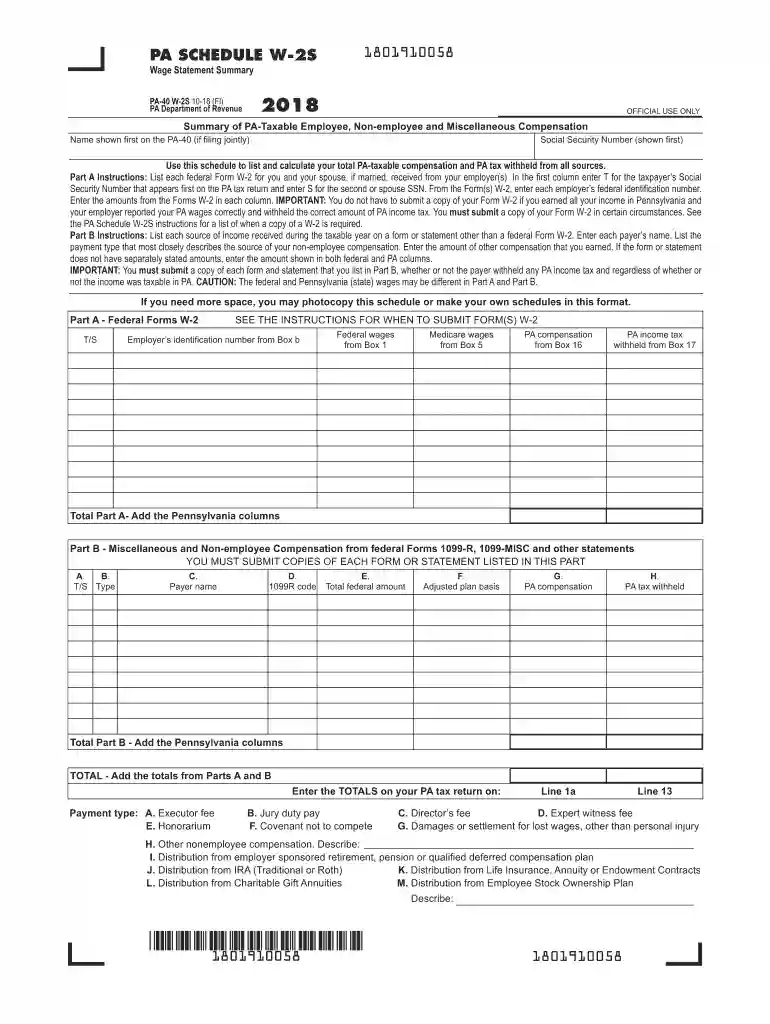
2018 PA Schedule W-2S - Wage Statement Summary (PA-40 W-2S). Forms/Publications-2026

Get Form
pa wage statement summary Preview on Page 1

Here's how it works

01. Edit your pa wage statement summary online
Type text, add images, blackout confidential details, add comments, highlights and more.

02. Sign it in a few clicks
Draw your signature, type it, upload its image, or use your mobile device as a signature pad.

03. Share your form with others
Send wage statement summary section 2 documents via email, link, or fax. You can also download it, export it or print it out.

How to use or fill out 2018 PA Schedule W-2S - Wage Statement Summary (PA-40 W-2S) with our platform

Form edit decoration
9.5
Ease of Setup
DocHub User Ratings on G2
9.0
Ease of Use
DocHub User Ratings on G2
  1. Click ‘Get Form’ to open the 2018 PA Schedule W-2S in the editor.
  2. Begin by entering your name and Social Security Number at the top of the form. If filing jointly, include your spouse's information as well.
  3. In Part A, list each federal Form W-2 received from your employer(s). Indicate whether the income is for you (T) or your spouse (S), and enter each employer’s federal identification number along with the corresponding amounts.
  4. For Part B, document any non-employee compensation or miscellaneous income. Enter the payer's name and select the payment type that best describes your income source. Ensure to input all amounts accurately.
  5. Review all entries for accuracy before saving. If needed, utilize our platform’s features to modify or add additional schedules.

Start using our platform today to easily complete your 2018 PA Schedule W-2S for free!

See more 2018 PA Schedule W-2S - Wage Statement Summary (PA-40 W-2S). Forms/Publications versions

We've got more versions of the 2018 PA Schedule W-2S - Wage Statement Summary (PA-40 W-2S). Forms/Publications form. Select the right 2018 PA Schedule W-2S - Wage Statement Summary (PA-40 W-2S). Forms/Publications version from the list and start editing it straight away!
Versions Form popularity Fillable & printable
2019 4.8 Satisfied (202 Votes)
2018 4.4 Satisfied (169 Votes)
be ready to get more

Complete this form in 5 minutes or less

Get form

Got questions?

We have answers to the most popular questions from our customers. If you can't find an answer to your question, please contact us.
Contact us

Many software solutions are available out there for document modifying and signing. DocHub is one of the most in-demand online solutions that comply with all data protection and compliance standards and ensures your electronically signed paperwork is legally enforceable. All you need to try it out is to sign up for an account, upload your pa schedule w 2s, provide the requested details, and click Sign. Create your electronic signature by typing, drawing it, uploading its picture to your document, or scanning a unique QR code.

Using a swift editing system like DocHub, you do not need anything but a browser and internet connection to modify your sch w 2 s on the internet swiftly. Upload your file or get the appropriate form in DocHub’s catalog, open our editor with a single click, and complete it electronically. To edit your forms at any time, sign up a free account with DocHub.

You must provide a copy of your Forms W-2 to the authorized IRS e-file provider before the provider sends the electronic return to the IRS. You dont need to send your Forms W-2 to the IRS and should keep them in a safe place with a copy of your tax return.
Forms OR-40, OR-40-P and OR-40-N can be found at .oregon.gov/dor/forms or you can contact us to order it.
Many forms are available for download on the Internet. Order forms online to be mailed to you. You may call 1-888-PATAXES (1-888-728-2937) to leave a message to have forms mailed to you.

Security and compliance

At DocHub, your data security is our priority. We follow HIPAA, SOC2, GDPR, and other standards, so you can work on your documents with confidence.

Learn more
ccpa2
pci-dss
gdpr-compliance
hipaa
soc-compliance

People also ask

All copies of Forms W-2, 1099-R, 1099-MISC, 1099-NEC and any other documents reporting compensation must be included with the tax return.
PA resident and part-year resident taxpayers must complete and include PA-40 Schedule A with an originally filed PA-40, Personal Income Tax Return, if there are any amounts on Lines 2 through 15 (not including subtotal Lines 4 and 10).
Every resident, part-year resident or nonresident individual must file a Pennsylvania Income Tax Return (PA-40) when he or she realizes income generating $1 or more in tax, even if no tax is due (e.g., when an employee receives compensation where tax is withheld).
(PURTA): PA DEPARTMENT OF REVENUE. PO BOX 280704. HARRISBURG PA 17128-0704. Withholding Reconciliation Statement: PA DEPARTMENT OF REVENUE. PO BOX 280904. HARRISBURG PA 17128-0904. Withholding: PA DEPARTMENT OF REVENUE. BUREAU OF INDIVIDUAL TAXES. PO BOX 280509. Notices and Assessments: PA DEPARTMENT OF REVENUE. PO BOX 280904.
PA-40 Schedule W-2S has been eliminated. All copies of Forms W-2, 1099-R, 1099-MISC, 1099-NEC and any other documents reporting compensation must be included with the tax return. Form 1099-R Filing Tips have been added to the compensation instructions for taxpayers required to include those documents.

Related links