Instructions For Form 6100 and Form 6150 (Filed Under 15 AAC ...-2026

Get Form
Instructions For Form 6100 and Form 6150 (Filed Under 15 AAC ... Preview on Page 1

Here's how it works

01. Edit your form online
Type text, add images, blackout confidential details, add comments, highlights and more.

02. Sign it in a few clicks
Draw your signature, type it, upload its image, or use your mobile device as a signature pad.

03. Share your form with others
Send it via email, link, or fax. You can also download it, export it or print it out.

How to use or fill out Instructions For Form 6100 and Form 6150 (Filed Under 15 AAC ... with DocHub

Form edit decoration
9.5
Ease of Setup
DocHub User Ratings on G2
9.0
Ease of Use
DocHub User Ratings on G2
  1. Click ‘Get Form’ to open it in the editor.
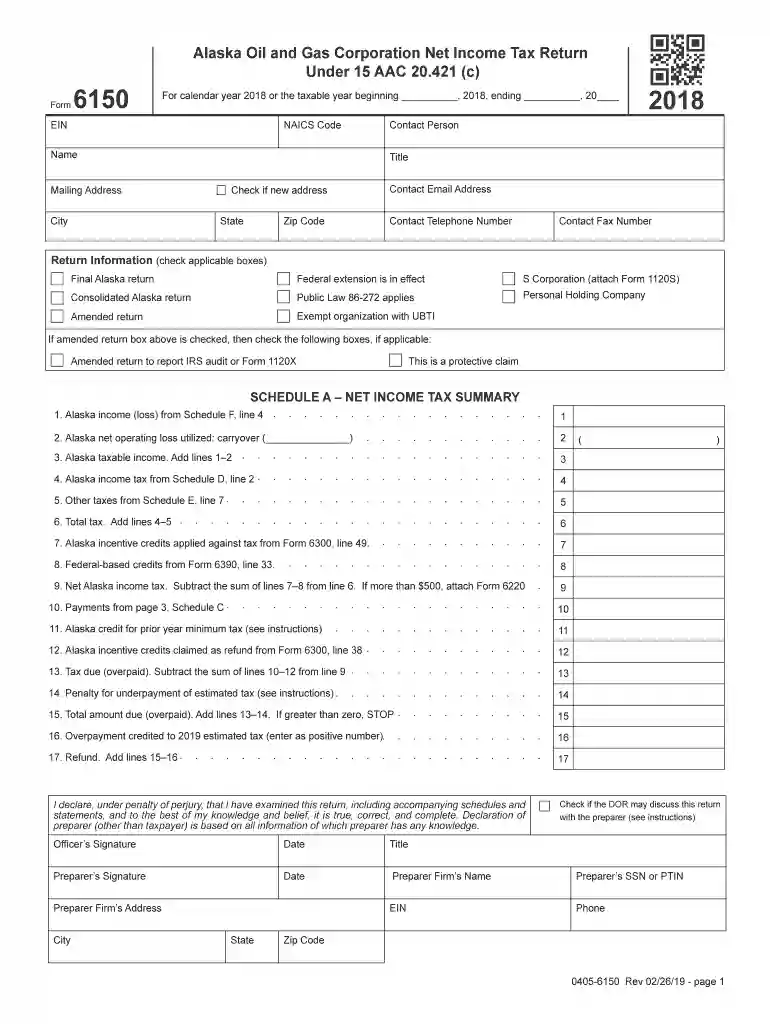
  2. Begin by entering your EIN and NAICS Code in the designated fields at the top of the form. Ensure that all information is accurate to avoid processing delays.
  3. Fill out the contact information section, including your name, title, mailing address, email, and phone number. If your address has changed, check the appropriate box.
  4. In the Return Information section, check any applicable boxes such as 'Final Alaska return' or 'Amended return' based on your filing status.
  5. Proceed to Schedule A and enter your Alaska income from Schedule F. Follow through each line carefully, adding or subtracting as instructed to calculate your total tax.
  6. Complete Schedules B through K as necessary, ensuring you provide all required details for each corporation included in your return.
  7. Review all entries for accuracy before signing and dating the declaration at the end of the form.

Start using our platform today for free to streamline your document editing and form completion!

See more Instructions For Form 6100 and Form 6150 (Filed Under 15 AAC ... versions

We've got more versions of the Instructions For Form 6100 and Form 6150 (Filed Under 15 AAC ... form. Select the right Instructions For Form 6100 and Form 6150 (Filed Under 15 AAC ... version from the list and start editing it straight away!
Versions Form popularity Fillable & printable
2023 4.6 Satisfied (54 Votes)
2022 4.8 Satisfied (68 Votes)
2021 4.8 Satisfied (46 Votes)
2020 4.4 Satisfied (124 Votes)
2019 4 Satisfied (55 Votes)
2019 4.4 Satisfied (253 Votes)
2018 4.3 Satisfied (138 Votes)
2018 4.3 Satisfied (114 Votes)
2017 4.1 Satisfied (84 Votes)
2015 4.3 Satisfied (234 Votes)
be ready to get more

Complete this form in 5 minutes or less

Get form

Got questions?

We have answers to the most popular questions from our customers. If you can't find an answer to your question, please contact us.
Contact us
20% of the net Qualified Business Income (or Loss) from all sources plus 20% of any qualified REIT dividends and Publicly Traded Partnerships (PTP) income (or loss) recognized on the tax return, or. 20% of the taxpayers taxable income minus the net capital gains and qualified dividends recognized on the return.
199A for its section in the Internal Revenue Codeis a 20% deduction on qualified business income (QBI) for owners of pass-through businesses. A pass-through business is one where the business passes its profits through to the individual owners, who then pay income taxes on their individual tax returns.
How to Fill Form 8995 Lines 1-4: Enter your business information and calculate your total QBI. Lines 6-10: Report income from Real Estate Investment Trusts (REIT) or Publicly Traded Partnerships (PTP) if applicable. Lines 11-15: Calculate the QBI deduction, considering your total taxable income and net capital gains.
How Do I Fill Out Form W-8BEN? Part I Identification of Beneficial Owner: Line 1: Enter your name as the beneficial owner. Line 2: Enter your country of citizenship. Line 3: Enter your permanent residence/mailing address. Line 4: Enter your mailing address, if different.
How to File a 5471 Extension. If a taxpayer requires an extension of filing Form 5471, then they would file an extension on Form 4868 for their regular tax return and then the 5471 will go on extension as well.

Security and compliance

At DocHub, your data security is our priority. We follow HIPAA, SOC2, GDPR, and other standards, so you can work on your documents with confidence.

Learn more
ccpa2
pci-dss
gdpr-compliance
hipaa
soc-compliance