Me real form 2026

Get Form
me real form Preview on Page 1

Here's how it works

01. Edit your form online
Type text, add images, blackout confidential details, add comments, highlights and more.

02. Sign it in a few clicks
Draw your signature, type it, upload its image, or use your mobile device as a signature pad.

03. Share your form with others
Send it via email, link, or fax. You can also download it, export it or print it out.

How to use or fill out me real form with our platform

Form edit decoration
9.5
Ease of Setup
DocHub User Ratings on G2
9.0
Ease of Use
DocHub User Ratings on G2
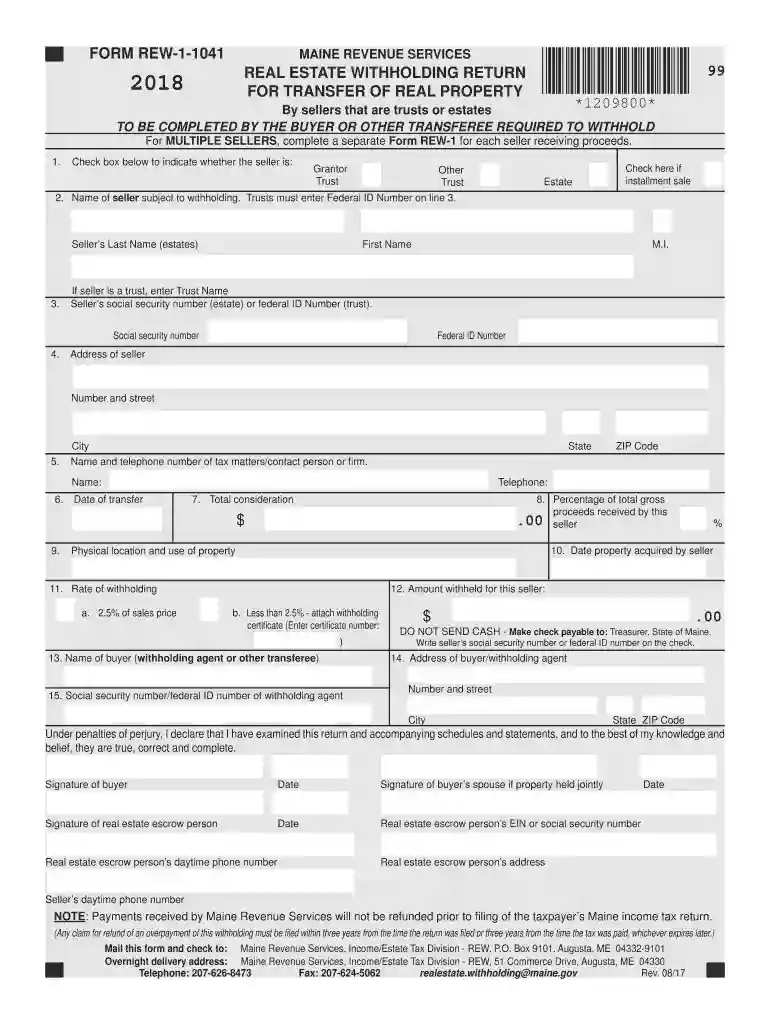
  1. Click ‘Get Form’ to open the me real form in the editor.
  2. In Block 1, check the appropriate box to indicate whether the seller is a Grantor, Trust, or Other Trust.
  3. In Block 2, enter the name of the seller. If the seller is a trust, ensure you provide their Federal ID Number in Block 3.
  4. Fill in Block 4 with the seller's address, including street number and city.
  5. Provide contact information for tax matters in Block 5, including name and telephone number.
  6. Complete Blocks 6 through 15 by entering relevant dates, amounts withheld, and details about both buyer and seller as required.
  7. Review all entries for accuracy before saving your completed form. Use our platform’s features to sign and distribute as needed.

Start using our platform today to simplify your document editing and form completion!

See more me real form versions

We've got more versions of the me real form form. Select the right me real form version from the list and start editing it straight away!
Versions Form popularity Fillable & printable
2023 4.7 Satisfied (36 Votes)
2022 4.8 Satisfied (73 Votes)
2021 4.3 Satisfied (76 Votes)
2020 4.3 Satisfied (224 Votes)
2019 4.3 Satisfied (35 Votes)
2018 4.4 Satisfied (90 Votes)
2017 4.4 Satisfied (279 Votes)
2011 4 Satisfied (31 Votes)
be ready to get more

Complete this form in 5 minutes or less

Get form

Got questions?

We have answers to the most popular questions from our customers. If you can't find an answer to your question, please contact us.
Contact us
The buyer of the property will withhold and remit the Real Estate Withholding money to Maine Revenue Services using form REW-1. The amount to be withheld is equal to 2.5% of the sale price.
2. Withholding required. Every buyer of real property located in Maine must withhold a withholding tax equal to 2 1/2% of the consideration.
The amount to be withheld is equal to 2.5% of the sale price. Note that for sales occurring on or after January 1, 2021, this withholding requirement applies to sales of property only when the consideration paid is $100,000 or more (previously $50,000).
Generally, you want about 90% of your estimated income taxes withheld and sent to the government.12 This ensures that you never fall behind on income taxes (something that can result in heavy penalties) and that you are not overtaxed throughout the year.
Married Tax Withholding Table If the Amount of Taxable Income Is:The Amount of Tax Withholding Should Be: Over $0 but not over $52,100 $0.00 plus 5.8% over $0 Over $52,100 but not over $123,250 $3,022.00 plus 6.75% of excess over $52,100 Over $123,250 $7,825.00 plus 7.15% of excess over $123,250 Mar 21, 2024

Security and compliance

At DocHub, your data security is our priority. We follow HIPAA, SOC2, GDPR, and other standards, so you can work on your documents with confidence.

Learn more
ccpa2
pci-dss
gdpr-compliance
hipaa
soc-compliance

People also ask

Maine state income tax rates Maine applies a graduated income tax system with three brackets, ranging from 5.8% to 7.15%. The percentage you pay depends on your taxable income and your filing status. State income taxes in Maine are due on April 15, 2025, unless you file for an extension.
The federal tax withholding calculator, or W-4 calculator, helps you determine how much federal income tax should be withheld from your pay. It considers your filing status, income, dependents, and more to estimate your yearly tax and suggest W-4 allowances.

Related links