Form clgs 32 1 2017-2026

Get Form
clgs 32 1 Preview on Page 1

Here's how it works

01. Edit your clgs 32 1 online
Type text, add images, blackout confidential details, add comments, highlights and more.

02. Sign it in a few clicks
Draw your signature, type it, upload its image, or use your mobile device as a signature pad.

03. Share your form with others
Send it via email, link, or fax. You can also download it, export it or print it out.

How to use or fill out form clgs 32 1 2017 with our platform

Form edit decoration
9.5
Ease of Setup
DocHub User Ratings on G2
9.0
Ease of Use
DocHub User Ratings on G2
  1. Click ‘Get Form’ to open it in the editor.
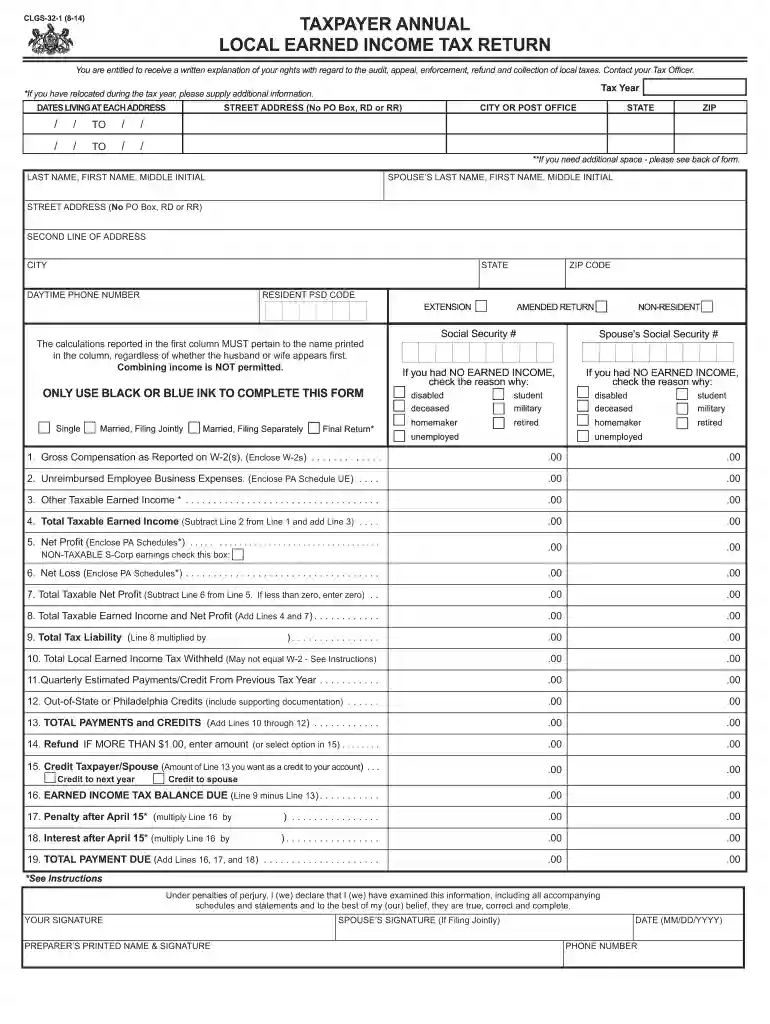
  2. Begin by entering your personal information, including your name, address, and Social Security number. Ensure you use black or blue ink for clarity.
  3. Proceed to Line 1 and input your gross earnings as reported on your W-2 forms. Remember to enclose legible photocopies of these documents.
  4. For Line 2, list any allowable employee business expenses and attach the Pennsylvania form PA-UE as required.
  5. Continue filling out Lines 3 through 12, ensuring all taxable income is accurately reported and supported by necessary documentation.
  6. Calculate your total tax liability on Line 9 by multiplying your total taxable earned income by the local earned income tax rate.
  7. Finally, review all entries for accuracy before submitting the completed form along with any required attachments to your local earned income tax collector.

Start using our platform today for free to simplify your form completion process!

See more form clgs 32 1 2017 versions

We've got more versions of the form clgs 32 1 2017 form. Select the right form clgs 32 1 2017 version from the list and start editing it straight away!
Versions Form popularity Fillable & printable
2016 4.8 Satisfied (121 Votes)
2014 4.4 Satisfied (549 Votes)
2013 4.3 Satisfied (52 Votes)
2012 4.4 Satisfied (52 Votes)
2011 4.3 Satisfied (43 Votes)
be ready to get more

Complete this form in 5 minutes or less

Get form

Got questions?

We have answers to the most popular questions from our customers. If you can't find an answer to your question, please contact us.
Contact us
Student Loan Servicer Even if you didnt receive a 1098-E from your servicer, you can download your 1098-E from your loan servicers website. If you are unsure who your loan servicer is, log in to StudentAid.gov or call the Federal Student Aid Information Center at 1-800-4-FED-AID (1-800-433-3243; TTY 1-800-730-8913).
Yes. If you live in a jurisdiction with an Earned Income tax in place and had wages for the year in question, a local earned income return must be filed annually by April 15, (unless the 15th falls on a Saturday or Sunday then the due date becomes the next business day) for the preceding calendar year.
Every resident, part-year resident or nonresident individual must file a Pennsylvania Income Tax Return (PA-40) when he or she realizes income generating $1 or more in tax, even if no tax is due (e.g., when an employee receives compensation where tax is withheld).
There may be a $25.00 fee for failure to file a Local Earned Income Tax Return by April 15th of the following tax year. The fee is per individual. Persons filing a combined return with a spouse could owe a late filing fee of $50.00.
If you are trying to locate, download, or print state of Pennsylvania tax forms, you can do so on the Pennsylvania Department of Revenue. The most common Pennsylvania income tax form is the PA-40.
be ready to get more

Complete this form in 5 minutes or less

Get form

People also ask

State law requires Pennsylvania residents with earned income, wages and/or net profits, to file an annual local earned income tax return and supply income and withholding documentation, such as a W-2. Even if you have employer withholding or are not expecting a refund, you must file an annual tax return.
Pennsylvania Local Earned Income Tax (EIT) Employers in Pennsylvania must withhold and remit a local EIT to the state on each employees behalf. The rates for this tax vary based on the employers location and the employees residence, which are each identified by a Political Subdivision (PSD) code.

Related links