Type text, add images, blackout confidential details, add comments, highlights and more.
02. Sign it in a few clicks
Draw your signature, type it, upload its image, or use your mobile device as a signature pad.
03. Share your form with others
Send california form 100w via email, link, or fax. You can also download it, export it or print it out.
How to use or fill out California Form 100W with DocHub
Ease of Setup
DocHub User Ratings on G2
Ease of Use
DocHub User Ratings on G2
Click ‘Get Form’ to open California Form 100W in the editor.
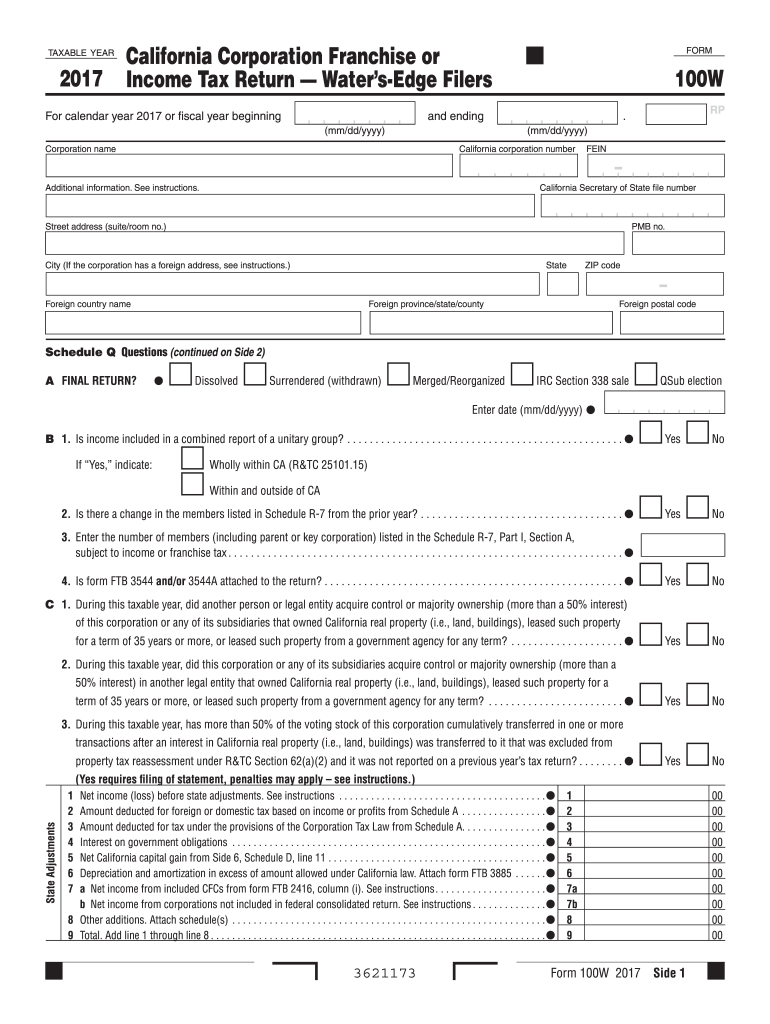
Begin by entering the taxable year at the top of the form. Ensure you specify whether it is for a calendar year or fiscal year.
Fill in your corporation's name, California corporation number, and FEIN in the designated fields. If applicable, include additional information such as your Secretary of State file number.
Complete the address section accurately, including street address, city, state, and ZIP code. If your corporation has a foreign address, refer to the instructions provided.
Proceed to Schedule Q and answer all questions regarding your corporation's status. This includes indicating if it is a final return or if income is included in a combined report.
Continue filling out each section methodically, ensuring that all required attachments are noted and included as necessary.
Start using our platform today to fill out California Form 100W easily and for free!
We've got more versions of the california form 100w form. Select the right california form 100w version from the list and start editing it straight away!
California form 100w instructionsCalifornia form 100w pdfCalifornia form 100w 2021California Form 100XCalifornia form 100w onlineCalifornia form 100w 2022California form 100w downloadCalifornia tax Form 109
Security and compliance
At DocHub, your data security is our priority. We follow HIPAA, SOC2, GDPR, and other standards, so you can work on your documents with confidence.
California Exempt Organization Business Income Tax
Apr 26, 2023 TAXABLE YEAR. CALIFORNIA FORM. Attach to Form 100, Form 100W, Form 100S, or Form 109. During the taxable year the corporation incurred the NOLRead more
If the corporation uses California computation method to compute the net income, see instructions. Schedule F Computation of Net Income. See instructions.Read more
Introduction. Benign prostatic hyperplasia (BPH) is a histologic diagnosis that refers to the proliferation of smooth muscle and epithelial cells within theRead more
Cookie consent notice
This site uses cookies to enhance site navigation and personalize your experience.
By using this site you agree to our use of cookies as described in our Privacy Notice.
You can modify your selections by visiting our Cookie and Advertising Notice.