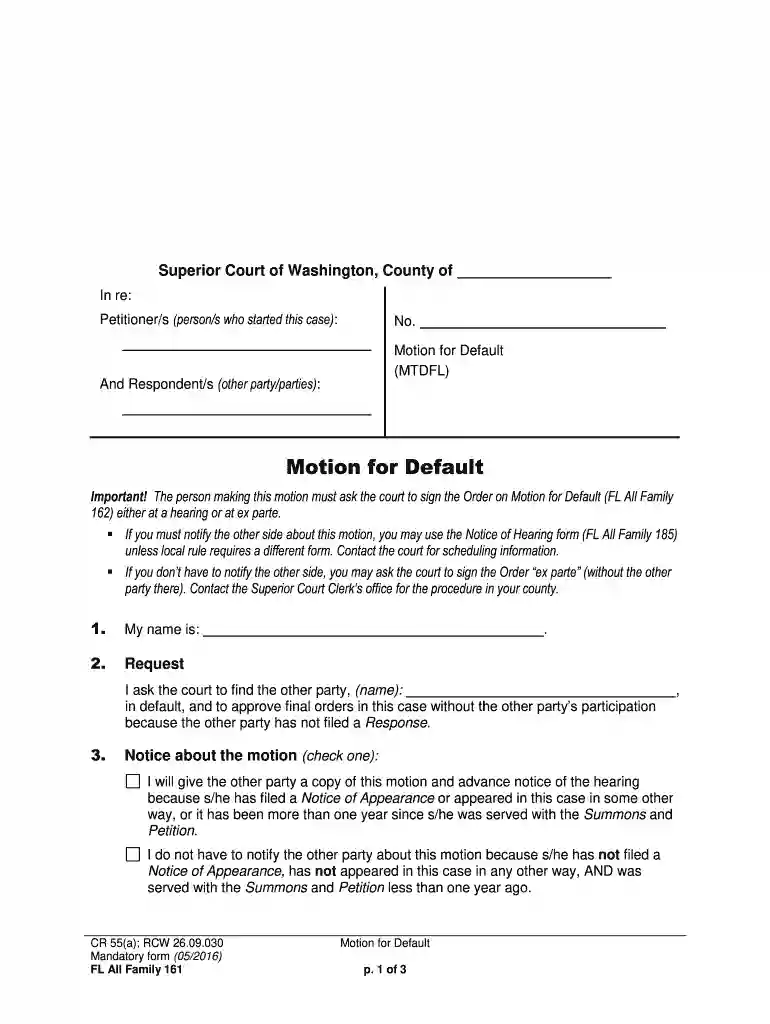
Fillable Motion for Default FL All Family 161 2026

Get Form
fl all family 162 Preview on Page 1

Here's how it works

01. Edit your fl all family 162 online
Type text, add images, blackout confidential details, add comments, highlights and more.

02. Sign it in a few clicks
Draw your signature, type it, upload its image, or use your mobile device as a signature pad.

03. Share your form with others
Send it via email, link, or fax. You can also download it, export it or print it out.

How to use or fill out Fillable Motion for Default FL All Family 161

Form edit decoration
9.5
Ease of Setup
DocHub User Ratings on G2
9.0
Ease of Use
DocHub User Ratings on G2
  1. Click ‘Get Form’ to open the Fillable Motion for Default FL All Family 161 in our editor.
  2. Begin by entering your name in the designated field at the top of the form. This identifies you as the petitioner.
  3. In the 'Request' section, clearly state your request for the court to find the other party in default and approve final orders without their participation.
  4. Indicate whether you will notify the other party about this motion by checking the appropriate box under 'Notice about the motion'.
  5. Fill in the date when the other party was served with a Summons and Petition, along with details regarding service type and location.
  6. Complete information regarding venue and jurisdiction, including where both parties lived at the time of filing.
  7. If applicable, provide details about military status as per federal and state regulations.
  8. Finally, sign and date the form at the bottom, ensuring all information is accurate before submission.

Start using our platform today to fill out your forms online for free!

See more Fillable Motion for Default FL All Family 161 versions

We've got more versions of the Fillable Motion for Default FL All Family 161 form. Select the right Fillable Motion for Default FL All Family 161 version from the list and start editing it straight away!
Versions Form popularity Fillable & printable
2018 4.8 Satisfied (46 Votes)
2016 4.3 Satisfied (343 Votes)
be ready to get more

Complete this form in 5 minutes or less

Get form

Got questions?

We have answers to the most popular questions from our customers. If you can't find an answer to your question, please contact us.
Contact us

Managing your documentation with DocHub this way is very simple once you have downloaded its extension for Google Chrome. Go to the Chrome Web Store and install DocHub - Sign PDF from Gmail to get it. Give our tool access to your Google account, and then open an email with the Fillable Motion for Default FL All Family 161 attached and point to the file with your cursor - the DocHub extension key will automatically show up there. Click on it to open your file in our editor. Make any essential adjustments, fill out the blanks, and click Sign to create your legally-binding eSignature.

You can quickly complete, modify, and even eSign your Fillable Motion for Default FL All Family 161 using DocHub. Create a new account and begin your free trial. After that, you can add the document with the form and simply make all the needed edits. No need to print on paper or use a third-party application to sign it, as you can place your electronic signature on your document faster through DocHub.

Property Declaration (form FL-160) is a multipurpose form, which may be filed with the court as an attachment to a Petition or Response or served on the other party to comply with disclosure requirements in place of a Schedule of Assets and Debts (form FL-142).
What is fl all family 135? FL All Family 135 is a court form used in family law cases in some jurisdictions to report and disclose financial information in divorce, separation, or custody cases.
This form is part of the preliminary and final declarations of disclosure (PDDs/FDDs), and it is mandatory that it be filled out and served even when a default judgment has been entered. This form is used to ensure a fair settlement and division of property and debts as part of your divorce proceedings.

Security and compliance

At DocHub, your data security is our priority. We follow HIPAA, SOC2, GDPR, and other standards, so you can work on your documents with confidence.

Learn more
ccpa2
pci-dss
gdpr-compliance
hipaa
soc-compliance

People also ask

If the respondent doesnt submit the document by the deadline, the petitioner can file a motion for default. At the hearing on the motion, the court will enter a default order prohibiting the respondent from doing anything else in the divorce case no presenting evidence, witnesses, or arguments.
CA FL-161 is a form used in California for reporting income, assets, and expenses related to spousal support or child support in family law cases.
Generally, a default allows you to obtain an earlier final hearing to finish your case. Once the default is signed by the clerk, you can request a trial or final hearing in your case. To obtain a default, you will need to complete Motion for Default, Florida Supreme Court Approved Family Law Form 12.922(a).
The FL-144 Waiver of Final Declaration of Disclosure form is used during a divorce in California when both parties agree to waive the requirement for a final declaration of disclosure, having already exchanged preliminary declarations and current financial information, thereby simplifying the finalization process of

Related links