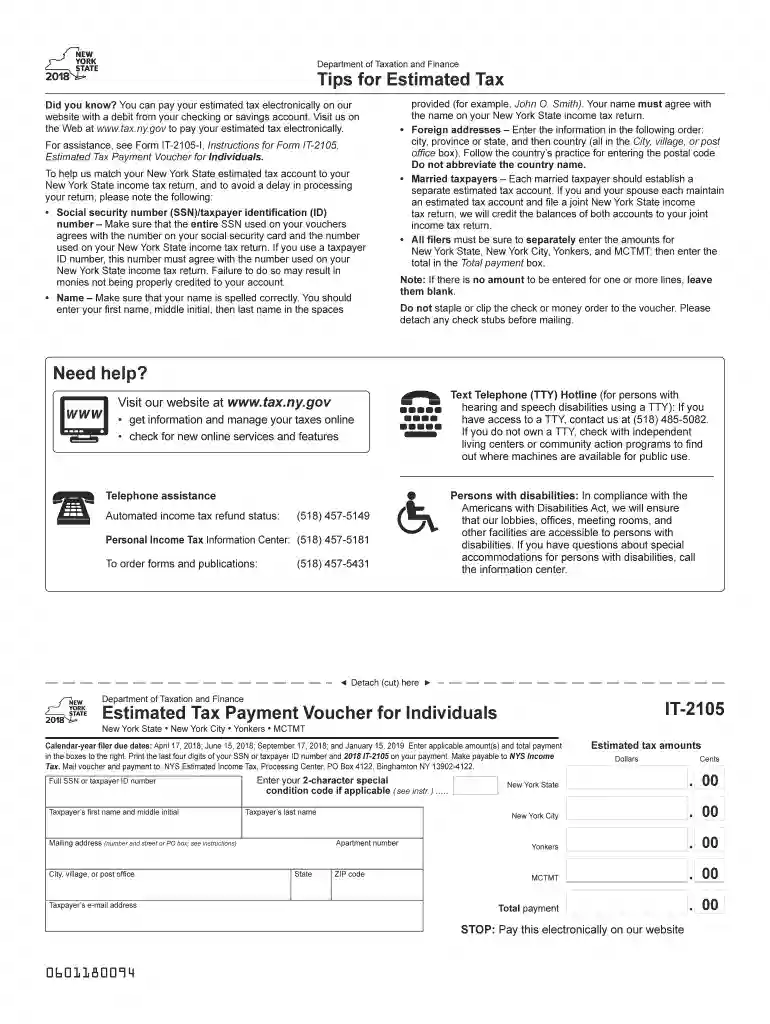
To help us match your NewYork State estimated tax account to your 2026

Get Form
To help us match your NewYork State estimated tax account to your Preview on Page 1

Here's how it works

01. Edit your form online
Type text, add images, blackout confidential details, add comments, highlights and more.

02. Sign it in a few clicks
Draw your signature, type it, upload its image, or use your mobile device as a signature pad.

03. Share your form with others
Send it via email, link, or fax. You can also download it, export it or print it out.

How to use or fill out To help us match your New York State estimated tax account to your

Form edit decoration
9.5
Ease of Setup
DocHub User Ratings on G2
9.0
Ease of Use
DocHub User Ratings on G2
  1. Click ‘Get Form’ to open it in the editor.
  2. Begin by entering your full Social Security Number (SSN) or taxpayer identification number. Ensure this matches the number on your social security card and your New York State income tax return.
  3. Next, accurately input your name in the format: first name, middle initial, and last name. This must align with how it appears on your New York State income tax return.
  4. If you have a foreign address, enter it in the order of city, province/state, and country without abbreviating the country name.
  5. For married taxpayers, each individual should create a separate estimated tax account. If filing jointly, both accounts will be credited accordingly.
  6. Individually enter amounts for New York State, New York City, Yonkers, and MCTMT. Sum these amounts and place the total in the designated box.
  7. Finally, ensure no staples or clips are used on your voucher before mailing it along with any payment to the specified address.

Start using our platform today to simplify filling out your forms for free!

See more To help us match your NewYork State estimated tax account to your versions

We've got more versions of the To help us match your NewYork State estimated tax account to your form. Select the right To help us match your NewYork State estimated tax account to your version from the list and start editing it straight away!
Versions Form popularity Fillable & printable
2023 4.6 Satisfied (43 Votes)
2022 4.8 Satisfied (62 Votes)
2021 4.4 Satisfied (230 Votes)
2020 4.2 Satisfied (66 Votes)
2019 4.2 Satisfied (74 Votes)
2018 4.4 Satisfied (266 Votes)
2013 4.2 Satisfied (23 Votes)
2009 4.1 Satisfied (30 Votes)
be ready to get more

Complete this form in 5 minutes or less

Get form

Got questions?

We have answers to the most popular questions from our customers. If you can't find an answer to your question, please contact us.
Contact us
Use Form 1040-ES to figure and pay your estimated tax. Estimated tax is the method used to pay tax on income that is not subject to withholding (for example, earnings from self-employment, interest, dividends, rents, alimony, etc.).
An underpayment penalty is a charge the IRS imposes on taxpayers who did not pay all of their estimated income taxes for the year or paid their taxes late. Youll face an underpayment penalty if you: Didnt pay at least 90% of the tax on your current-year return or 100% of the tax shown on the prior years return.
Generally, most taxpayers will avoid this penalty if they either owe less than $1,000 in tax after subtracting their withholding and refundable credits, or if they paid withholding and estimated tax of at least 90% of the tax for the current year or 100% of the tax shown on the return for the prior year, whichever is
Ready? Log in to (or create) your Individual Online Services account. Select the Services menu from the upper left corner of the page. Select Payments, bills and notices, then select Make a payment from the expanded menu.
You may send estimated tax payments with Form 1040-ES by mail, or you can pay online, by phone or from your mobile device using the IRS2Go app. You can also make your estimated tax payments through your online account, where you can see your payment history and other tax records. Go to IRS.gov/account.

Security and compliance

At DocHub, your data security is our priority. We follow HIPAA, SOC2, GDPR, and other standards, so you can work on your documents with confidence.

Learn more
ccpa2
pci-dss
gdpr-compliance
hipaa
soc-compliance

People also ask

Answer: Report all your estimated tax payments on Form 1040, line 26. Also include any overpayment that you elected to credit from your prior year tax return.
No, the IRS does not send confirmation of your estimated tax payments. However they do have an online site where you can check to see what they show for your estimated tax payments and when they were paid. To confirm the amount of your payments, sign into your account at the IRS, or create one. For individuals only.
New York State - Department of Taxation and Finance, Main Phone. 518-457-5181. Check your refund status. 518-457-5149. Form 1099-G. 518-457-5181. Disagree with your bill or notice. 518-485-9791. STAR Program. 518-457-2036. Primary Services. Description. Hours.

Related links