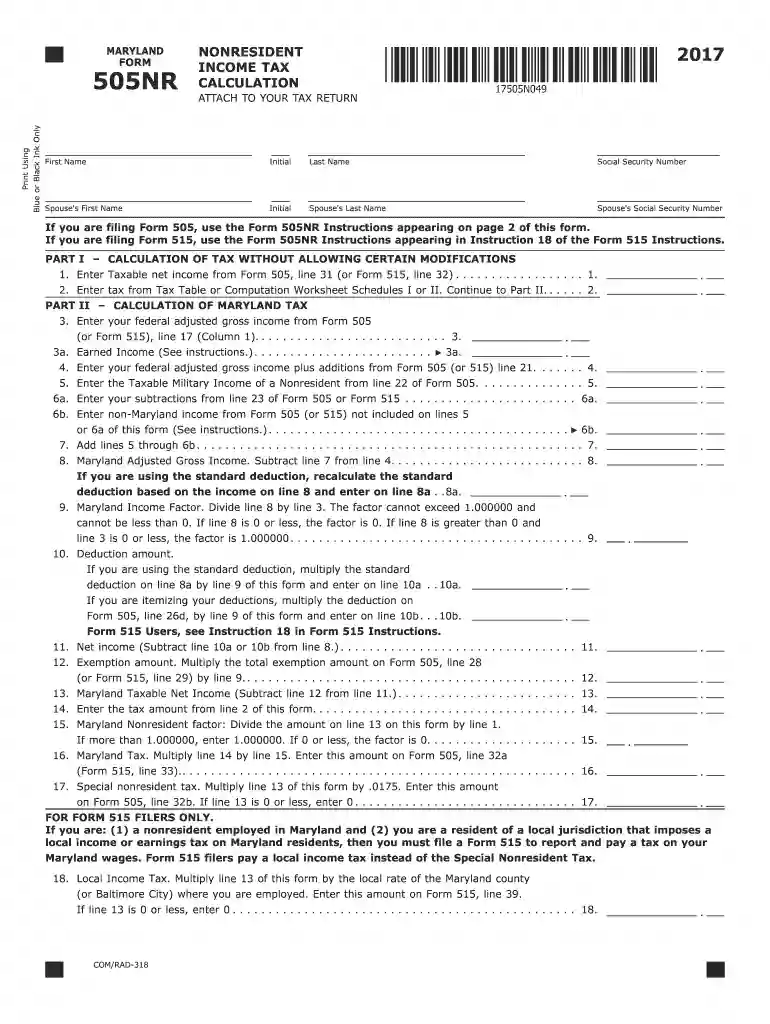
Enter tax from Tax Table or Computation Worksheet Schedules I or II 2026

Get Form
maryland tax computation worksheet Preview on Page 1

Here's how it works

01. Edit your maryland tax computation worksheet online
Type text, add images, blackout confidential details, add comments, highlights and more.

02. Sign it in a few clicks
Draw your signature, type it, upload its image, or use your mobile device as a signature pad.

03. Share your form with others
Send it via email, link, or fax. You can also download it, export it or print it out.

How to use or fill out Enter tax from Tax Table or Computation Worksheet Schedules I or II with our platform

Form edit decoration
9.5
Ease of Setup
DocHub User Ratings on G2
9.0
Ease of Use
DocHub User Ratings on G2
  1. Click ‘Get Form’ to open the Enter tax from Tax Table or Computation Worksheet Schedules I or II in the editor.
  2. Begin by entering your first name, middle initial, and last name in the designated fields. Ensure accuracy as this information is crucial for identification.
  3. Input your Social Security Number and, if applicable, your spouse's details in the corresponding fields.
  4. In Part I, enter your taxable net income from Form 505, line 31 on line 1. This figure is essential for calculating your tax.
  5. For line 2, refer to the Tax Table or Computation Worksheet Schedules I or II to find the appropriate tax amount based on your taxable income entered in line 1.
  6. Continue filling out subsequent lines by following the instructions provided for each section. Pay close attention to any specific calculations required for deductions and exemptions.

Start using our platform today to simplify your tax form completion process for free!

See more Enter tax from Tax Table or Computation Worksheet Schedules I or II versions

We've got more versions of the Enter tax from Tax Table or Computation Worksheet Schedules I or II form. Select the right Enter tax from Tax Table or Computation Worksheet Schedules I or II version from the list and start editing it straight away!
Versions Form popularity Fillable & printable
2023 4.8 Satisfied (20 Votes)
2022 4.8 Satisfied (27 Votes)
2021 4.8 Satisfied (65 Votes)
2020 4.2 Satisfied (109 Votes)
2019 4.2 Satisfied (112 Votes)
2018 4.2 Satisfied (80 Votes)
2017 4.2 Satisfied (102 Votes)
be ready to get more

Complete this form in 5 minutes or less

Get form

Got questions?

We have answers to the most popular questions from our customers. If you can't find an answer to your question, please contact us.
Contact us
A tax computation is a statement showing the tax adjustments to the accounting profit to arrive at the income that is chargeable to tax. Tax adjustments include non-deductible expenses, non-taxable receipts, further deductions and capital allowances.
Tax tables can be found in several official IRS documents. Each set of documents may have the tax tables on different pages. The below example uses the tax tables found in the 2024 Form 1040 and 1040-SR Tax and Earned Income Credit Tables publication.
How to Download the ITR Computation Sheet? Step 2: Log in to your account by entering PAN details and password. Step 3: Select e-File Response to Outstanding Tax Demand after logging in. Step 4: When you click the button Response to Outstanding Tax Demand, a window will open that shows any outstanding tax demands.
Schedule 1 also includes some common adjustments to income, like the student loan interest deduction and deductions for educator expenses. Schedule 2: Supporting documentation for tax form 1040 if box 11b is checked.
Step By Step To Obtain Your Tax Overview Log into the HMRC online account. Scroll down and Log In. Select Self Assessment Follow the link View Self Assessment return for tax year 20xx to 20xx Select the appropriate tax year you require from the drop down box. Click Go

Security and compliance

At DocHub, your data security is our priority. We follow HIPAA, SOC2, GDPR, and other standards, so you can work on your documents with confidence.

Learn more
ccpa2
pci-dss
gdpr-compliance
hipaa
soc-compliance

People also ask

How to download ITR computation online from income tax portal? Visit the official Income Tax website at .incometax.gov.in. Log in using your user ID (PAN), password, and captcha code. On the homepage, click on the e-File menu. Under that, choose Income Tax Returns and then View Filed Returns.
THAT IS THE WORKSHEET that calculates both the capital gains tax and ordinary income tax combined. Line 25 (last line) of the worksheet ties to Form 1040, line 16 Tax.

Related links