Massachusetts department of revenue form 355 es 2018-2019-2026

Get Form
massachusetts department of revenue form 355 es 2018-2019 Preview on Page 1

Here's how it works

01. Edit your form online
Type text, add images, blackout confidential details, add comments, highlights and more.

02. Sign it in a few clicks
Draw your signature, type it, upload its image, or use your mobile device as a signature pad.

03. Share your form with others
Send it via email, link, or fax. You can also download it, export it or print it out.

How to use or fill out Massachusetts Department of Revenue Form 355 ES 2018-2019

Form edit decoration
9.5
Ease of Setup
DocHub User Ratings on G2
9.0
Ease of Use
DocHub User Ratings on G2
  1. Click ‘Get Form’ to open it in the editor.
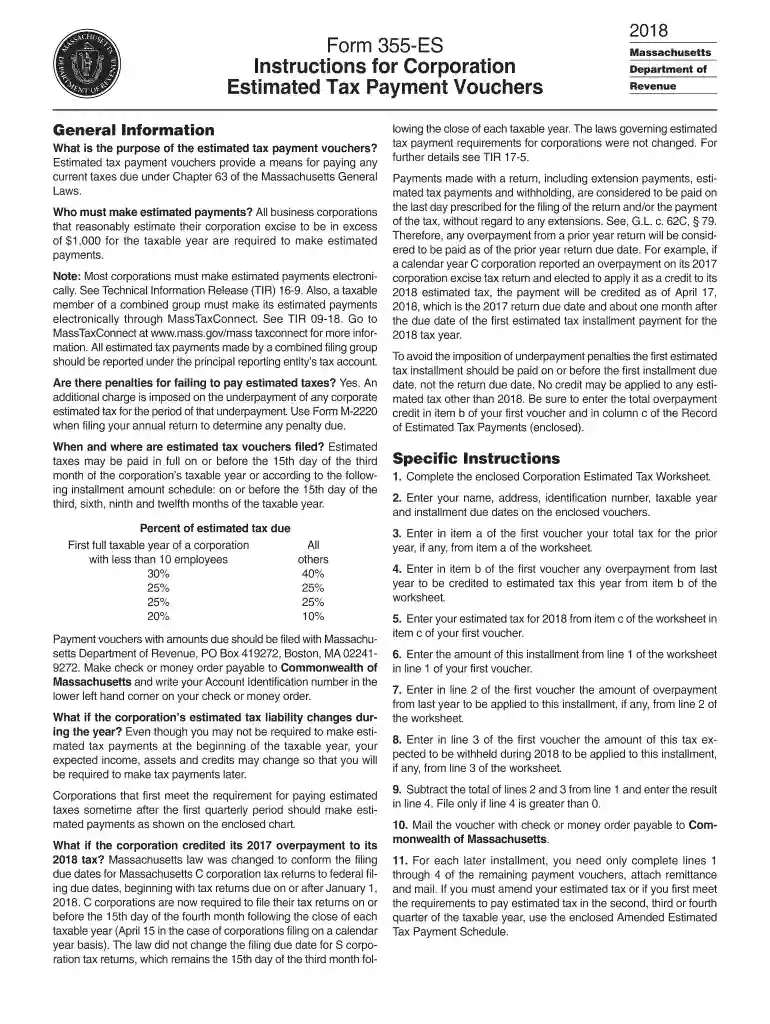
  2. Begin by entering your corporation's name, address, and identification number at the top of the form.
  3. Complete the Corporation Estimated Tax Worksheet included with the form. This will help you determine your total tax for the prior year and any overpayment credits.
  4. In item a of the first voucher, input your total tax from the previous year as calculated in the worksheet.
  5. For item b, enter any overpayment from last year that you wish to credit towards this year's estimated tax.
  6. In item c, input your estimated tax for 2018 based on your calculations from the worksheet.
  7. Calculate and enter the amount due for this installment based on the percentages provided (40% for first installment).
  8. Mail the completed voucher along with a check or money order payable to Commonwealth of Massachusetts to the specified address.

Start using our platform today to easily fill out and manage your forms online for free!

See more massachusetts department of revenue form 355 es 2018-2019 versions

We've got more versions of the massachusetts department of revenue form 355 es 2018-2019 form. Select the right massachusetts department of revenue form 355 es 2018-2019 version from the list and start editing it straight away!
Versions Form popularity Fillable & printable
2023 4.3 Satisfied (51 Votes)
2022 4.8 Satisfied (80 Votes)
2021 4.4 Satisfied (63 Votes)
2020 4.3 Satisfied (107 Votes)
2019 4.4 Satisfied (164 Votes)
2018 4.3 Satisfied (108 Votes)
2001 4.4 Satisfied (143 Votes)
be ready to get more

Complete this form in 5 minutes or less

Get form

Got questions?

We have answers to the most popular questions from our customers. If you can't find an answer to your question, please contact us.
Contact us
Which Form Should Be Filed? Businesses incorporated under the laws of the Commonwealth or businesses doing business in Massachusetts but incorporated elsewhere should file Form 355. DOR also has the following tax forms to meet the unique filing needs of combined filers, security corporations and S corporations.
Make Estimated Tax Payments Online With MassTaxConnect Individuals and businesses can make estimated tax payments electronically through MassTaxConnect. Its fast, easy, and secure. In addition, extension, return, and bill payments can also be made.
Mail to: Massachusetts Department of Revenue, PO Box 7025, Boston, MA 02204.
Business corporations with taxable years ending in the same month as the taxable year for which the combined report is being filed will pay the non-income measure of excise tax as part of the combined report.
Payments are made on Form 355-ES, Corporate Estimated Tax Payment, which must be filed electronically through MassTaxConnect. Estimated taxes must either be: Paid in full on or before the 15th day of the third month of the corporations taxable year, or. Paid in four installments.
be ready to get more

Complete this form in 5 minutes or less

Get form

People also ask

Massachusetts HOA Tax Return Filing Requirements Massachusetts homeowner association elects to file Form 1120H annually, before its due date, which is the 15th day of the third month after a tax year; to revoke an election requires the consent of IRS.

Related links