Schedule K-1 Form N-35 Rev 2015 Shareholder's ... - Hawaii.gov-2026

Get Form
Schedule K-1 Form N-35 Rev 2015 Shareholder's ... - Hawaii.gov Preview on Page 1

Here's how it works

01. Edit your form online
Type text, add images, blackout confidential details, add comments, highlights and more.

02. Sign it in a few clicks
Draw your signature, type it, upload its image, or use your mobile device as a signature pad.

03. Share your form with others
Send it via email, link, or fax. You can also download it, export it or print it out.

How to use or fill out Schedule K-1 Form N-35 Rev 2015 Shareholder's ... - Hawaii.gov with Our Platform

Form edit decoration
9.5
Ease of Setup
DocHub User Ratings on G2
9.0
Ease of Use
DocHub User Ratings on G2
  1. Click ‘Get Form’ to open it in the editor.
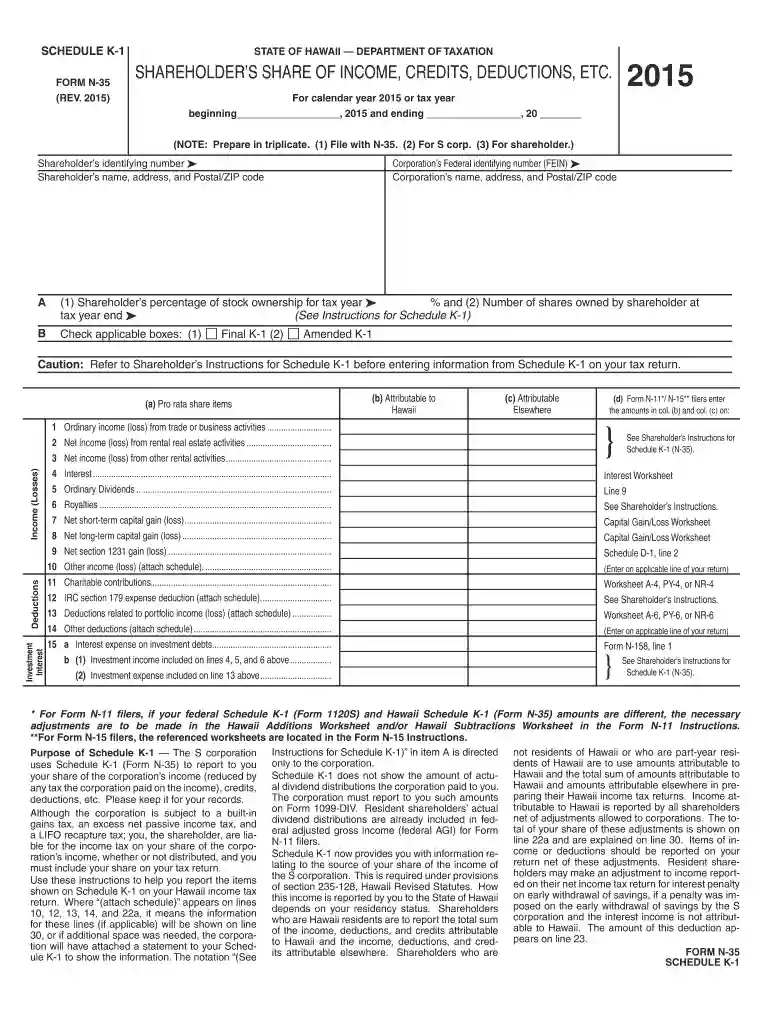
  2. Begin by entering the shareholder’s identifying number and name, along with their address and postal/ZIP code. This information is crucial for accurate identification.
  3. Next, input the corporation’s Federal identifying number (FEIN) and its name and address. Ensure these details match official records to avoid discrepancies.
  4. In section A, indicate the shareholder’s percentage of stock ownership for the tax year and the number of shares owned at year-end. This data is essential for calculating tax obligations.
  5. Check any applicable boxes in section B, such as whether this is a final or amended K-1. This helps clarify the nature of the document.
  6. Proceed to fill out income details across various categories like ordinary income, dividends, and capital gains. Attach additional schedules if necessary for comprehensive reporting.

Start using our platform today to streamline your form completion process for free!

See more Schedule K-1 Form N-35 Rev 2015 Shareholder's ... - Hawaii.gov versions

We've got more versions of the Schedule K-1 Form N-35 Rev 2015 Shareholder's ... - Hawaii.gov form. Select the right Schedule K-1 Form N-35 Rev 2015 Shareholder's ... - Hawaii.gov version from the list and start editing it straight away!
Versions Form popularity Fillable & printable
2023 4.1 Satisfied (53 Votes)
2022 4.5 Satisfied (30 Votes)
2021 4.9 Satisfied (28 Votes)
2020 4.4 Satisfied (147 Votes)
2019 4.3 Satisfied (95 Votes)
2018 4.4 Satisfied (266 Votes)
2017 4.3 Satisfied (58 Votes)
2016 4 Satisfied (57 Votes)
2015 4.4 Satisfied (459 Votes)
2014 4.1 Satisfied (31 Votes)
2005 4 Satisfied (51 Votes)
be ready to get more

Complete this form in 5 minutes or less

Get form

Got questions?

We have answers to the most popular questions from our customers. If you can't find an answer to your question, please contact us.
Contact us

eSignatures are an excellent replacement for traditional signing, as they save time, effort, and costs people spend on printing, scanning, and paper delivery. You can electronically sign your Schedule K-1 Form N-35 Rev 2015 Shareholder's ... - Hawaii.gov using a reliable and robust online document management tool like DocHub. It complies with major eSignature policies (ESIGN and UETA), so all documents approved there are legally binding and have the same validity as manually signed ones.

With a swift editing platform like DocHub, you do not require anything but a browser and internet connection to edit your Schedule K-1 Form N-35 Rev 2015 Shareholder's ... - Hawaii.gov on the internet swiftly. Add your file or find the appropriate form in DocHub’s catalog, open our editor with one click, and finish it electronically. To edit your forms at any time, sign up a free account with DocHub.

Form N-35 is used to report the income, de- ductions, gains, losses, etc., of an S corporation doing business in Hawaii. Do not file Form N-35 until the corporation has been notified by the In- ternal Revenue Service (IRS) that the corpora- tions election to be treated as an S corporation has been accepted.
Any person who is in Hawaiʻi for a temporary or transient purpose and whose permanent residence is not Hawaiʻi is considered a Hawaiʻi nonresident. Each year, a nonresident who earns income from Hawaiʻi sources must file a State of Hawaiʻi tax return and will be taxed only on income from Hawaiʻi sources.
Schedule K-1 is the federal tax form prepared by these entities to report annual income, losses, credits, deductions and other distributions for each partner, shareholder or beneficiary. If you receive a Schedule K-1, youll need to use the information on it to complete and file your personal income tax return.

Security and compliance

At DocHub, your data security is our priority. We follow HIPAA, SOC2, GDPR, and other standards, so you can work on your documents with confidence.

Learn more
ccpa2
pci-dss
gdpr-compliance
hipaa
soc-compliance

People also ask

A completed copy of the federal return must be attached to the Form N-15. Full-year Hawaiʻi residents filing a federal return should file state Form N-11.
Schedule K-1 now provides you with information re- lating to the source of your share of the income of the S corporation. This is required under provisions of section 235-128, Hawaii Revised Statutes. How this income is reported by you to the State of Ha- waii depends on your residency status.
Schedule K-1 is a schedule of IRS Form 1065, U.S. Return of Partnership Income. Its provided to partners in a business partnership to report their share of a partnerships profits, losses, deductions and credits to the IRS.
Schedule K-1 is an IRS form used by partnerships, S-Corporations, and estates and trusts to declare the income, deductions, and credits that partners, shareholders, and beneficiaries have received in the tax year. Individual taxpayers transfer the financial information on their K-1s to their tax returns.
Every partnership engaging in trade or business, or having income from sources within the State, shall file a partnership return pursuant to section 235-95, HRS, and this section, regardless of the partnerships principal place of business or the residency status of the partners.

Related links