Type text, add images, blackout confidential details, add comments, highlights and more.
02. Sign it in a few clicks
Draw your signature, type it, upload its image, or use your mobile device as a signature pad.
03. Share your form with others
Send it via email, link, or fax. You can also download it, export it or print it out.
How to use or fill out 2017 Instructions for Schedule F, Profit or Loss From Farming with our platform
Ease of Setup
DocHub User Ratings on G2
Ease of Use
DocHub User Ratings on G2
Click ‘Get Form’ to open the 2017 Instructions for Schedule F in the editor.
Begin by entering your principal agricultural activity code on Line B. This code should reflect the primary source of your income.
On Line C, select your accounting method: check 'Cash' if you report income when received and expenses when paid, or 'Accrual' if you report income when earned and expenses when incurred.
Proceed to Part I to report farm income. Fill in Lines 1 through 8 with the appropriate amounts based on your records of sales, livestock, and other income sources.
In Part II, detail your farm expenses. Ensure you categorize each expense correctly and provide necessary documentation for deductions.
Finally, review all entries for accuracy before saving or exporting the completed form directly from our platform.
Start using our platform today to simplify filling out your Schedule F form for free!
Fill out 2017 Instructions for Schedule F. 2017 Instructions for Schedule F, Profit or Loss From Farming online It's free
See more 2017 Instructions for Schedule F. 2017 Instructions for Schedule F, Profit or Loss From Farming versions
We've got more versions of the 2017 Instructions for Schedule F. 2017 Instructions for Schedule F, Profit or Loss From Farming form. Select the right 2017 Instructions for Schedule F. 2017 Instructions for Schedule F, Profit or Loss From Farming version from the list and start editing it straight away!
Income received from farming is calculated on IRS Form 1040, Schedule F, and transferred to IRS Form 1040. Note: Other income on Schedule F may represent income that is not obtained from the borrowers farming operations.
What is the Schedule F for 2017?
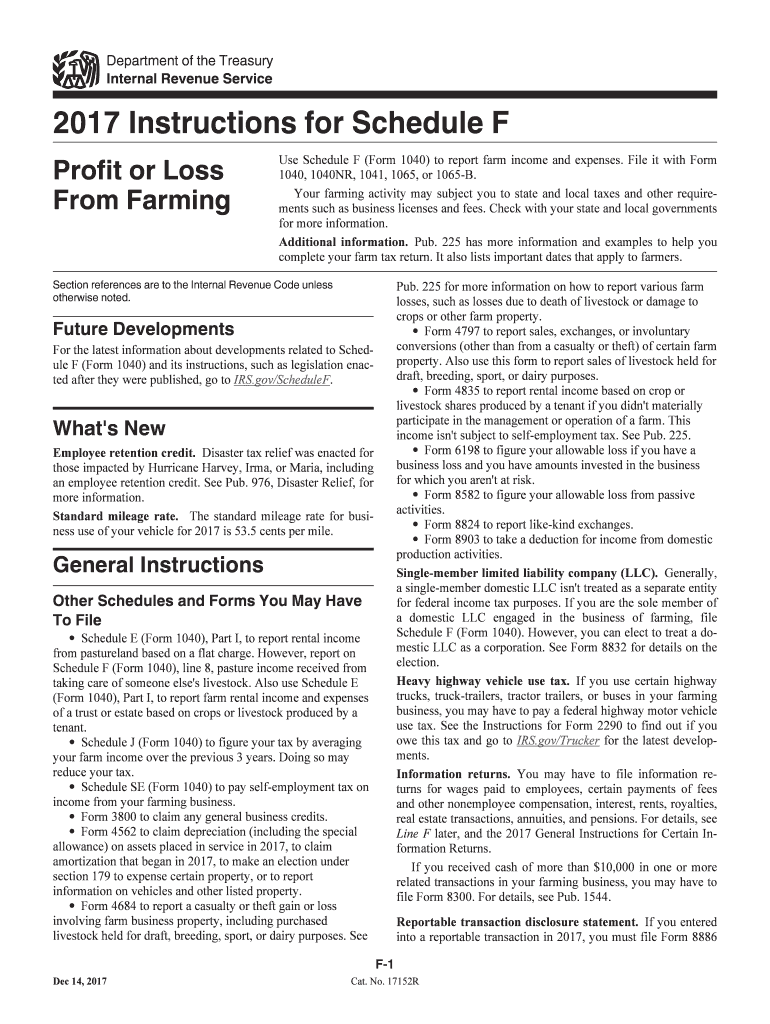
Use Schedule F (Form 1040) to report farm income and expenses. File it with Form 1040, 1040NR, 1041, 1065, or 1065-B. Your farming activity may subject you to state and local taxes and other require- ments such as business licenses and fees. Check with your state and local governments for more information.
Is Schedule F used to report profit or loss from farming?
Schedule F ultimately computes the net farming profit or loss that gets reported on the designated line of your 1040. If you have a profit or a loss, it gets combined with the other non-farming income reported on your return and increases or reduces your taxable income.
What is a Schedule F farm income or loss?
Sole proprietor farming businesses use IRS Schedule F, Profit or Loss from Farming to report income and expenses of the farming business. Schedule F can be used by partnerships, Corporations, Trusts and Estates to report farming activities.
Is profit or loss from farming reported on Schedule L?
About Schedule F (Form 1040), Profit or Loss From Farming Use Schedule F (Form 1040) to report farm income and expenses.
Related Searches
Schedule F instructionsSchedule F exampleSchedule F loss limitations2017 Form 1040 instructionsSchedule F farm incomeSchedule F 2024Schedule F pdfFarm losses 5 year rule
Security and compliance
At DocHub, your data security is our priority. We follow HIPAA, SOC2, GDPR, and other standards, so you can work on your documents with confidence.
Schedule F (Form 1040), Profit or Loss From Farming
Because the principal source of farm income is from dairy farming, Mr. Rosso will write Dairy in box A of Schedule F and write the number 112120 from the
Profit or Loss From Farming. ▷ Attach to Form 1040, Form 1040NR, Form 1041 Yes. No. 36. Check the box that describes your investment in this activity and see
Cookie consent notice
This site uses cookies to enhance site navigation and personalize your experience.
By using this site you agree to our use of cookies as described in our Privacy Notice.
You can modify your selections by visiting our Cookie and Advertising Notice.