




Here's how it works

01. Edit your rt 8a online
Type text, add images, blackout confidential details, add comments, highlights and more.

02. Sign it in a few clicks
Draw your signature, type it, upload its image, or use your mobile device as a signature pad.

03. Share your form with others
Send it via email, link, or fax. You can also download it, export it or print it out.
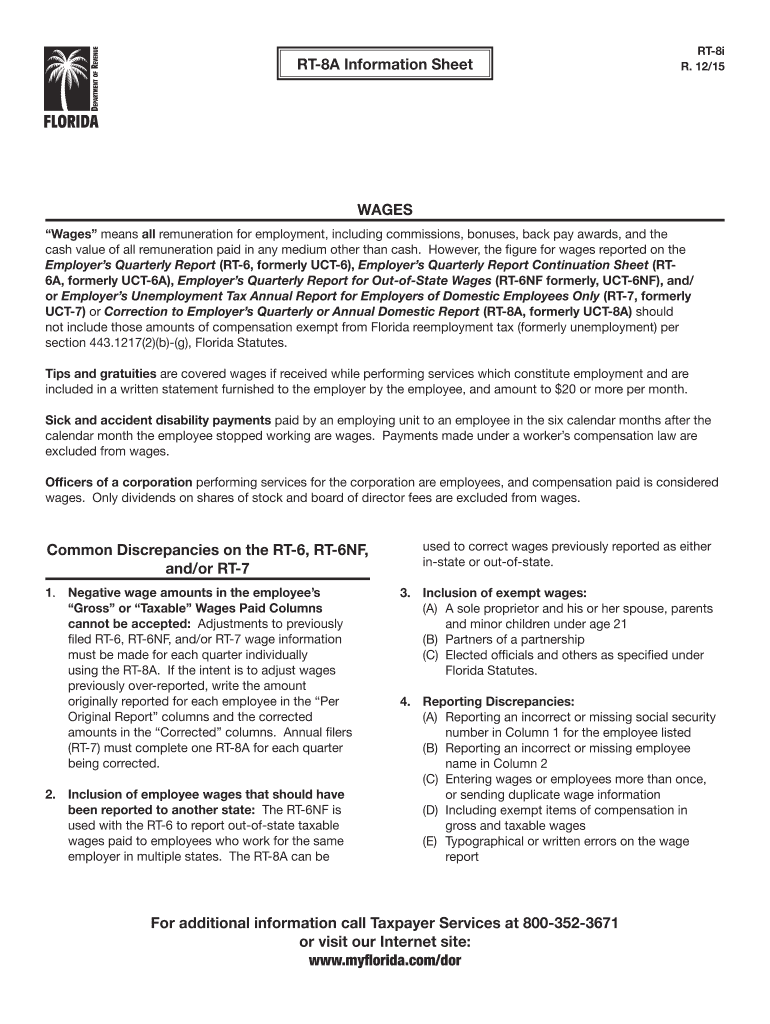
How to use or fill out RT-8i RT-8A Information Sheet WAGES with our platform

- Click ‘Get Form’ to open the RT-8i RT-8A Information Sheet WAGES in the editor.
- Begin by entering the employee's details in Column 1, ensuring that the social security number is accurate and complete.
- In Column 2, input the employee's name. Double-check for any typographical errors to avoid discrepancies.
- For each employee, report their gross wages in the appropriate columns. If you are correcting previously reported amounts, enter the original figures in the 'Per Original Report' columns and the corrected amounts in the 'Corrected' columns.
- Review all entries for accuracy, particularly focusing on exempt wages and ensuring no duplicate information is submitted.
- Once completed, save your changes and utilize our platform’s features to sign and distribute your document as needed.
Start using our platform today to streamline your form completion process for free!
Fill out RT-8i RT-8A Information Sheet WAGES online
It's free
It's free
See more RT-8i RT-8A Information Sheet WAGES versions
We've got more versions of the RT-8i RT-8A Information Sheet WAGES form. Select the right RT-8i RT-8A Information Sheet WAGES version from the list and start editing it straight away!
Security and compliance
At DocHub, your data security is our priority. We follow HIPAA, SOC2, GDPR, and other standards, so you can work on your documents with confidence.
Learn more


Related forms

Patient Consent Form Therapeutic for Hyperhidrosis
The document is a Patient Consent Form for Botox Therapeutic treatment aimed at reducing hyperhidrosis (excessive sweati ...

Psc 35 scoring
The document is a scoring sheet for the Pediatric Symptom Checklist (PSC-35), an optional tool for clinicians to assess ...

Navigating on the check-boxes using tab key and selecting
The document is the Illinois Department of Revenue ST-1 form, which is used for reporting Sales and Use Tax and E911 Sur ...

Forms and Instructions - Filing and Paying Business TaxesInternal Revenue Service
The document is a Maine Income Tax Withholding Business Change Notification form (Form 941BN-ME) used to report changes ...

Sowela online application form
The document is an application form for admission to Sowela Technical Community College, outlining the required document ...

Building Evacuation Plan - The University of Texas at Brownsville
The document outlines the Building Evacuation Plan for the University of Texas at Brownsville, detailing the responsibil ...

College of Nursing and Health Sciences - The University of Texas at - uttyler
The document is a syllabus for NURS 3513: Psychiatric/Mental Health Nursing at the University of Texas at Tyler, detaili ...

BOF 958, Dealer's Record of Sale (DROS) Cancellation Correction
The document is a form from the California Department of Justice, Bureau of Firearms, used for canceling or correcting p ...