Wage refund philadelphia create 2026

Get Form
philadelphia wage tax refund 2022 Preview on Page 1

Here's how it works

01. Edit your philadelphia wage tax refund 2022 online
Type text, add images, blackout confidential details, add comments, highlights and more.

02. Sign it in a few clicks
Draw your signature, type it, upload its image, or use your mobile device as a signature pad.

03. Share your form with others
Send philadelphia wage tax refund petition 2022 via email, link, or fax. You can also download it, export it or print it out.

How to use or fill out wage refund philadelphia create

Form edit decoration
9.5
Ease of Setup
DocHub User Ratings on G2
9.0
Ease of Use
DocHub User Ratings on G2
  1. Click ‘Get Form’ to open it in the editor.
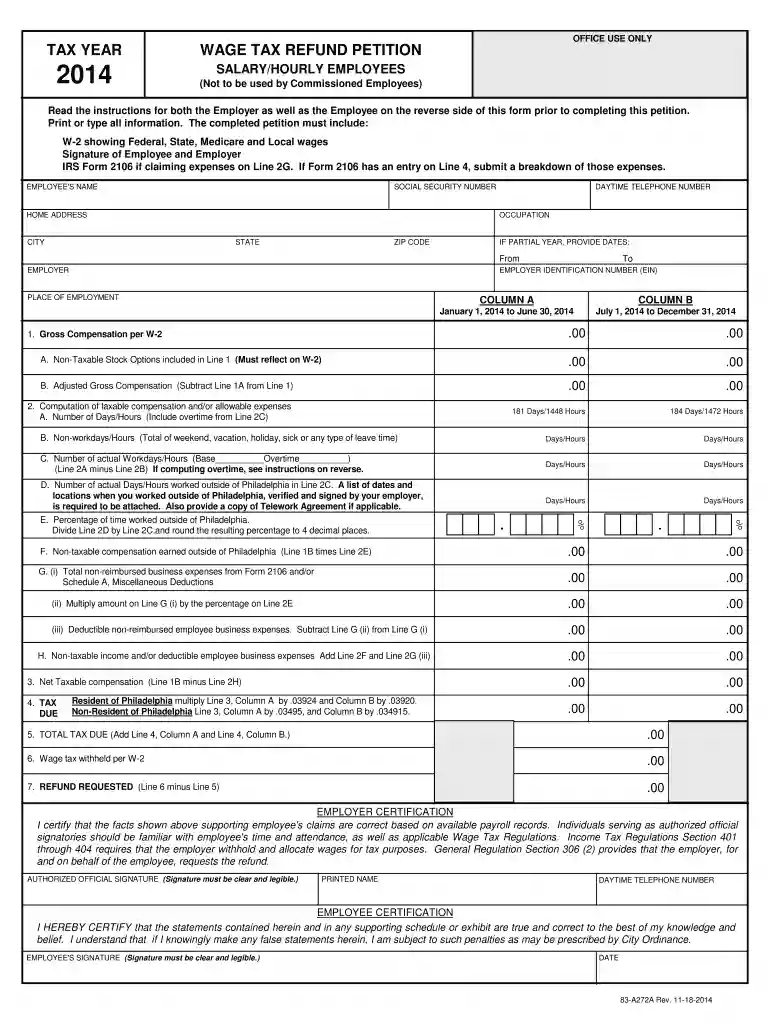
  2. Begin by entering your personal information, including your name, Social Security number, home address, and daytime telephone number. Ensure all details are accurate.
  3. Fill in your employer's information, including their name and Employer Identification Number (EIN). If applicable, indicate the dates of employment for partial year claims.
  4. Complete the compensation section by entering figures from your W-2 form. Pay attention to non-taxable stock options and adjusted gross compensation.
  5. Detail your workdays and hours in Philadelphia versus outside the city. Attach any required documentation, such as a list of dates worked outside Philadelphia.
  6. Calculate your net taxable compensation and total tax due based on the provided tax rates for residents and non-residents.
  7. Both you and your employer must sign the petition. Ensure signatures are clear and legible before submitting.

Start using our platform today to easily complete your wage refund petition online for free!

See more wage refund philadelphia create versions

We've got more versions of the wage refund philadelphia create form. Select the right wage refund philadelphia create version from the list and start editing it straight away!
Versions Form popularity Fillable & printable
2024 4.7 Satisfied (33 Votes)
2023 4.5 Satisfied (45 Votes)
2022 4.9 Satisfied (50 Votes)
2021 4.1 Satisfied (31 Votes)
2020 4.8 Satisfied (155 Votes)
2019 4.3 Satisfied (269 Votes)
2018 4.2 Satisfied (31 Votes)
2017 4.4 Satisfied (91 Votes)
2014 4.4 Satisfied (380 Votes)
2013 4.4 Satisfied (534 Votes)
2012 4 Satisfied (57 Votes)
2010 4.2 Satisfied (39 Votes)
be ready to get more

Complete this form in 5 minutes or less

Get form

Got questions?

We have answers to the most popular questions from our customers. If you can't find an answer to your question, please contact us.
Contact us
To request a refund of your withholdings for previous tax years, please contact the IRS at 1-800-829-1040 for Federal tax withholding refund and your State Revenue Office for state tax withholding refund.
Wage Tax refund requests must be submitted through the Philadelphia Tax Center. You dont need a username and password to submit a refund request on the Philadelphia Tax Center. NEW FOR 2023 REQUESTS: Revenue has published updated instructions and templates for non-resident Wage Tax Refund requests.
To claim a refund, you must request, or petition, the City by filling out the appropriate form and providing any other required documentation. The easiest and fastest way to request a refund is online at the Philadelphia Tax Center. This is the most secure way to send us personal and confidential information.
No need to call or visit us for status updates. This online refund tracker will tell you when to expect a refund check or if additional information is required to process your petition. You can access the tool by visiting tax-services.phila.gov on your computer, smartphone, or tablet.

Security and compliance

At DocHub, your data security is our priority. We follow HIPAA, SOC2, GDPR, and other standards, so you can work on your documents with confidence.

Learn more
ccpa2
pci-dss
gdpr-compliance
hipaa
soc-compliance