Va 8453 2014 form-2026

Get Form
va 8453 2014 form Preview on Page 1

Here's how it works

01. Edit your form online
Type text, add images, blackout confidential details, add comments, highlights and more.

02. Sign it in a few clicks
Draw your signature, type it, upload its image, or use your mobile device as a signature pad.

03. Share your form with others
Send it via email, link, or fax. You can also download it, export it or print it out.

How to use or fill out VA 8453 2014 form with our platform

Form edit decoration
9.5
Ease of Setup
DocHub User Ratings on G2
9.0
Ease of Use
DocHub User Ratings on G2
  1. Click ‘Get Form’ to open the VA 8453 2014 form in the editor.
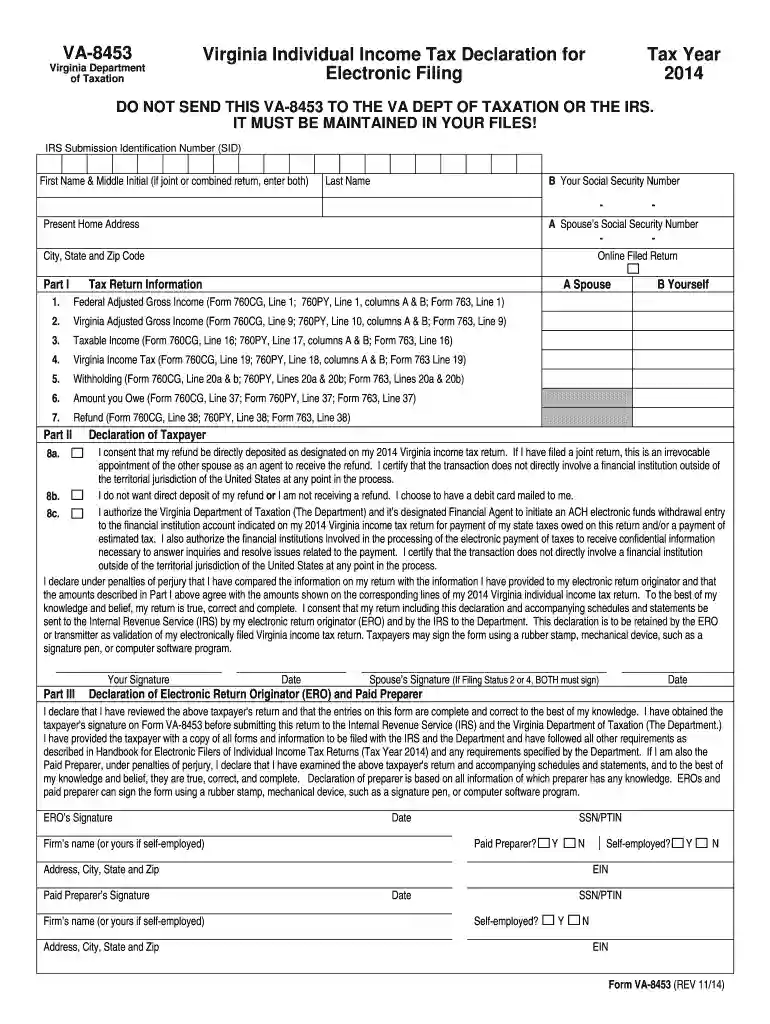
  2. Begin by entering your first name, middle initial (if applicable), and last name in the designated fields. If filing jointly, include your spouse's information as well.
  3. Input your Social Security Number and your spouse’s Social Security Number in the appropriate sections.
  4. Fill out your present home address, including city, state, and zip code.
  5. In Part I, provide the required financial details such as Federal Adjusted Gross Income and Virginia Adjusted Gross Income. Ensure accuracy by cross-referencing with your tax return forms.
  6. Complete Part II by declaring whether you consent to direct deposit for refunds or prefer a debit card. Make sure to authorize any electronic funds withdrawal if applicable.
  7. Sign and date the form in Part III. If filing jointly, ensure both signatures are included.

Start using our platform today to easily complete your VA 8453 form online for free!

See more va 8453 2014 form versions

We've got more versions of the va 8453 2014 form form. Select the right va 8453 2014 form version from the list and start editing it straight away!
Versions Form popularity Fillable & printable
2023 4.4 Satisfied (51 Votes)
2022 4.1 Satisfied (21 Votes)
2021 4.8 Satisfied (93 Votes)
2020 4.3 Satisfied (123 Votes)
2019 4.4 Satisfied (164 Votes)
2018 4.3 Satisfied (237 Votes)
2017 4.3 Satisfied (119 Votes)
2016 4.4 Satisfied (35 Votes)
2014 4.4 Satisfied (540 Votes)
2013 4 Satisfied (22 Votes)
be ready to get more

Complete this form in 5 minutes or less

Get form

Got questions?

We have answers to the most popular questions from our customers. If you can't find an answer to your question, please contact us.
Contact us
Taxpayers and electronic return originators (EROs) use this form to send any required paper forms or supporting documentation listed next to the checkboxes on the front of the form. Form 8453 is used solely to transmit the forms listed on the front of the form. Do not send Forms W-2, W-2G, or 1099-R.
VA-8453. Virginia Department. of Taxation. Virginia Individual Income Tax Declaration for. Electronic Filing.
Get federal tax forms for current and prior years Download them from IRS.gov. Order online and have them delivered by U.S. mail. Order by phone at 1-800-TAX-FORM (1-800-829-3676)
Form 8453 (with the required forms or supporting documents) must be mailed to the IRS within three business days after receiving acknowledgement that the return was accepted. An electronically-transmitted return will not be considered complete until a Form 8453 is received by the IRS.
A signed Form 8453 authorizes the transmitter to send the return to the IRS.
be ready to get more

Complete this form in 5 minutes or less

Get form

People also ask

Individual e-file only - Before you transmit their return, your client must sign the applicable forms: Form FTB 8453 , California e-file Return Authorization for Individuals. Form FTB 8453 PMT , California Payment for Automatic Extension and Estimate Payment Authorization for Individuals.
Taxpayers and electronic return originators (EROs) use Form 8453 to send any required paper forms or supporting documentation with the e-file. File Form 8453 if any of these forms are in the return: Form 1098-C. Form 2848.

Related links