01. Edit your principal residence exemption audit notice online
Type text, add images, blackout confidential details, add comments, highlights and more.
02. Sign it in a few clicks
Draw your signature, type it, upload its image, or use your mobile device as a signature pad.
03. Share your form with others
Send michigan pre form via email, link, or fax. You can also download it, export it or print it out.
How to use or fill out PRE Audit Questionnaire - State of Michigan with our platform
Ease of Setup
DocHub User Ratings on G2
Ease of Use
DocHub User Ratings on G2
Click ‘Get Form’ to open the PRE Audit Questionnaire in the editor.
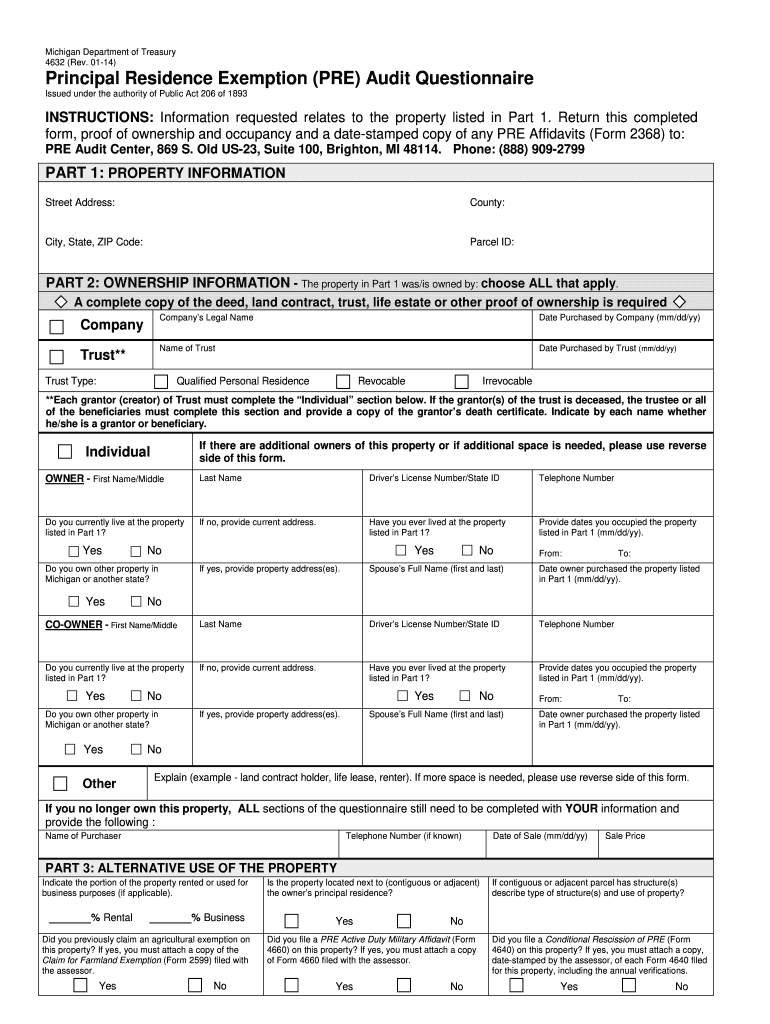
Begin with Part 1: Property Information. Fill in the street address, county, city, state, ZIP code, and parcel ID accurately.
Move to Part 2: Ownership Information. Select all applicable ownership types and provide necessary details such as company name or trust information. Ensure you attach proof of ownership.
Complete the individual owner section by entering names, driver’s license numbers, and contact information. Answer questions regarding current residency and past occupancy.
In Part 3: Alternative Use of the Property, indicate any rental or business use percentages and answer related questions about exemptions and military affidavits.
Review all entries for accuracy before saving your completed form. Utilize our platform's features to easily edit any mistakes.
Start filling out your PRE Audit Questionnaire today for free using our platform!
Fill out PRE Audit Questionnaire - State of Michigan - michigan online It's free
See more PRE Audit Questionnaire - State of Michigan - michigan versions
We've got more versions of the PRE Audit Questionnaire - State of Michigan - michigan form. Select the right PRE Audit Questionnaire - State of Michigan - michigan version from the list and start editing it straight away!
May 25, 2011 Before the auditor arrives, you may wish to make sure all your records are in the order that they will be handled on the USDA GAPs checklist.Read more
Cookie consent notice
This site uses cookies to enhance site navigation and personalize your experience.
By using this site you agree to our use of cookies as described in our Privacy Notice.
You can modify your selections by visiting our Cookie and Advertising Notice.