St 101 2014 form-2026

Get Form
st 101 2014 form Preview on Page 1

Here's how it works

01. Edit your form online
Type text, add images, blackout confidential details, add comments, highlights and more.

02. Sign it in a few clicks
Draw your signature, type it, upload its image, or use your mobile device as a signature pad.

03. Share your form with others
Send it via email, link, or fax. You can also download it, export it or print it out.

How to use or fill out st 101 2014 form with our platform

Form edit decoration
9.5
Ease of Setup
DocHub User Ratings on G2
9.0
Ease of Use
DocHub User Ratings on G2
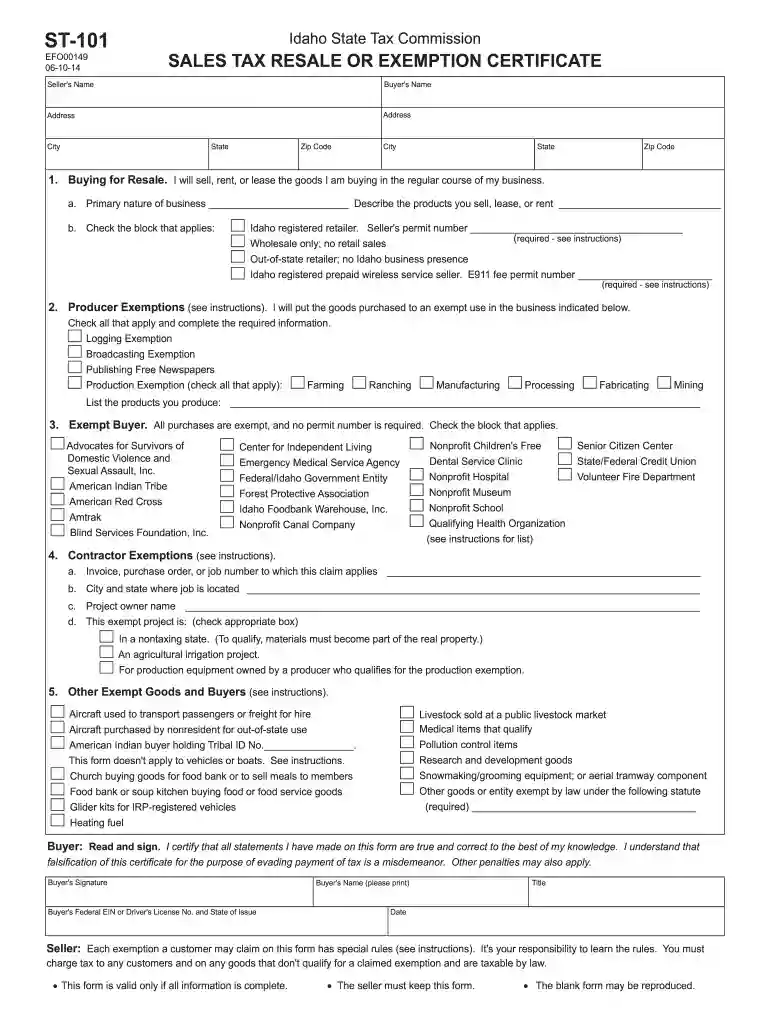
  1. Click ‘Get Form’ to open the ST-101 2014 form in the editor.
  2. Begin by entering the Seller's and Buyer's names along with their addresses, city, state, and zip code. Ensure all fields are accurately filled to avoid processing delays.
  3. In Section 1, indicate if you are buying for resale. Provide your Idaho seller's permit number if applicable and describe your primary business activities.
  4. For Section 2, check any applicable producer exemptions and list the products you produce. This section is crucial for businesses claiming tax exemptions.
  5. In Section 3, identify if you qualify as an exempt buyer by checking the appropriate box. Make sure to include any required identification numbers.
  6. Complete Section 4 if claiming contractor exemptions by providing necessary project details such as job location and owner name.
  7. Finally, review all entries for accuracy before signing at the bottom of the form. Your signature certifies that all information is true.

Start filling out your ST-101 form online for free today using our platform!

See more st 101 2014 form versions

We've got more versions of the st 101 2014 form form. Select the right st 101 2014 form version from the list and start editing it straight away!
Versions Form popularity Fillable & printable
2023 4.8 Satisfied (24 Votes)
2022 4.8 Satisfied (32 Votes)
2020 4.8 Satisfied (214 Votes)
2018 4.4 Satisfied (93 Votes)
2014 4.4 Satisfied (279 Votes)
2013 4.8 Satisfied (25 Votes)
2011 4 Satisfied (39 Votes)
2007 4.9 Satisfied (28 Votes)
be ready to get more

Complete this form in 5 minutes or less

Get form

Got questions?

We have answers to the most popular questions from our customers. If you can't find an answer to your question, please contact us.
Contact us
Login to your income tax account on the portal (.incometaxindiaefiling.gov.in). In the tab named Forms, locate Form 12BB and download the same. Begin filling up the form by entering your basic details like your employee code, employee name, date of birth, etc.
Even if you didnt receive a 1098-E from your servicer, you can download your 1098-E from your loan servicers website. If you are unsure who your loan servicer is, log in to StudentAid.gov or call the Federal Student Aid Information Center at 1-800-4-FED-AID (1-800-433-3243; TTY 1-800-730-8913).
To submit the ST-101 form, you can mail it to the New York State Tax Department, P.O. Box 4129, Eagan, MN 55121-4129.
How to fill out Form ST-101? Locate your business information in the form. Fill in your name, address, and the type of business. Provide the sellers information, including their name and address. Indicate the type of property being purchased. Sign the form with an electronic signature. Download the completed form.
Form ST-101, New York State and Local Annual Sales and Use Tax Return.

Security and compliance

At DocHub, your data security is our priority. We follow HIPAA, SOC2, GDPR, and other standards, so you can work on your documents with confidence.

Learn more
ccpa2
pci-dss
gdpr-compliance
hipaa
soc-compliance

People also ask

ST-100 Form: New York State and Local Quarterly Sales and Use Tax Return for Quarterly Filers. ST-101 Form: New York State and Local Sales and Use Tax Return for Annual filers.

Related links