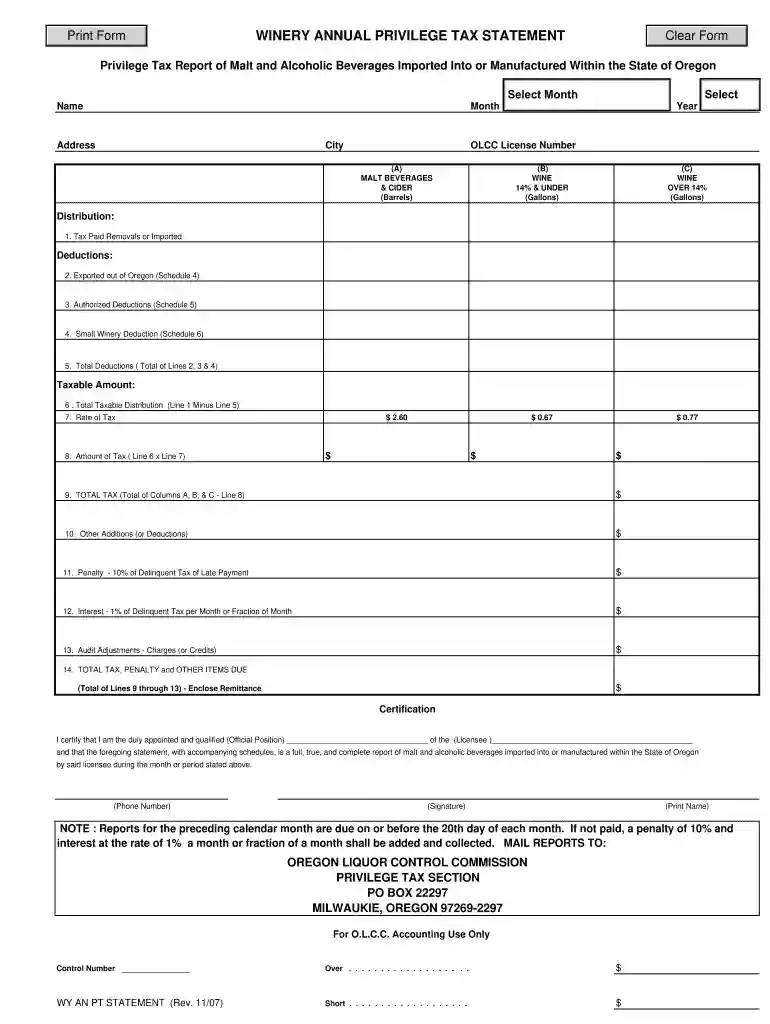
olcc privilege tax Preview on Page 1

WINERY ANNUAL PRIVILEGE TAX STATEMENT - Oregon.gov - oregon 2026

Here's how it works

  • 01. Edit your olcc privilege tax online

    Type text, add images, blackout confidential details, add comments, highlights and more.

  • 02. Sign it in a few clicks

    Draw your signature, type it, upload its image, or use your mobile device as a signature pad.

  • 03. Share your form with others

    Send oregon privilege tax online via email, link, or fax. You can also download it, export it or print it out.

How to use or fill out WINERY ANNUAL PRIVILEGE TAX STATEMENT - Oregon.gov - oregon with our platform

Form edit decoration
9.5
Ease of Setup
DocHub User Ratings on G2
9.0
Ease of Use
DocHub User Ratings on G2
  1. Click ‘Get Form’ to open the WINERY ANNUAL PRIVILEGE TAX STATEMENT in the editor.
  2. Begin by entering your Name, Month, Year, Address, and City as required. Ensure that the information matches your OLCC license.
  3. Input your OLCC License Number in the designated field to identify your business.
  4. Fill out the columns for MALT BEVERAGES & CIDER, WINE 14% & UNDER, and WINE OVER 14% based on your taxable product totals from the appropriate schedules.
  5. Complete Line 1 for Tax Paid Removals or Imported products. Use Schedules 1, 2, 3, 8 & 9 to declare taxes due.
  6. Proceed to Lines 2 through 4 for deductions related to exported products and authorized deductions. Calculate Total Deductions on Line 5.
  7. Calculate the Taxable Amount on Line 6 by subtracting Total Deductions from Line 1. Then determine the Rate of Tax on Line 7.
  8. Multiply Line 6 by Line 7 to find Amount of Tax on Line 8. Sum up Columns A, B, & C for Total Tax on Line 9.
  9. Complete Lines for Other Additions or Deductions (Line 10), Penalty (Line 11), Interest (Line 12), and Audit Adjustments (Line 13).
  10. Finally, calculate Total Tax, Penalty and Other Items Due on Line 14 and ensure all fields are filled accurately before submission.

Start using our platform today to easily complete your WINERY ANNUAL PRIVILEGE TAX STATEMENT online for free!

See more olcc privilege tax versions

We've got more versions of the olcc privilege tax form. Select the right olcc privilege tax version from the list and start editing it straight away!

VersionsForm popularityFillable & printable
20164.8 Satisfied (85 Votes)
20074.4 Satisfied (158 Votes)

be ready to get more

Complete this form in 5 minutes or less

Security and compliance

At DocHub, your data security is our priority. We follow HIPAA, SOC2, GDPR, and other standards, so you can work on your documents with confidence.

oregon privilege tax

Oregon Liquor and Cannabis Commission

The first 40,000 gallons of wine sold in Oregon from a US manufacturer of wines producing less than 100,000 gallons annually are exempt from Privilege Tax. ThisRead more

Learn more
If you believe that this page should be taken down, please follow our DMCA take down process here