Form 637 2013-2026

Get Form
form 637 2013 Preview on Page 1

Here's how it works

01. Edit your form online
Type text, add images, blackout confidential details, add comments, highlights and more.

02. Sign it in a few clicks
Draw your signature, type it, upload its image, or use your mobile device as a signature pad.

03. Share your form with others
Send it via email, link, or fax. You can also download it, export it or print it out.

How to use or fill out form 637 2013 with our platform

Form edit decoration
9.5
Ease of Setup
DocHub User Ratings on G2
9.0
Ease of Use
DocHub User Ratings on G2
  1. Click ‘Get Form’ to open it in the editor.
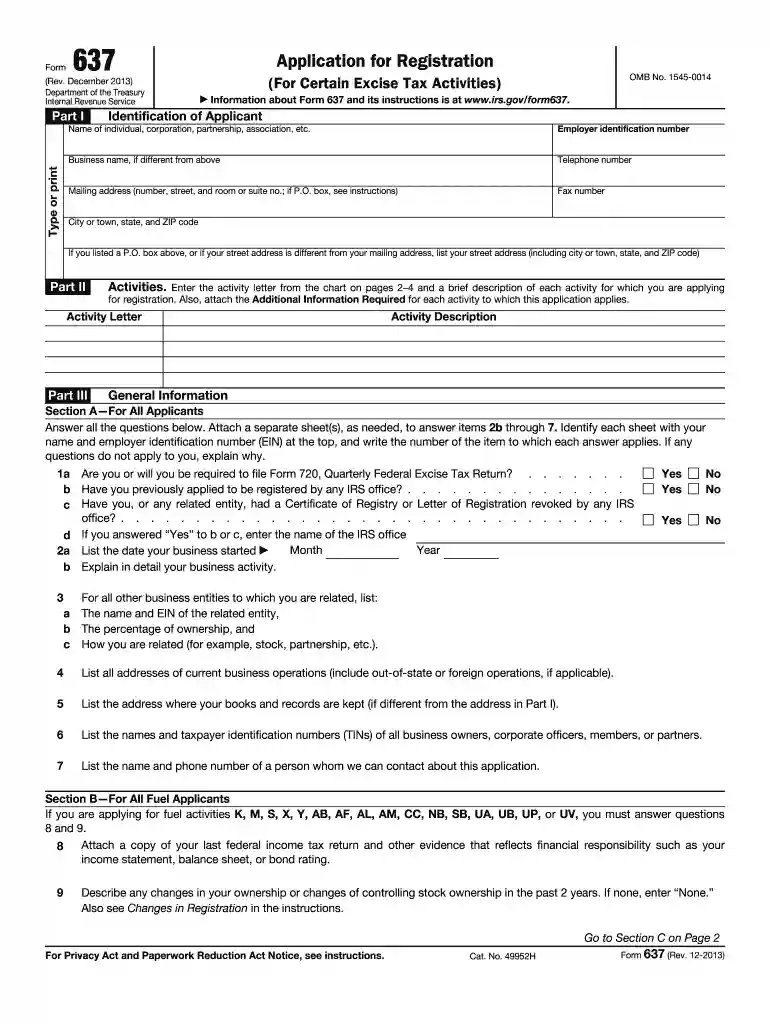
  2. Begin with Part I, where you will enter your identification details. Fill in your name, employer identification number (EIN), business name, and contact information accurately.
  3. Move to Part II and specify the activities for which you are applying. Refer to the activity letter chart on pages 2–4 of the form and provide a brief description of each activity.
  4. In Section A of Part III, answer all questions thoroughly. If necessary, attach additional sheets labeled with your name and EIN for items requiring detailed explanations.
  5. For fuel applicants, complete Section B by answering specific questions related to your fuel activities and attaching required documentation like tax returns.
  6. Finally, review all entries for accuracy before signing at the bottom of the form. Ensure that you date your signature as well.

Start using our platform today to fill out Form 637 effortlessly and for free!

See more form 637 2013 versions

We've got more versions of the form 637 2013 form. Select the right form 637 2013 version from the list and start editing it straight away!
Versions Form popularity Fillable & printable
2022 4.6 Satisfied (53 Votes)
2022 4.1 Satisfied (49 Votes)
2019 4.8 Satisfied (89 Votes)
2017 4.3 Satisfied (217 Votes)
2013 4.4 Satisfied (59 Votes)
2009 4.3 Satisfied (152 Votes)
be ready to get more

Complete this form in 5 minutes or less

Get form

Got questions?

We have answers to the most popular questions from our customers. If you can't find an answer to your question, please contact us.
Contact us
According to the IRS, government entities, including state and local governments, are exempt from this tax. To claim this exemption, the entity must provide the service provider with a certificate of exemption, docHubing their eligibility.
Use Form 637, Application for Registration (For Certain Excise Tax Activities), to apply for registration for activities under IRC sections 4101, 4222, 4662 and 4682. Form 637 contains a description of each activity letter. A person can register for more than one activity on Form 637, if applicable.
Businesses that are subject to excise tax generally must file a Form 720, Quarterly Federal Excise Tax Return to report the tax to the IRS. Many excise taxes go into trust funds for projects related to the taxed product or service, such as highway and airport improvements.
Use Form 2848 to authorize an individual to represent you before the IRS. The individual you authorize must be a person eligible to practice before the IRS.

Security and compliance

At DocHub, your data security is our priority. We follow HIPAA, SOC2, GDPR, and other standards, so you can work on your documents with confidence.

Learn more
ccpa2
pci-dss
gdpr-compliance
hipaa
soc-compliance