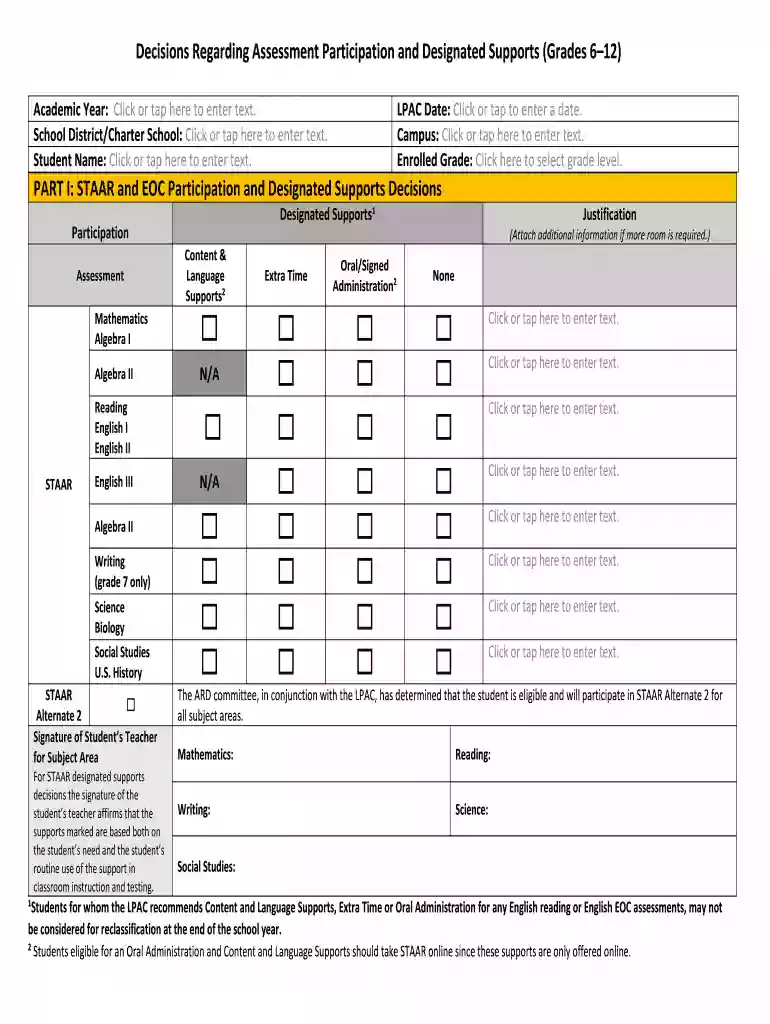
Decisions regarding assessment participation and designated supports 2026

Get Form
decisions regarding assessment participation and designated supports Preview on Page 1

Here's how it works

01. Edit your decisions regarding assessment participation and designated supports online
Type text, add images, blackout confidential details, add comments, highlights and more.

02. Sign it in a few clicks
Draw your signature, type it, upload its image, or use your mobile device as a signature pad.

03. Share your form with others
Send it via email, link, or fax. You can also download it, export it or print it out.

How to use or fill out decisions regarding assessment participation and designated supports

Form edit decoration
9.5
Ease of Setup
DocHub User Ratings on G2
9.0
Ease of Use
DocHub User Ratings on G2
  1. Click ‘Get Form’ to open it in the editor.
  2. Begin by entering the Academic Year, School District/Charter School, and Student Name in the designated fields.
  3. Fill in the LPAC Date and Campus information, then select the Enrolled Grade from the dropdown menu.
  4. In Part I, review the STAAR and EOC Participation section. Mark the appropriate assessments for Mathematics, Reading, and Writing as applicable.
  5. Indicate any Designated Supports needed by checking the relevant boxes under Content & Language Supports. Ensure that these supports align with classroom instruction.
  6. Provide a justification for any selected supports in the space provided. If more room is needed, attach additional information.
  7. Complete Parts II through IV by following similar steps for TELPAS Participation and obtaining necessary signatures from LPAC members.

Start using our platform today to streamline your document editing and ensure accurate assessment participation decisions!

be ready to get more

Complete this form in 5 minutes or less

Get form

Got questions?

We have answers to the most popular questions from our customers. If you can't find an answer to your question, please contact us.
Contact us
Accommodations can be changes to how kids take tests, like extended time. Or they may be tools and supports, such as an extra notepad. With computer-based tests, accommodations may be built in. For example, there may be a special tool that reads aloud text for a student with dyslexia .
Non-embedded supports are those that must be provided by the schools locally, such as a handheld calculator, abacus, or scratch paper.
Accommodations are typically grouped into four categories: presentation, response, setting, and timing and scheduling. The table below summarizes the relationship between barriers related to learning and the corresponding accommodation categories, and it also provides examples of accommodations for each category.
What are locally-approved designated supports? Basic Transcribing. Braille. Calculation Aids. Content and Language Supports. Individualized Structured Reminders. Large Print. Manipulating Test Materials. Mathematics Manipulatives.
LPACs are responsible for providing testing personnel with assessment decisions as well as STAAR and TELPAS accommodations information for EB students in time for appropriate testing arrangements to be made.

Security and compliance

At DocHub, your data security is our priority. We follow HIPAA, SOC2, GDPR, and other standards, so you can work on your documents with confidence.

Learn more
ccpa2
pci-dss
gdpr-compliance
hipaa
soc-compliance

People also ask

Language Proficiency Assessment Committee (LPAC)

Related links