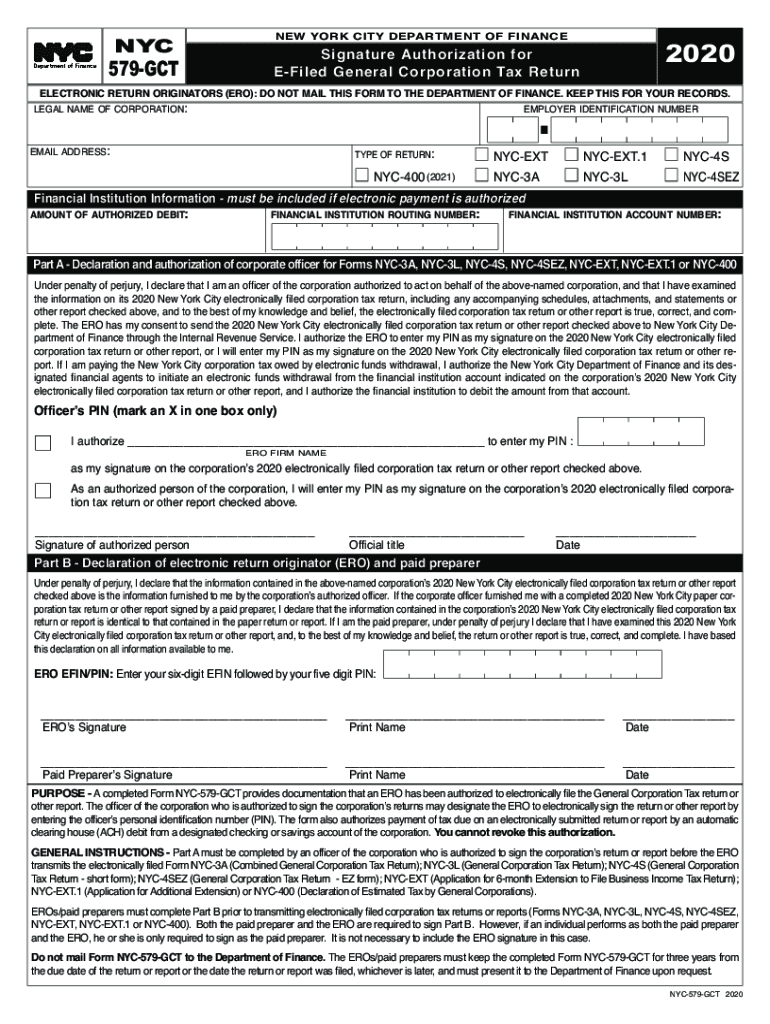
NYC NEW YORK CITY DEPARTMENT OF FINANCE Signature ... 2026

Get Form
NYC NEW YORK CITY DEPARTMENT OF FINANCE Signature ... Preview on Page 1

Here's how it works

01. Edit your form online
Type text, add images, blackout confidential details, add comments, highlights and more.
02. Sign it in a few clicks
Draw your signature, type it, upload its image, or use your mobile device as a signature pad.
03. Share your form with others
Send it via email, link, or fax. You can also download it, export it or print it out.

How to use or fill out NYC NEW YORK CITY DEPARTMENT OF FINANCE Signature Authorization Form with our platform

Form edit decoration
9.5
Ease of Setup
DocHub User Ratings on G2
9.0
Ease of Use
DocHub User Ratings on G2
  1. Click ‘Get Form’ to open it in the editor.
  2. Begin by entering the legal name of the corporation and its Employer Identification Number (EIN) in the designated fields.
  3. Provide your email address and select the type of return you are filing from the options available.
  4. If you are authorizing electronic payment, fill in the financial institution's routing number and account number, along with the amount of authorized debit.
  5. In Part A, an authorized corporate officer must declare their authority and examine the information provided. They will also need to enter their PIN as a signature.
  6. Part B requires signatures from both the Electronic Return Originator (ERO) and any paid preparer involved. Ensure all necessary fields are completed before submission.

Start using our platform today for free to streamline your document editing and signing process!

See more NYC NEW YORK CITY DEPARTMENT OF FINANCE Signature ... versions

We've got more versions of the NYC NEW YORK CITY DEPARTMENT OF FINANCE Signature ... form. Select the right NYC NEW YORK CITY DEPARTMENT OF FINANCE Signature ... version from the list and start editing it straight away!
Versions Form popularity Fillable & printable
2022 4.3 Satisfied (22 Votes)
2021 4.8 Satisfied (34 Votes)
2020 4.8 Satisfied (41 Votes)
2019 4.8 Satisfied (45 Votes)
2018 4.7 Satisfied (52 Votes)
2017 4.3 Satisfied (56 Votes)
2016 4 Satisfied (58 Votes)
2015 4.2 Satisfied (29 Votes)
2014 4 Satisfied (46 Votes)
2013 4 Satisfied (54 Votes)
2012 4 Satisfied (56 Votes)
be ready to get more

Complete this form in 5 minutes or less

Get form

Got questions?

We have answers to the most popular questions from our customers. If you can't find an answer to your question, please contact us.
Contact us
The City can take steps to collect the debt, such as sending your debt to a collection agency or seizing assets. If your tickets in judgment total more than $350, your vehicle could be booted or towed.
New York City Department of Finance Agency overview Jurisdiction New York City Employees 2,156 (2020) Agency executives Preston Niblack, Commissioner Jeffrey Shear, First Deputy Commissioner Anthony Miranda, Sheriff Key document New York City Charter2 more rows
Make checks payable to NYC Department of Finance. All payments must be in U.S. currency. When paying by check, you are authorizing us to either use information from your check as a one-time electronic fund transfer from your account or process the payment as a check transaction.
Some notices explain an action we took or decision we made. These may later result in a bill. Other notices request additional information about what you reported on a return for a tax other than personal income tax. These may include a letter from our audit department.
The Department of Finance administers the tax and revenue laws of the City fairly, efficiently, and transparently to instill public confidence and encourage compliance while providing exceptional customer service.

Security and compliance

At DocHub, your data security is our priority. We follow HIPAA, SOC2, GDPR, and other standards, so you can work on your documents with confidence.

Learn more
ccpa2
pci-dss
gdpr-compliance
hipaa
soc-compliance