Type text, add images, blackout confidential details, add comments, highlights and more.
02. Sign it in a few clicks
Draw your signature, type it, upload its image, or use your mobile device as a signature pad.
03. Share your form with others
Send it via email, link, or fax. You can also download it, export it or print it out.
How to use or fill out Tax Paid Request Form - Uxbridge, MA with our platform
Ease of Setup
DocHub User Ratings on G2
Ease of Use
DocHub User Ratings on G2
Click ‘Get Form’ to open the Tax Paid Request Form - Uxbridge, MA in the editor.
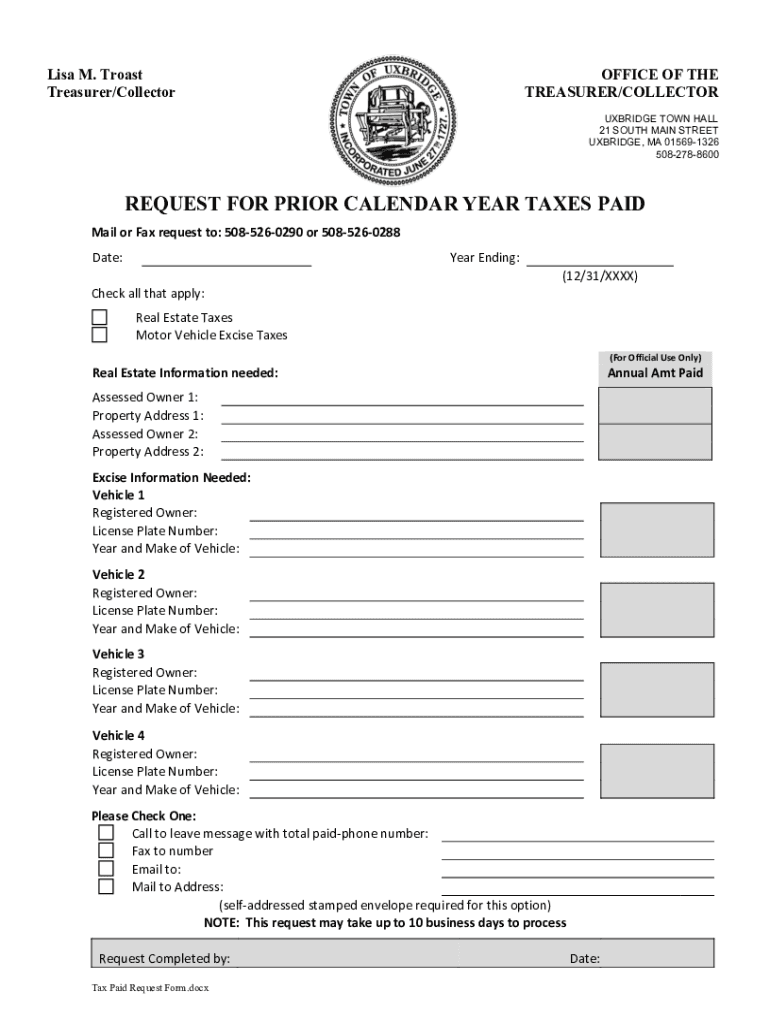
Begin by entering the date and year ending at the top of the form. This information is crucial for processing your request accurately.
Check all applicable boxes for the types of taxes you are requesting information on: Real Estate Taxes or Motor Vehicle Excise Taxes.
For Real Estate Taxes, fill in the Annual Amount Paid, Assessed Owner(s), and Property Address(es) as required.
If requesting Motor Vehicle Excise Taxes, provide details for each vehicle including Registered Owner, License Plate Number, and Year and Make of Vehicle. You can add up to four vehicles.
Select your preferred method of receiving the information by checking one of the options: call, fax, email, or mail (note that a self-addressed stamped envelope is required for mail).
Finally, complete the form by signing it with your name under 'Request Completed by' before submitting it through our platform.
Start filling out your Tax Paid Request Form today for free using our platform!
Fill out Tax Paid Request Form - Uxbridge, MA online It's free
See more Tax Paid Request Form - Uxbridge, MA versions
We've got more versions of the Tax Paid Request Form - Uxbridge, MA form. Select the right Tax Paid Request Form - Uxbridge, MA version from the list and start editing it straight away!
The fastest and easiest way for taxpayers to view their tax records is by logging on to their IRS Online Account. There, they can: View, print or download their tax transcripts.
How can I get my 1040 form online?
You can download a PDF of the 1040 tax form on the IRS website. If you hire a tax preparer to help you, they might also provide the form. You can also create an online account with the IRS to access your tax record, which may include 1040 forms from previous years.
Can I download my tax forms?
There are a number of excellent sources available for taxpayers to obtain tax forms, instructions, and publications. They include: Downloading from IRS Forms Publications page. Picking up copies at an IRS Taxpayer Assistance Center.
How to pull up tax forms?
Get federal tax forms for current and prior years Download them from IRS.gov. Order online and have them delivered by U.S. mail. Order by phone at 1-800-TAX-FORM (1-800-829-3676)
What is the property tax rate in Uxbridge, MA?
Median Uxbridge, MA effective property tax rate: 1.40%, docHubly higher than the national median of 1.02%, but lower than the Massachusetts state median of 1.23%.
Related Searches
Town of uxbridge, maUxbridge town ma tax collectorTown of uxbridge ma tax assessorUxbridge MA USPay uxbridge ma Water billUxbridge ma building departmentNotary uxbridge maUxbridge, ma public records
Security and compliance
At DocHub, your data security is our priority. We follow HIPAA, SOC2, GDPR, and other standards, so you can work on your documents with confidence.
If your employer has an online portal where you access paycheck information, timecards, and other employment information, log into the website to see if your W-2 can be accessed there. Even if you cant find it in your email or online, you may still be able to get it electronically.
Related links
Sprintax | Worcester Polytechnic Institute
If you would like to request and pay for a passcode electronically, please access the web form at the blue link directly below. Please allow 1-2 business daysRead more
Cookie consent notice
This site uses cookies to enhance site navigation and personalize your experience.
By using this site you agree to our use of cookies as described in our Privacy Notice.
You can modify your selections by visiting our Cookie and Advertising Notice.