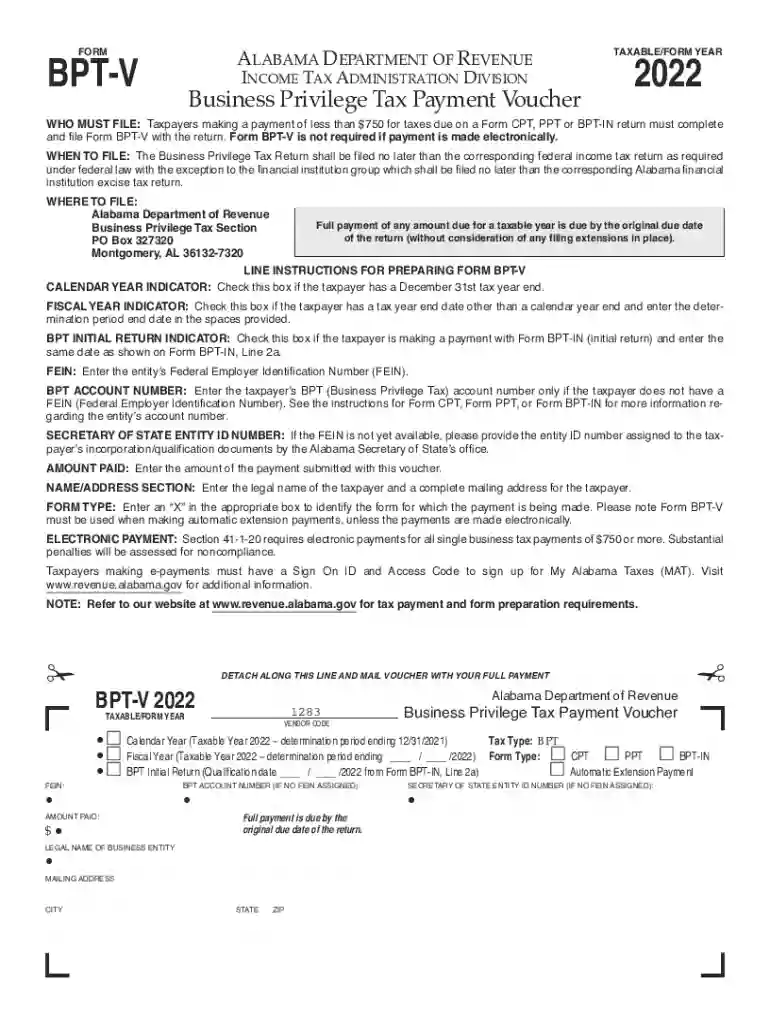
Bpt v 2022-2026

Get Form
2022 bpt Preview on Page 1

Here's how it works

01. Edit your 2022 bpt online
Type text, add images, blackout confidential details, add comments, highlights and more.

02. Sign it in a few clicks
Draw your signature, type it, upload its image, or use your mobile device as a signature pad.

03. Share your form with others
Send bpt in 2022 via email, link, or fax. You can also download it, export it or print it out.

How to use or fill out bpt v 2022 with our platform

Form edit decoration
9.5
Ease of Setup
DocHub User Ratings on G2
9.0
Ease of Use
DocHub User Ratings on G2
  1. Click ‘Get Form’ to open the bpt v 2022 in the editor.
  2. Begin by checking the appropriate box for either Calendar Year or Fiscal Year based on your tax year end date.
  3. If applicable, indicate if this is an initial return by checking the BPT Initial Return box and entering the date from Form BPT-IN.
  4. Enter your Federal Employer Identification Number (FEIN) in the designated field. If you do not have a FEIN, provide your BPT account number instead.
  5. If you lack a FEIN, include your Secretary of State Entity ID number in the corresponding section.
  6. Input the amount you are paying with this voucher in the Amount Paid field.
  7. Fill out your legal name and complete mailing address in the Name/Address section.
  8. Select the form type by marking an 'X' in the appropriate box to identify which form this payment corresponds to.

Start using our platform today for free to streamline your document editing and form completion!

See more bpt v 2022 versions

We've got more versions of the bpt v 2022 form. Select the right bpt v 2022 version from the list and start editing it straight away!
Versions Form popularity Fillable & printable
2023 4.1 Satisfied (44 Votes)
2022 4.8 Satisfied (258 Votes)
2021 4.2 Satisfied (120 Votes)
2020 4.3 Satisfied (58 Votes)
2019 4.4 Satisfied (245 Votes)
2017 4.3 Satisfied (53 Votes)
2016 4.4 Satisfied (307 Votes)
2015 4 Satisfied (37 Votes)
2014 4 Satisfied (42 Votes)
be ready to get more

Complete this form in 5 minutes or less

Get form

Got questions?

We have answers to the most popular questions from our customers. If you can't find an answer to your question, please contact us.
Contact us
According to the Alabama business privilege tax law, every corporation, limited liability entity, and disregarded entity doing business in Alabama or organized, incorporated, qualified, or registered under the laws of Alabama is required to file an Alabama Business Privilege Tax Return and Annual Report.
The One Big Beautiful Bill that passed includes permanently extending tax cuts from the Tax Cuts and Jobs Act, including increasing the cap on the amount of state and local or sales tax and property tax (SALT) that you can deduct, makes cuts to energy credits passed under the Inflation Reduction Act, makes changes to
The Business Privilege Tax remains due every registered year until the entity is legally dissolved/withdrawn through Alabama Secretary of State, regardless of whether such entity is actively doing business in Alabama.
Picking up copies at an IRS Taxpayer Assistance Center. Going to the IRS Small Business and Self-Employed Tax Center page. Requesting copies by phone 800-TAX-FORM (800-829-3676). Hours of operation are 7 a.m. to 10 p.m., Monday-Friday, your local time except Alaska and Hawaii which are Pacific time.

Security and compliance

At DocHub, your data security is our priority. We follow HIPAA, SOC2, GDPR, and other standards, so you can work on your documents with confidence.

Learn more
ccpa2
pci-dss
gdpr-compliance
hipaa
soc-compliance